iPhoneAddict Apps
  • Actualités
  • Accueil Apps
  • iPhone
  • iPad
  • Universelles
  • Mac
  • Apple TV
KG KultureGeek
App
iPhone / iPad Télécharger iAddict v5 Mac Télécharger iAddict Mac
  • Actualités
  • Accueil Apps
  • iPhone
  • iPad
  • Universelles
  • Mac
  • Apple TV
  • Archives keynotes
  • Firmwares & iTunes
  • Contactez-nous
  • Comparateur de prix
  • KultureGeek
Accueil » Liste des Apps » Apps Universelles » Musique » Instrument 1
L'application n'est plus disponible sur l'App Store français
1.3.4 iOS €Gratuit Artiphon, Inc. 4.5 2 This is the iOS companion app for the Artiphon INSTRUMENT 1. Connect the INSTRUMENT 1 device to your iPhone, iPad, or iPod using the provided USB-to-Lightning cable, download the Artiphon app, and immediately start exploring and combining an...
Instrument 1

Instrument 1

iOS Universel / Musique

Gratuit
Obtenir sur l'App Store
Facebook X E-mail

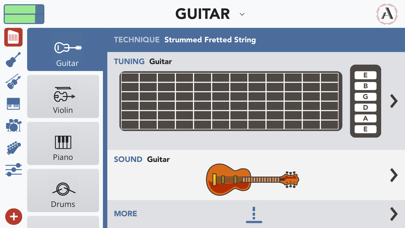
This is the iOS companion app for the Artiphon INSTRUMENT 1. Connect the INSTRUMENT 1 device to your iPhone, iPad, or iPod using the provided USB-to-Lightning cable, download the Artiphon app, and immediately start exploring and combining an intuitive palette of musical sounds, techniques, and features.


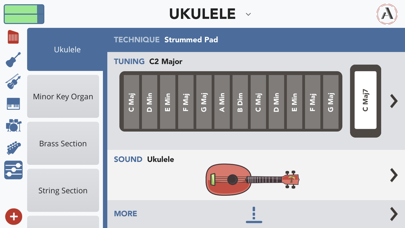
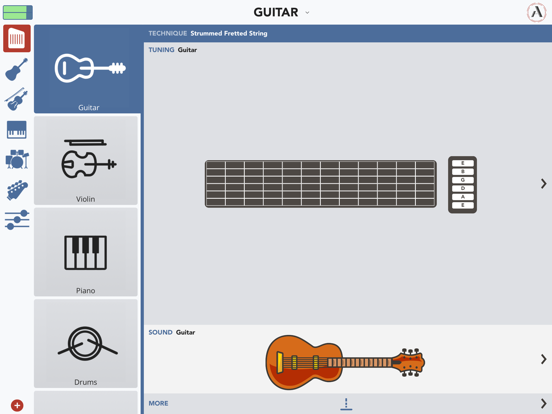
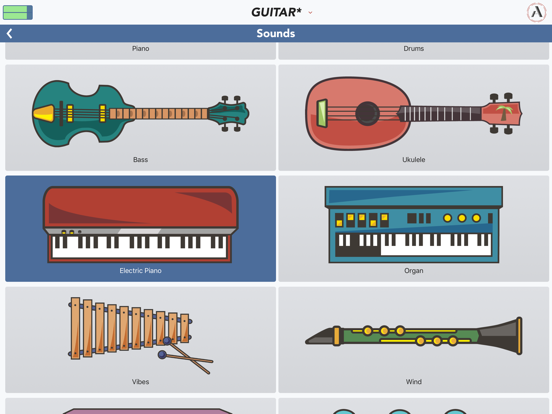
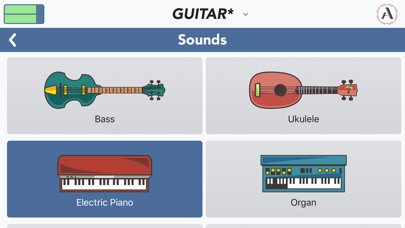
• Use the Artiphon app to play a custom-built collection of sounds that includes: guitar, violin, piano, drums, ukulele, bass, vibes, wind, bells, organ, electric piano, square wave, sine wave, and triangle wave.

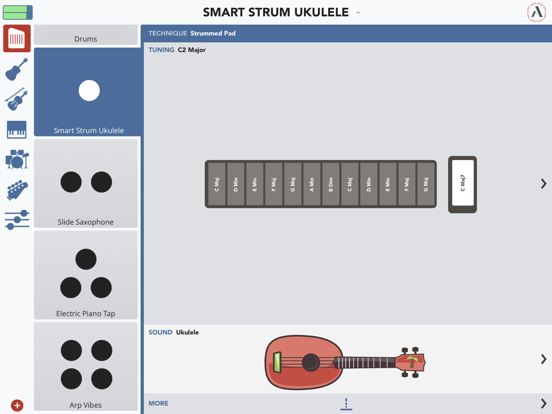
• Design your own instruments by combining techniques, sounds, and tunings, and then save those custom presets to your personal library.

• Use this app to choose the modes and methods for playing your INSTRUMENT 1. Modes include Fretted, Fretless, Grid, and Pad. Methods include Strum, Bow, Slide, Tap, and iBow.

• Use the app to configure and store custom presets that you can then access when connecting your INSTRUMENT 1 to your favorite music software like Ableton Live, GarageBand, Logic, MainStage, Cubase, and more.

• Use the Artiphon app’s built-in arpeggiator to automatically cycle through notes and chords in Fretted, Fretless, Grid, and Pad modes.

• Use the app’s iBow feature to play the INSTRUMENT 1 using your iPhone or iPod as a virtual bow.

• The INSTRUMENT 1 can also be played with any iOS, OS X, or PC program that accepts MIDI. Try the INSTRUMENT 1 with other iOS apps including GarageBand, Animoog, ThumbJam, and dozens more.

• To customize your INSTRUMENT 1 when connecting it to a Mac or PC, download the desktop Preset Editor app from Artiphon.com.

We invite you to report any issues you observe while using the app to: support@artiphon.com. Thanks!

En voir plus...

Quoi de neuf dans la dernière version ?

We’ve fixed some formatting issues that caused the screen to get cut off in certain views. Now you can see what you’re doing.
  • Screenshot #1 pour Instrument 1
  • Screenshot #2 pour Instrument 1
  • Screenshot #3 pour Instrument 1
  • Screenshot #4 pour Instrument 1
  • Screenshot #5 pour Instrument 1
  • Screenshot #6 pour Instrument 1

Note

(2 notes)

Détails sur l'application

Version
1.3.4
Taille
182.5 Mo
Version minimum d'iOS
12.1
Dernière mise à jour
19/01/2022
Publié par
Artiphon, Inc.

Newsletter App Store

Recevez chaque jour les meilleures promos

Actualité Apple

Image Portées par l’iPhone Ultra, les ventes de smartphones pliables vont augmenter de 20 %
Portées par l’iPhone Ultra, les ventes de smartphones pliables vont augmenter de 20 %
Image HP, Asus et Acer adoptent la mémoire chinoise CXMT : Apple et Dell sous pression
HP, Asus et Acer adoptent la mémoire chinoise CXMT : Apple et Dell sous pression
Image Big Walk, le jeu « social » évènement, débarque aussi sur Mac
Big Walk, le jeu « social » évènement, débarque aussi sur Mac
Image Ted Lasso est de retour : le premier épisode de la saison 4 est disponible sur Apple TV
Ted Lasso est de retour : le premier épisode de la saison 4 est disponible sur Apple TV
iPhoneAddict Apps

Le catalogue iPhoneAddict pour suivre les nouveautés, mises à jour et baisses de prix de l’App Store.

Apps

Toutes les apps iOS iPhone iPad Universelles Mac Apple TV

iPhoneAddict

Actualité Apple Archives keynotes Contact À propos KultureGeek

Suivez-nous

©2009-2026 i2CMedia. Tous droits réservés.