AT-METRONOME The best for practice!
iOS Universel / Musique
The best for musical instrument practice!
AT-METRONOME is the very simple metronome made only for musical instrument practice.
The author who train to playing the violin actually made in a user friendly manner.
Feature:
A feeling of use of an analog metronome is thought as important.
The sound of the real metronome was recorded, and it adjusted carefully and has finished.
By proximity sensor and more, even if you can not see a screen, a start/stop can be performed.
Even if you have grasped the musical instrument, all can be comfortably operated on one screen.
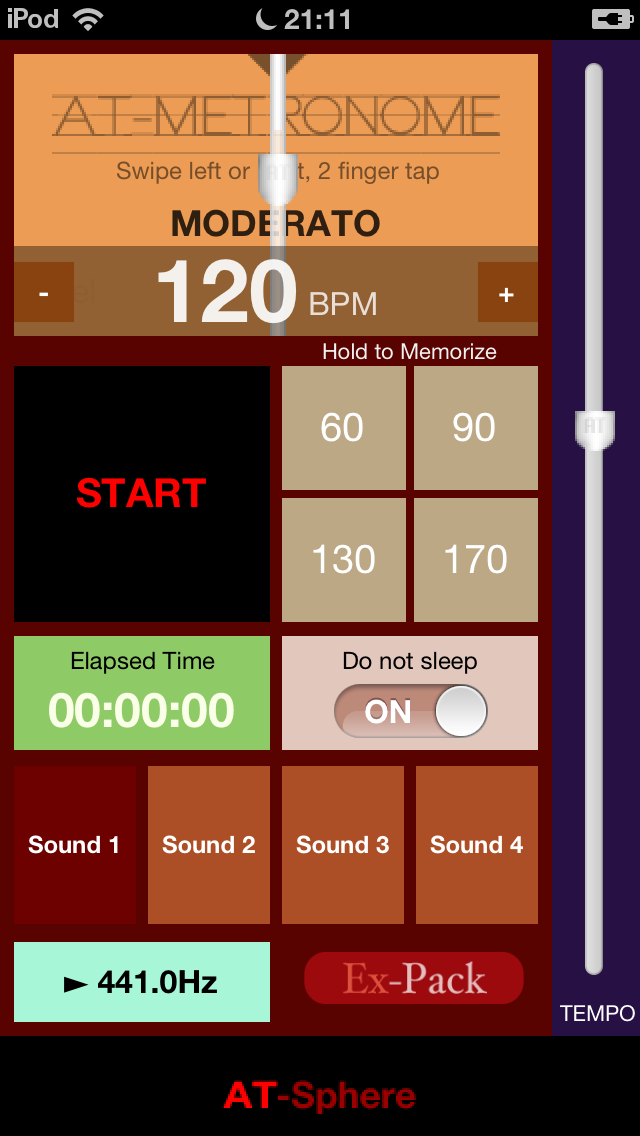
It can set up to 40bpm - 200bpm. (Practical range)
4 tempos are memorizable.
Elapsed time is displayed and it is useful for repeated practice.
The sound 440Hz(Change is possible) of the sign wave can be played.
*This application gives high priority to the interval stable rather than the exact BPM value.
Usage:
A start/stop can be performed with a START/STOP button.
Moreover, a start/stop can be performed also with Swipe anywhere on the screen, 2 finger tap, and the proximity sensing.
Tempo will be changed if the TEMPO slider is moved.
Tempo can be adjusted with the button of "+" and "-" per 1bpm.
If the button 'Hold to Memorize' hold 1 second or more, the tempo at that time will be memorized. It is memorizable to four.
Tap Sound1-4 button, you can choose sound. (Only 4 inch display model and iPad)
If a Do not sleep switch is turned ON, the automatic lock of a screen will become disable.
If a 440-Hz button is pushed, play/stop of the sound of sign wave can be performed.
Expanded function are purchased from the screen displayed with the "Ex-Pack" button, and the advertisement can be made undisplayed.
By Settings of the home
- ON/OFF of a proximity sensor.(iPhone only)
- Frequency of sign wave.
* This application is operating in AmbientSound mode.
Please keep in mind that sound does not come out from speaker in silent mode of iPhone.
***** Expanded function *****
Tempo is set up automatically by tap of the TAP-TEMPO button by a quarter note continuously. (It sets to the average of the interval of latest 4 tap. )
The simple beat can be chosen with the segment switch under a screen.
If the tap of the "Elapsed time" button is carried out, time until it stops automatically, or the interval which raises 10bpm can be chosen.
In this hard practice mode, please repeat a weak phrase.
You are the speed king!!
You must be.
Quoi de neuf dans la dernière version ?
Built for iOS 7