iPhoneAddict Apps
  • Actualités
  • Accueil Apps
  • iPhone
  • iPad
  • Universelles
  • Mac
  • Apple TV
KG KultureGeek
App
iPhone / iPad Télécharger iAddict v5 Mac Télécharger iAddict Mac
  • Actualités
  • Accueil Apps
  • iPhone
  • iPad
  • Universelles
  • Mac
  • Apple TV
  • Archives keynotes
  • Firmwares & iTunes
  • Contactez-nous
  • Comparateur de prix
  • KultureGeek
Accueil » Liste des Apps » Apps iPhone » Musique » Chordana Composer
3.0.7 iOS €3,99€ CASIO COMPUTER CO., LTD. 4 1 [Compatible devices] iPhone6 or later(Except for the iPhone SE). [System requirements] iOS 11.0 or later required. An easy way to create your own original tunes! Chordana Composer makes it easy for you to write your own tunes, even if you don't...
Chordana Composer

Chordana Composer

iPhone / Musique

3,99€ au lieu de 5,99€
Acheter sur l'App Store
Facebook X E-mail

[Compatible devices] iPhone6 or later(Except for the iPhone SE).

[System requirements] iOS 11.0 or later required.

An easy way to create your own original tunes!

Chordana Composer makes it easy for you to write your own tunes, even if you don't know how to compose music.
You can enter a motif (two-bar melody) using your choice of 3 input modes. There's no need to enter the melody for the entire tune.
You just enter one motif and Chordana Composer automatically creates a whole tune, so you don't have to spend ages composing the music.

Product Features

1. Three ways to enter your motif (2-bar melody) 

 A melody that comes to you in the middle of an ordinary day...
Have you ever thought: “This would make a really great tune.
But I need to know how to compose, and it's no good if I can't read music. And that all takes time to learn”?
Chordana Composer will take care of all those concerns.
Just enter 2 bars of the motif you thought of.
Chordana Composer will automatically make it into an entire tune.
 You can choose from 3 types of input method.
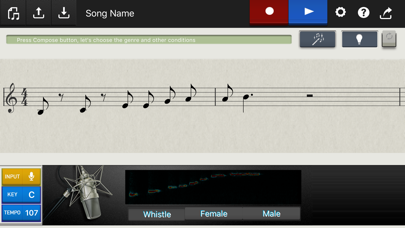
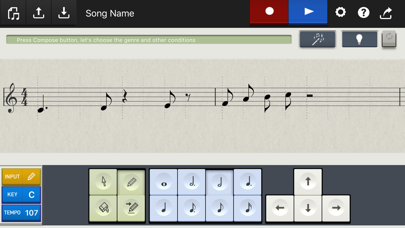
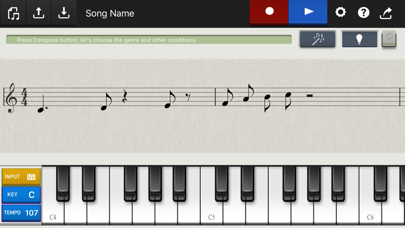
In "Keyboard input mode" you use a virtual keyboard, in "Notation input mode, you paste the notes into a sheet of music, and in "Microphone input mode", you just sing the motif into the microphone.

2. Automatic composition by choosing "Genre" and "Concept"

 Once you've entered the melody using one of the modes above, you're ready for automatic composition.
Choose whichever combination of "Genre", "Concept", "Range of melody movement" and "Level of melody tension" creates a tune that best matches what you've imagined.

3. Your own editing using the Hints function
In Notation input mode, you can edit the the created melody yourself.
If you enable the Hints function when you're editing the tune, the notation is color coded as a reference for your edits (notes that match the chord, notes in the same scale, notes that increase the tension and other notes you need to be aware of).

4. Using simple steps, you can upload your finished tune as a video to YouTube along with the staff notation, or slideshow of photos. You can also send your tunes as email attachments in AAC or MIDI format, and it's really easy to make your own ringtones*1 too.
*1: To use your tune as an iPhone ringtone, you need to connect to a Mac or Windows computer and transfer the tune to your iPhone via iTunes.

En voir plus...

Quoi de neuf dans la dernière version ?

・Bug fixes
・Updated "About upload to YouTube"
  • Screenshot #1 pour Chordana Composer
  • Screenshot #2 pour Chordana Composer
  • Screenshot #3 pour Chordana Composer

D'autres applications du développeur

Chordana TapChordana TapiOS UniverselChordana ViewerChordana VieweriOS UniverselCASIO WATCH+CASIO WATCH+iPhoneC-AssistC-AssistiOS UniverselMusic Practice ToolMusic Practice TooliPhoneCZ App for iPadCZ App for iPadiPadVoir toutes les apps

Note

(1 notes)

Détails sur l'application

Version
3.0.7
Taille
92.6 Mo
Version minimum d'iOS
11.0
Dernière mise à jour
24/01/2024
Publié par
CASIO COMPUTER CO., LTD.

Newsletter App Store

Recevez chaque jour les meilleures promos

Actualité Apple

Image Apple teste iOS 26.6.1 sur iPhone pour des correctifs
Apple teste iOS 26.6.1 sur iPhone pour des correctifs
Image L’iPhone original de 2007 perd son dernier réseau mobile aux États-Unis avec l’arrêt de la 2G
L’iPhone original de 2007 perd son dernier réseau mobile aux États-Unis avec l’arrêt de la 2G
Image Le Mac Pro fête ses 20 ans, cinq mois après son abandon définitif par Apple
Le Mac Pro fête ses 20 ans, cinq mois après son abandon définitif par Apple
Image Widow’s Bay : Apple TV organise des projections gratuites au cinéma pour le final de la saison 1
Widow’s Bay : Apple TV organise des projections gratuites au cinéma pour le final de la saison 1
iPhoneAddict Apps

Le catalogue iPhoneAddict pour suivre les nouveautés, mises à jour et baisses de prix de l’App Store.

Apps

Toutes les apps iOS iPhone iPad Universelles Mac Apple TV

iPhoneAddict

Actualité Apple Archives keynotes Contact À propos KultureGeek

Suivez-nous

©2009-2026 i2CMedia. Tous droits réservés.