iPhoneAddict Apps
  • Actualités
  • Accueil Apps
  • iPhone
  • iPad
  • Universelles
  • Mac
  • Apple TV
KG KultureGeek
App
iPhone / iPad Télécharger iAddict v5 Mac Télécharger iAddict Mac
  • Actualités
  • Accueil Apps
  • iPhone
  • iPad
  • Universelles
  • Mac
  • Apple TV
  • Archives keynotes
  • Firmwares & iTunes
  • Contactez-nous
  • Comparateur de prix
  • KultureGeek
Accueil » Liste des Apps » Apps iPhone » Musique » Kion_comfortable sound
1.9 iOS €Gratuit tadaki tokairin 0 0 You can make own playlist combining your library songs and youtube songs. Kion means Comfortable Sound in Japanese. Features. Picture-in-picture playback. Create and play your own list of songs from your Music Library combined with YouTube...
Kion_comfortable sound

Kion_comfortable sound

iPhone / Musique

Gratuit
Obtenir sur l'App Store
Facebook X E-mail

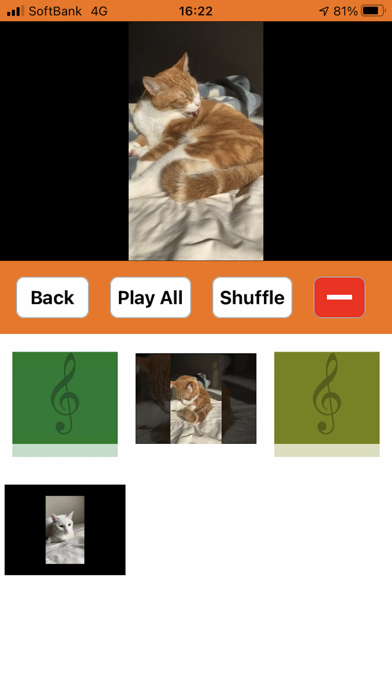
You can make own playlist combining your library songs and youtube songs.

Kion means Comfortable Sound in Japanese.

Features.
Picture-in-picture playback.
Create and play your own list of songs from your Music Library combined with YouTube content.
Repeat YouTube content with one click.

How to add,
Added from Music Library
Tap the "+ Add" button
Tap the music library
Tap the song you want to add.

Added from YouTube
If YouTube App have been downloaded.
Tap the "+ Add" button
Tap youtube
Tap the YouTube content you want to add.
Tap the share button
Tap the copy button appeared.
Tap "Kion" in the upper left to return to "Kion"
Then in "Kion" you can see the Youtube content you want to add.
You can add YouTube content to "Kion" in 5 seconds and 3 clicks.

If Youtube App have NOT been downLoaded.
Tap the "+ Add" button
Tap youtube
Tap the YouTube content you want to add.
Tap the share button
Press long the URL appeared.
Tap the copy button appeared.
Tap Done button in the upper left.
Then in "Kion" you can see the Youtube content you want to add.

You can change the order by long-pressing each holder, list, or content image.

From Music Library.
Album, artist, and song titles are automatically displayed below each image.
The songs in the music library are written below the image

From YouTube.
Nothing is displayed.
Click on the bottom part of the image and give it a title such as a song title.
Click the bottom part of each image to give each title.


youtube-ios-player-helper
Copyright 2014 Google Inc. All rights reserved.
Licensed under the Apache License, Version 2.0 (the "License");

En voir plus...

Quoi de neuf dans la dernière version ?

bug fixed

  • Screenshot #1 pour Kion_comfortable sound
  • Screenshot #2 pour Kion_comfortable sound

D'autres applications du développeur

芸能人名クイズ脳トレ 全824問芸能人名クイズ脳トレ 全824問iOS UniverselTappaT How many seconds Tap 1000?TappaT How many seconds Tap 1000?iPhoneFind 101 CatsFind 101 CatsiOS UniverselAppearing 5 DifferencesAppearing 5 DifferencesiOS UniverselDoSoDoSoiOS UniverselDiary for PetDiary for PetiOS Universel

Note

(0 note)

Détails sur l'application

Version
1.9
Taille
16.5 Mo
Version minimum d'iOS
14.1
Dernière mise à jour
30/08/2021
Publié par
tadaki tokairin

Newsletter App Store

Recevez chaque jour les meilleures promos

Actualité Apple

Image iPhone : Apple dépasse pour la première fois les 10 milliards de dollars de ventes annuelles en Inde
iPhone : Apple dépasse pour la première fois les 10 milliards de dollars de ventes annuelles en Inde
Image iPhone « des vingt ans » : Apple testerait des écrans de 6,4 et 7 pouces sans bordures
iPhone « des vingt ans » : Apple testerait des écrans de 6,4 et 7 pouces sans bordures
Image Google Health synchronise maintenant ses données avec Apple Santé
Google Health synchronise maintenant ses données avec Apple Santé
Image Apple organise un concours de sosies de Ted Lasso dans son Apple Store de New York
Apple organise un concours de sosies de Ted Lasso dans son Apple Store de New York
iPhoneAddict Apps

Le catalogue iPhoneAddict pour suivre les nouveautés, mises à jour et baisses de prix de l’App Store.

Apps

Toutes les apps iOS iPhone iPad Universelles Mac Apple TV

iPhoneAddict

Actualité Apple Archives keynotes Contact À propos KultureGeek

Suivez-nous

©2009-2026 i2CMedia. Tous droits réservés.