Midiflow Keyboard (Audiobus)
iOS Universel / Musique
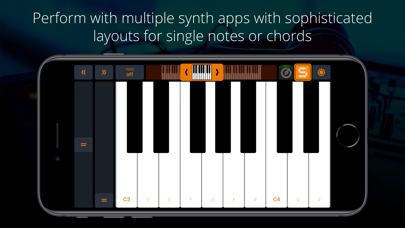
This keyboard for Audiobus 3 allows you to perform music with multiple synth apps at the same time. Use the piano or scale layout to play single notes, and select the chord keyboard for accompaniments. With Audiobus 3, it's super simple to connect the keyboard to your synth apps.
+ Piano layout
+ Scale layouts (Min/Maj Blue, Ionian, Dorian, ...)
+ Chord layout
+ 2 independent keyboard strips on the iPad, 3 on the iPad Pro
+ Quickly switch sounds
+ Adjust visible key range and
+ Jump to other octaves using up/down buttons
+ Transpose output in half-tone steps
+ Modulation wheel
+ Pitch-Bend wheel
+ "Hold" mode with unisono option
+ Note velocity can be controlled via position or acceleration of the touch, or set to a fixed value
+ Use Split View/Slide Over to display the keyboard next to other apps
NOTE: This app requires Audiobus 3. Insert it into one or more MIDI sender ports to control the synth apps in the MIDI output ports of the respective pipelines.
DETAILS
Midiflow Keyboard is probably the most essential MIDI companion app for Audiobus. It allows you to trigger your synth apps with sophisticated layouts for single notes or chords. With its two keyboards, you can even perform with multiple sounds simultaneously.
HANDY CONTROLS
The streamlined user interface shows the most important controls on the main screen. Quickly change the visible key range in octave steps – you can even keep holding down keys while doing so. Switch on "hold" and keys will stay pressed until you hit them again. Or activate "unisono" and only one note will sound. And, of course, there are pitch-bend and modulation wheels for effects.
PLAY WITH SENSITIVITY
It's not only about which notes you play, but how you play them. By default, you play louder notes by hitting them further down the length of the key. You can also make the app interpret the actual velocity of your taps by using the accelerometer. However, if all you want is a fixed velocity on each tap, that is possible, too.
OPTIMIZE YOUR LAYOUT
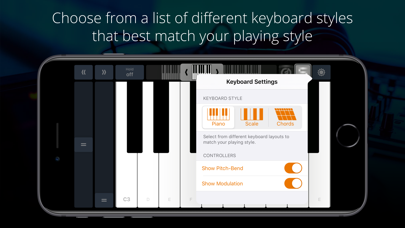
Choose from a list of different keyboard styles that match your playing style best. The regular piano layout is just the beginning. You can select from a list of scale layouts to explore their different sounds and play solos without ever hitting a wrong note. Screen space is valuable – hide the pitch-bend and/or modulation wheel if you don't need them, making more space for keys.
PLAY CHORDS LIKE A PIANIST
Since it can be quite tricky to play chords on a touch screen, this app comes with a unique chord keyboard. The lower row triggers root notes, while the upper rows trigger chords. This layout makes it very easy to play chord accompaniments with index and middle finger that would require two full hands on a real piano.
SWITCH SOUNDS QUICKLY
The port selector in the upper right corner allows you to specify, for each keyboard, which sound to trigger. You can even select multiple destinations to layer the sounds. In order to reflect the active sound, the color scheme of the keyboard will adjust to match the app's icon.
SPLIT VIEW AND SLIDE OVER
Midiflow Keyboard works great in Split View and Slide Over, the two multitasking modes in iOS. Just swipe from the right screen side and launch the keyboard. That way, you can trigger nodes while making adjustments in an effect app or Audiobus itself. In order to take full advantage of the screen space, the keyboard is rotated 90 degrees. You can either use the right hand to play it while using the left hand in the main app, or simply rotate the device to use both hands for the keys.
Quoi de neuf dans la dernière version ?
Compatibility improvements for recent iOS versions