MIDIKeys - MIDI Controller
iPhone / Musique
MIDIKeys is a MIDI keyboard controller that can be used to send MIDI messages to synthesizer apps and hardware MIDI synthesizers.
MIDIKeys doesn't produce any sound on its own, it is for playing hardware or software VST-style MIDI synthesizers via MIDI hardware interfaces connected to the iPhone dock connector or virtual MIDI instruments like IK Multimedia SampleTank® for iOS or ThumbJam running in the background on your iPhone.
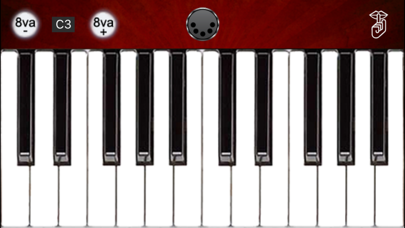
The entire range may be transposed up or down (up to a three octave limit) by touching the 8va -/+ buttons on the main screen. Touching the display for the transpose value between the octave shift buttons resets the transpose to C3 (60).
Both fixed or variable note MIDI Note On event velocity based on touch position within the key are available as options on the settings page.
While playing, you may also optionally send real-time volume, expression, modulation, or wind controller MIDI messages by tilting the iPhone/iPod Touch to the right or left.
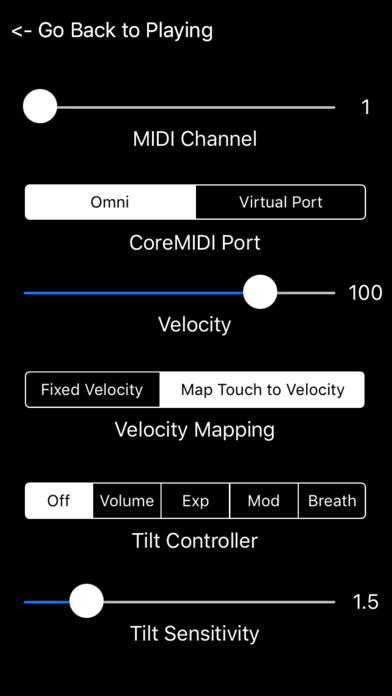
Set the transmit channel using the MIDI Channel slider. Any channel from 1-16 may be selected. Channel 1 is the default.
Choose between "Omni" sending MIDI data to all CoreMIDI apps or "Virtual Port" sending to a named CoreMIDI virtual output port. When the "Virtual Port option is selected, MIDIKeys will show up as an input option labeled "MIDIKeys" in apps that support virtual ports like Sonosaurus ThumbJam and MIDIBridge. "Omni" mode is selected by default.
Note-on events may be sent with either a fixed or variable velocity based on where you touch on the key. Set the maximum velocity using the Velocity slider. Any value from 0-127 may be selected. Default value is 100.
Select between fixed or variable velocity mapped to the touch position using the selector. When the velocity is mapped to touch, the minimum velocity is approximately 10% of the value set on the Velocity slider and the max is 100% of the value. Touching lower or higher on the key (area below the black keys only for the white keys) results in lower or higher velocity values sent in the MIDI Note On event for the key. Black key highest velocity starts at the bottom of the key and gets lower as you touch higher.
MIDIKeys can send Volume, Expression, Modulation, or Breath Control message by tilting the device to the right or left.
Select a controller on the Tilt Controller selector. Default is no controller messages.
When a controller is enabled, tilting the device to the right or left will send the selected controller messages to the external device. Values increase as the device is tilted farther to the right.
You may set the tilt sensitivity using the Tilt Sensitivity slider. The range is from 1 to 4, with higher values being more sensitive. Default value is 1.5.
If you ever have "stuck" notes, you may touch the "Shhh" icon on the main screen to send a MIDI "All Notes Off" message and stop the sounds.
All settings are saved when exiting MIDIKeys and restored the next time it is run.
Quoi de neuf dans la dernière version ?
This update from Apple will improve the functionality of this app. No new features are included.
Bug fixes and performance improvements.
Added first note transpose display on main screen. Touching the displayed value resets the first note transpose to C3 (60).
Reversed the key position to velocity mapping direction for the black keys.