iPhoneAddict Apps
  • Actualités
  • Accueil Apps
  • iPhone
  • iPad
  • Universelles
  • Mac
  • Apple TV
KG KultureGeek
App
iPhone / iPad Télécharger iAddict v5 Mac Télécharger iAddict Mac
  • Actualités
  • Accueil Apps
  • iPhone
  • iPad
  • Universelles
  • Mac
  • Apple TV
  • Archives keynotes
  • Firmwares & iTunes
  • Contactez-nous
  • Comparateur de prix
  • KultureGeek
Accueil » Liste des Apps » Apps iPhone » Navigation » switch Map
L'application n'est plus disponible sur l'App Store français
3.0.1 iOS €Gratuit Takahiro Maeda 0 0 switch Map is a map that displays the shortest route by automatically swapping the order of turning around multiple destinations. You can also change the state of the destination.      ーHow to useー  There are two ways to stab a pin...
switch Map

switch Map

iPhone / Navigation

Gratuit
Obtenir sur l'App Store
Facebook X E-mail

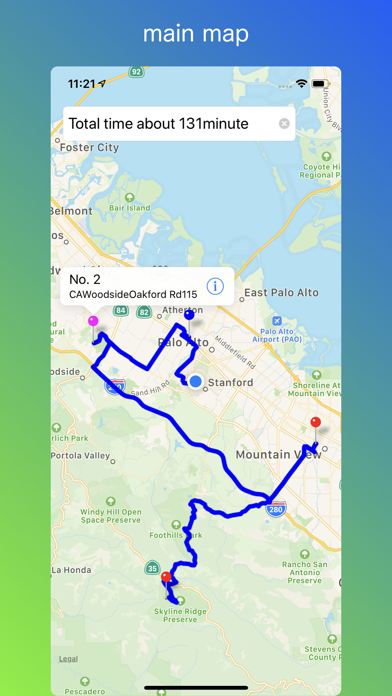
switch Map is a map that displays the shortest route by automatically swapping the order of turning around multiple destinations.

You can also change the state of the destination.

     ーHow to useー

 There are two ways to stab a pin on the map

1、Press and hold the destination on the map

2、Enter the address in the search field


The pin sticking path will be displayed.

When multiple pins are pierced, the order of turning around the destination is automatically swapped, and the route of turning all the pins at the shortest is displayed.

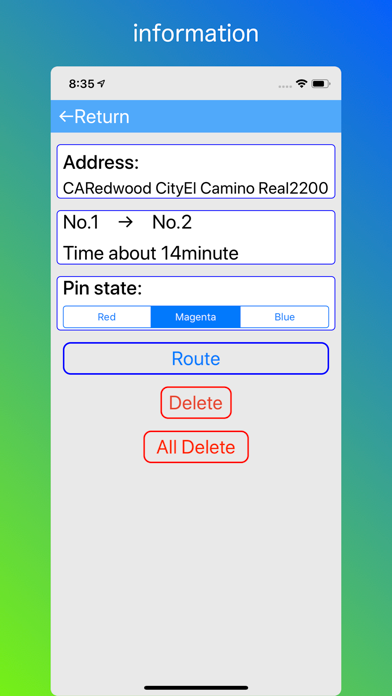
Tap the pin and press the info (i) button to move to the pin detailed information screen.

The pin color can be changed to red, pink, blue.
As an example, red can be used in places that have not yet been done, pink is a place to go once more, blue is already in place, and so on.

By tapping the route button, you can go to the map application and guide with voice.

If you tap the delete button, the selected pin will be deleted from the map.

If you press the Return button on the top left, you will move to the map screen.

En voir plus...

Quoi de neuf dans la dernière version ?

ver 3.0.1

Added save function of pin.

-The positions and colors of the pins you pierced are saved.
-When the app restarts, the previous pin state is restored.
-If you want to erase all the pins at once, move to the detailed information screen of pins and press the All Delete button.
  • Screenshot #1 pour switch Map
  • Screenshot #2 pour switch Map
  • Screenshot #3 pour switch Map

Note

(0 note)

Détails sur l'application

Version
3.0.1
Taille
21.1 Mo
Version minimum d'iOS
9.2
Dernière mise à jour
20/06/2019
Publié par
Takahiro Maeda

Newsletter App Store

Recevez chaque jour les meilleures promos

Actualité Apple

Image iPhone : Apple a capté 49 % des revenus de smartphones au 2e trimestre, un record
iPhone : Apple a capté 49 % des revenus de smartphones au 2e trimestre, un record
Image L’iPhone Air 2 aurait une Dynamic Island plus petite et d’autres nouveautés
L’iPhone Air 2 aurait une Dynamic Island plus petite et d’autres nouveautés
Image iPhone 18e : les 9 Go de RAM se confirment un peu plus
iPhone 18e : les 9 Go de RAM se confirment un peu plus
Image Apple met à jour Shazam avec des autocollants iMessage pour l’album petal d’Ariana Grande
Apple met à jour Shazam avec des autocollants iMessage pour l’album petal d’Ariana Grande
iPhoneAddict Apps

Le catalogue iPhoneAddict pour suivre les nouveautés, mises à jour et baisses de prix de l’App Store.

Apps

Toutes les apps iOS iPhone iPad Universelles Mac Apple TV

iPhoneAddict

Actualité Apple Archives keynotes Contact À propos KultureGeek

Suivez-nous

©2009-2026 i2CMedia. Tous droits réservés.