Elevation For Real
iPhone / Navigation
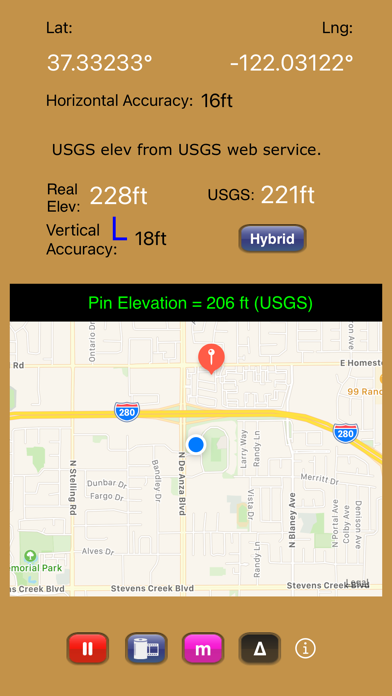
Get real-time elevation from your iOS device's GPS receiver and built-in geoid model.
Also displayed is ground elevation from the USGS Elevation Web Service in the U.S. and Canada, and from the Google Maps Elevation API elsewhere.
Here are some more features:
- Real-time map which displays your location
- Estimated vertical and horizontal accuracy
- Spot elevation data displayed by tapping map
- English or metric units based on your region setting
- Start/Stop button
- One touch screenshots
- NO Third-Party Ads!
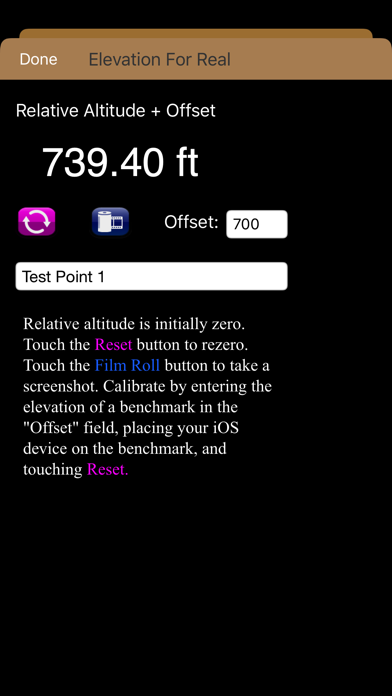
- Pressure altimeter. Measure relative altitudes or calibrate to an elevation benchmark. Use indoors or out. Even works in Airplane Mode! Note: your iOS device must be equipped with a barometer to access pressure altimeter functionality. The iPhone 6 and later and the iPad Air 2 and later have barometers.
Download Elevation For Real today!
Notes:
1) homedatasheet.com, Inc. is not affiliated with USGS. USGS Elevation Web Service is available to the general public online, at no cost.
2) ***The initial view of this app requires a GPS signal to work properly. A clear view of the sky is needed for GPS reception, and it may take several seconds to get a position fix. Elevation for Real will run on devices not equipped with a GPS receiver and GPS-equipped devices that are not receiving a GPS signal, but any resulting elevation readings will just be the approximate ground elevation at your location, even if you are several stories up in a tall building.
3) ***Any elevation measurements with personal safety or financial implications should be performed by professionals with professional GPS equipment. Elevation for Real is not intended to determine flood hazard. Consult a licensed professional in your jurisdiction, such as a surveyor or engineer, when dealing with flood risk.
Quoi de neuf dans la dernière version ?
- Coded in Swift
- Uses Google Maps Elevation API outside the U.S. and Canada
- Checks which country the user is located in to determine which elevation service to use (USGS or Google Maps)