• KultureGeek
  • Comparateur de prix
       
iPhoneAddict
 iAddictv5Notre Application iPhone/iPad
  • Accueil Apps
  • Actualité Apple
  • Keynote Apple
  • Firmwares & iTunes
  • Contactez-nous
Accueil » Liste des Apps » Apps Universelles » Photo et vidéo » Adjust brightness of image
L'application n'est plus disponible sur l'App Store français
1.1.4 iOS €Gratuit Kazuya Fujita 0 0 1. Tap "Selecting an image to adjust the brightness (six maximum)" and select an image from the album. 2. Adjust the brightness of the image by moving the slider left or right. 3. To return the brightness of the image to the default state, tap...
Adjust brightness of image

Adjust brightness of image

iOS Universel / Photo et vidéo

Gratuit
Obtenir sur l'App Store

1. Tap "Selecting an image to adjust the brightness (six maximum)" and select an image from the album.
2. Adjust the brightness of the image by moving the slider left or right.
3. To return the brightness of the image to the default state, tap "Restore" at the bottom left.
4. Tap "Save" in the bottom right to save the image in "BRI_DATA" which is automatically generated in the album.

Please contact the review section or DM here.
https://twitter.com/corasck

En voir plus...

Quoi de neuf dans la dernière version ?

Fixed bugs and improved internal processing.
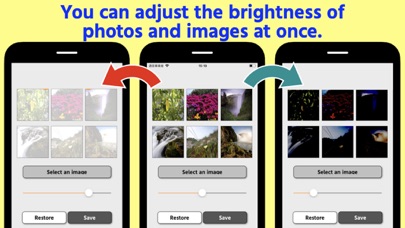
  • Screenshot #4 pour Adjust brightness of image

D'autres applications du développeur

Electronic seal[PRO]
/ iOS Universel
Convert to JPG,HEIC,PNG - PRO
/ iOS Universel

Note

(0 note)

Détails sur l'application

Version
1.1.4
Taille
24.2 Mo
Version minimum d'iOS
12.0
Dernière mise à jour
07/04/2021
Publié par
Kazuya Fujita

Newsletter App Store

Recevez chaque jour les meilleures promos

Actualité Apple

Image [#BonPlan] Les AirPods Pro 3 en promo pour seulement 198 €
[#BonPlan] Les AirPods Pro 3 en promo pour seulement 198 €
Image Nouvelle pub d’Apple pour les AirPods Pro 3 et la réduction de bruit avec Vinicius Jr
Nouvelle pub d’Apple pour les AirPods Pro 3 et la réduction de bruit avec Vinicius Jr
Image Le MacBook avec écran tactile est « 100% confirmé » selon un leaker
Le MacBook avec écran tactile est « 100% confirmé » selon un leaker
Image Siri AI : comment contourner la file d’attente sur macOS 27 Golden Gate
Siri AI : comment contourner la file d’attente sur macOS 27 Golden Gate
Partenaires : Actualité iPhone - Culture Geek
©2009-2026 i2CMedia | A propos |