• KultureGeek
  • Comparateur de prix
       
iPhoneAddict
 iAddictv5Notre Application iPhone/iPad
  • Accueil Apps
  • Actualité Apple
  • Keynote Apple
  • Firmwares & iTunes
  • Contactez-nous
Accueil » Liste des Apps » Apps Universelles » Photo et vidéo » Afro Booth : Add Afro Style to photos
L'application n'est plus disponible sur l'App Store français
1.0 iOS €Gratuit JIRAPAS TONGTHONG 0 0 Afro Booth App, Add Afro Style to your photos now!, If you want to be Afro Style, This App is right for you. Many Afro styles with many colours black,red,blond,red,purple,green and rainbow for get instantly to making your funny photo of you, family,...
Afro Booth : Add Afro Style to photos

Afro Booth : Add Afro Style to photos

iOS Universel / Photo et vidéo

Gratuit
Obtenir sur l'App Store

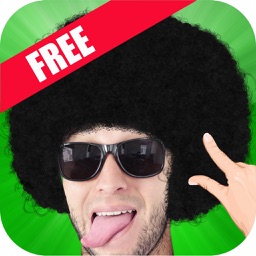
Afro Booth App, Add Afro Style to your photos now!, If you want to be Afro Style, This App is right for you. Many Afro styles with many colours black,red,blond,red,purple,green and rainbow for get instantly to making your funny photo of you, family, friends, kids, pets even party time!

** Make your funny photo with Afro Style - Many Afro styles with many colours instantly! **

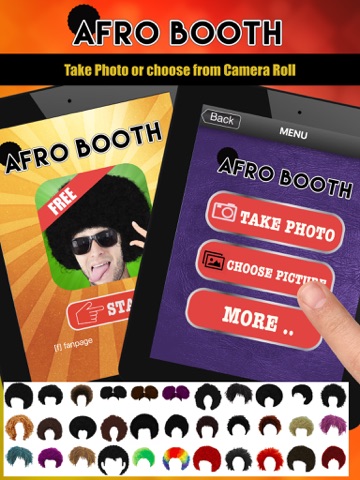
Want to be Disco Afro Star? Use This Afro Booth App is easy & funny to use and look realistic Afro, come with variety of beautiful 33 Afro styles.

How to use ?, just take a picture, or select from the camera roll or your photo gallery, then select Afro hair that you like. Change the position-scale-rotation afro hair items with your fingers.

When a your picture with Afro hair is good looking,it easy to save images & share to Twitter, Facebook

== Features: ==
1. The Interface is easy to use and beautiful.
2. Variety of beautiful Afro styles and included with many colours black,red,blond,red,purple,green and rainbow.
3. Take photos using the camera or select a picture from your camera roll / photo gallery.
4. Scale, rotate, move adjust with your finger easily.
5. Save and Share your photo with Beard to Facebook, Twitter
6. Afro Booth works best with front face view photos.

== Instruction ==

1. Select a picture from your camera roll (photo gallery) or take photo.
2. Adjust your photo fix in frame, one finger for move and two fingers for scale and rotation, then tap OK button for use this picture.
3. Tab "+ Afro Button" for open/close Afro hair’s gallery then slide for view & select Afro hair that you want to attach on your photo.
4. Use your fingers for adjust (scale-move-rotation) beard by one finger for move and two fingers for scale and rotation.
5. When Afro hair had selected, It's appear white frame around that Afro hair. User can tap another Afro hair for change item selection.
6. When Afro hair had selected can use "Bin Button" for delete its.
7. Tap “To Front” button to bring Afro hair which had selected to front than other Afro hairs (in case more than 1 person booth).
8. Save to Camera Roll or your photo gallery by use "Save Button".
9. For Sharing your funny photo use "Sharing Button" then select social media Facebook, Twitter that you want to share.

Download now! and make funny photos with Afro Styles

En voir plus...

Quoi de neuf dans la dernière version ?

This app has been updated by Apple to display the Apple Watch app icon.

  • Screenshot #1 pour Afro Booth : Add Afro Style to photos
  • Screenshot #2 pour Afro Booth : Add Afro Style to photos
  • Screenshot #3 pour Afro Booth : Add Afro Style to photos
  • Screenshot #4 pour Afro Booth : Add Afro Style to photos
  • Screenshot #5 pour Afro Booth : Add Afro Style to photos
  • Screenshot #6 pour Afro Booth : Add Afro Style to photos

D'autres applications du développeur

เกมทายจังหวัด คำขวัญ77จังหวัด
/ iOS Universel
Barbe éditeur de photos
/ iOS Universel
Jeux Sirène facil
Jeux Sirène facil
/ iOS Universel
Petite princesse coloriage
/ iOS Universel
Jeux trouver les différences
/ iOS Universel
Jeux objets cachés detective
/ iOS Universel
Voir toutes les apps

Note

(0 note)

Détails sur l'application

Version
1.0
Taille
30.1 Mo
Version minimum d'iOS
6.0
Dernière mise à jour
06/05/2016
Publié par
JIRAPAS TONGTHONG

Newsletter App Store

Recevez chaque jour les meilleures promos

Actualité Apple

Image iOS 26.2.1 et watchOS 26.2.1 sont disponibles avec iOS 18.7.4/16.7.13/15.8.6/12.5.8
iOS 26.2.1 et watchOS 26.2.1 sont disponibles avec iOS 18.7.4/16.7.13/15.8.6/12.5.8
Image Apple préparerait un module Face ID plus fin pour l’iPhone Air 2 (et les Mac ?)
Apple préparerait un module Face ID plus fin pour l’iPhone Air 2 (et les Mac ?)
Image AirTag 2 : les iPhone et Apple Watch compatibles avec Localisation précise
AirTag 2 : les iPhone et Apple Watch compatibles avec Localisation précise
Image Malware : une base de données expose près d’un million de mots de passe iCloud
Malware : une base de données expose près d’un million de mots de passe iCloud
Partenaires : Actualité iPhone - Culture Geek
©2009-2026 i2CMedia | A propos |