• KultureGeek
  • Comparateur de prix
       
iPhoneAddict
 iAddictv5Notre Application iPhone/iPad
  • Accueil Apps
  • Actualité Apple
  • Keynote Apple
  • Firmwares & iTunes
  • Contactez-nous
Accueil » Liste des Apps » Apps Universelles » Photo et vidéo » BatchResizer2
L'application n'est plus disponible sur l'App Store français
2.9.2 iOS €Gratuit Koichi Otera 5 3 BatchResizer2 is a successor version of BatchResizer remade for targeting iOS9 to make it easier to use. BatchResizer2 is a simple app which enables you to resize or crop to square or rotate even delete a number of photos at a time. The resized...
BatchResizer2

BatchResizer2

iOS Universel / Photo et vidéo

Gratuit
Obtenir sur l'App Store

BatchResizer2 is a successor version of BatchResizer remade for targeting iOS9 to make it easier to use.

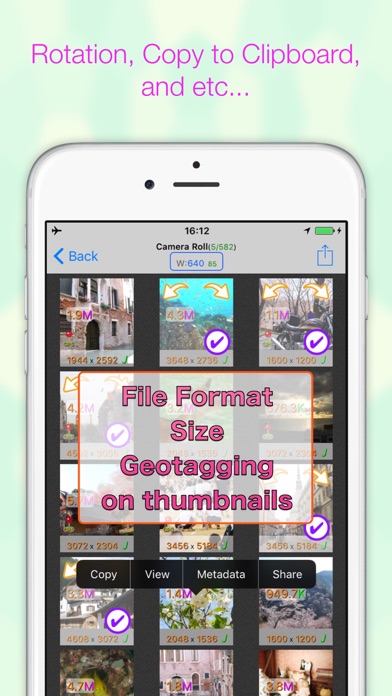
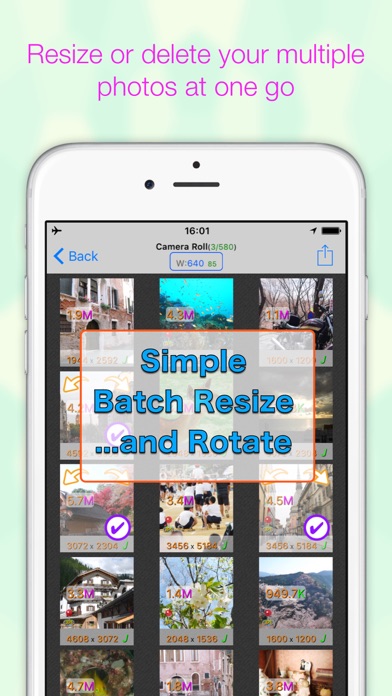
BatchResizer2 is a simple app which enables you to resize or crop to square or rotate even delete a number of photos at a time.
The resized photos can be saved in camera roll or sent by e-mail or into Dropbox.
Resize settings are customizable and you can quickly pick the setting and go easily.
You can also output the resized photos into a working directory without messing up your camera roll.

※ The iPhone's all select button will be shown only when the device's orientation is landscape because of space.
※ If you feel the display slow, please try to switch off the 'Show file size' option.


[Feature]
- Shrink several photos at once
- Resizing and cropping square in one operation
- PNG Image can be resized with transparency
- Adding white border and dropping shadow
- You can make presets of resize settings
- Output image format is selectable(PNG or JPEG)
- You can send the resized photos by email or save to Dropbox without saving them to Camera Roll
- You can select to embed matadata to the resized photo from original one
- You can also delete selected photos.
- View a images metadata(like Exif, TIFF, GPS, file size, file name)

URL scheme is batchresizer2://

[notice]
This app requires you to access privileges of your photos. When you run the app for the first time, you will be prompted to give the permission. If you want change the permission later, you can set it by launching Settings app and change the switch of BatchResizer2's photo access.

En voir plus...

Quoi de neuf dans la dernière version ?

- Updated frameworks
  • Screenshot #1 pour BatchResizer2
  • Screenshot #2 pour BatchResizer2
  • Screenshot #3 pour BatchResizer2
  • Screenshot #4 pour BatchResizer2
  • Screenshot #5 pour BatchResizer2
  • Screenshot #6 pour BatchResizer2

Note

(3 notes)

Détails sur l'application

Version
2.9.2
Taille
18.5 Mo
Version minimum d'iOS
13.0
Dernière mise à jour
16/09/2021
Publié par
Koichi Otera

Newsletter App Store

Recevez chaque jour les meilleures promos

Actualité Apple

Image Apple étend les alertes d’hypertension de l’Apple Watch à sept nouveaux pays
Apple étend les alertes d’hypertension de l’Apple Watch à sept nouveaux pays
Image Shrinking : la saison 3 démarre sur Apple TV (1 épisode), et la saison 4 est confirmée
Shrinking : la saison 3 démarre sur Apple TV (1 épisode), et la saison 4 est confirmée
Image Volvo confirme garder Apple CarPlay dans ses voitures
Volvo confirme garder Apple CarPlay dans ses voitures
Image Tim Cook, patron d’Apple, réagit après les actions de l’ICE à Minneapolis
Tim Cook, patron d’Apple, réagit après les actions de l’ICE à Minneapolis
Partenaires : Actualité iPhone - Culture Geek
©2009-2026 i2CMedia | A propos |