iPhoneAddict Apps
  • Actualités
  • Accueil Apps
  • iPhone
  • iPad
  • Universelles
  • Mac
  • Apple TV
KG KultureGeek
App
iPhone / iPad Télécharger iAddict v5 Mac Télécharger iAddict Mac
  • Actualités
  • Accueil Apps
  • iPhone
  • iPad
  • Universelles
  • Mac
  • Apple TV
  • Archives keynotes
  • Firmwares & iTunes
  • Contactez-nous
  • Comparateur de prix
  • KultureGeek
Accueil » Liste des Apps » Apps Universelles » Photo et vidéo » ChromaVlend - Photos & Videos
L'application n'est plus disponible sur l'App Store français
1.2 iOS €2,99€ Gamelarious 0 0 ChromaVlend provides you with simple and easy to use tools to do chromakey and replace your backgrounds with any video or image of you choosing. No subscription, no ads, no in-app purchases, no watermarks. CREATE A LIST OF COLORS TO REMOVE Use the...
ChromaVlend - Photos & Videos

ChromaVlend - Photos & Videos

iOS Universel / Photo et vidéo

2,99€ au lieu de 3,49€
Acheter sur l'App Store
Facebook X E-mail

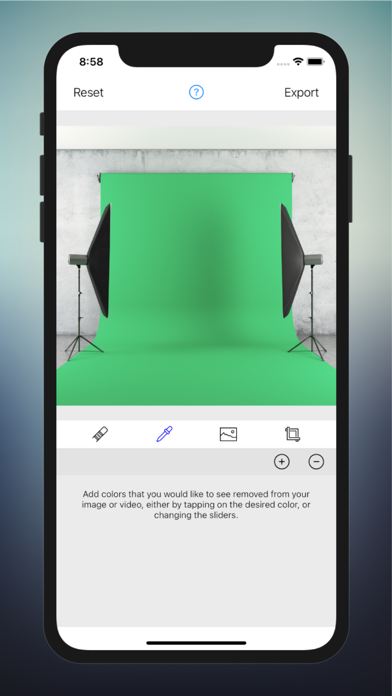
ChromaVlend provides you with simple and easy to use tools to do chromakey and replace your backgrounds with any video or image of you choosing. No subscription, no ads, no in-app purchases, no watermarks.

CREATE A LIST OF COLORS TO REMOVE
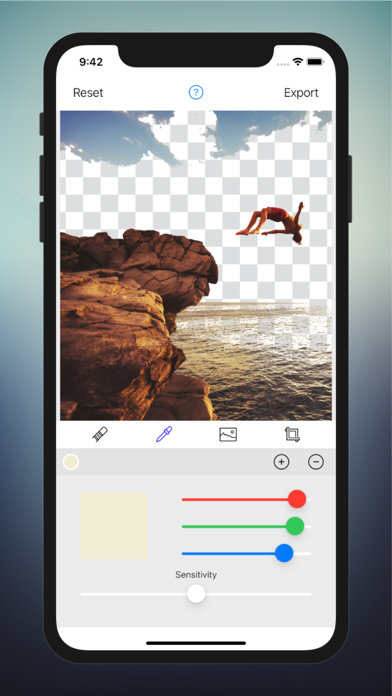
Use the color remover tool to make a list of up to 10 colors you wish to remove, simply by tapping on it with your finger.
Play around with the sensitivity sliders and RGB sliders to get the exact colors of your background.

USE A BRUSH TO MANUALLY ERASE PARTS OF YOUR IMAGE
If the colors you pick aren’t enough to erase every thing you wish, you can trust the brush tool to get the job done. Use your finger or Apple Pencil to manually erase. You can even zoom in on the image to increase accuracy.

SELECT A NEW BACKGROUND
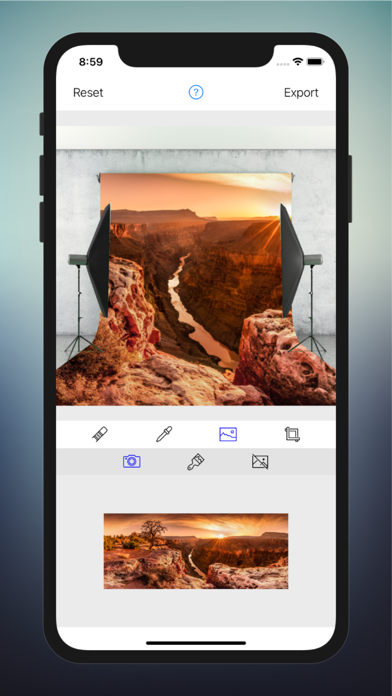
Use the background picker tool to choose a new background. You can pick a video or image from your photos library, or pick any color you want. If you are working with an image as your foreground, you can choose a transparent background as well.

RESIZE AND MOVE YOUR LAYERS
Using the crop tool, you can select the layer you want to change, and resize or move the layer as you wish.

TRIM YOUR VIDEO AND ALIGN THE START TIMES
Are the start times not aligned perfectly on the two videos you want to use? With the trim tool you can change the start time and the end time of your videos without difficulty.

For any questions, feedback and support, please contact us:

Gamelarious: https://www.gamelarious.com
Feedback: feedback@gamelarious.com
Support: support@gamelarious.com

En voir plus...

Quoi de neuf dans la dernière version ?

Bug fixes and performance improvements.
  • Screenshot #1 pour ChromaVlend - Photos & Videos
  • Screenshot #2 pour ChromaVlend - Photos & Videos
  • Screenshot #3 pour ChromaVlend - Photos & Videos
  • Screenshot #4 pour ChromaVlend - Photos & Videos
  • Screenshot #5 pour ChromaVlend - Photos & Videos
  • Screenshot #6 pour ChromaVlend - Photos & Videos

D'autres applications du développeur

Videocraft: Video MakerVideocraft: Video MakeriOS Universel

Note

(0 note)

Détails sur l'application

Version
1.2
Taille
7.6 Mo
Version minimum d'iOS
13.0
Dernière mise à jour
28/03/2022
Publié par
Gamelarious

Newsletter App Store

Recevez chaque jour les meilleures promos

Actualité Apple

Image iPhone Ultra pliable : stock limité au lancement, mais pas de sortie décalée par pays
iPhone Ultra pliable : stock limité au lancement, mais pas de sortie décalée par pays
Image iPhone : Apple va modifier le ciblage publicitaire (ATT) en Europe
iPhone : Apple va modifier le ciblage publicitaire (ATT) en Europe
Image AirTag : deux femmes poursuivent Apple après avoir été suivies à leur insu
AirTag : deux femmes poursuivent Apple après avoir été suivies à leur insu
Image WhatsApp prépare des réactions emoji personnalisables sur iPhone
WhatsApp prépare des réactions emoji personnalisables sur iPhone
iPhoneAddict Apps

Le catalogue iPhoneAddict pour suivre les nouveautés, mises à jour et baisses de prix de l’App Store.

Apps

Toutes les apps iOS iPhone iPad Universelles Mac Apple TV

iPhoneAddict

Actualité Apple Archives keynotes Contact À propos KultureGeek

Suivez-nous

©2009-2026 i2CMedia. Tous droits réservés.