iPhoneAddict Apps
  • Actualités
  • Accueil Apps
  • iPhone
  • iPad
  • Universelles
  • Mac
  • Apple TV
KG KultureGeek
App
iPhone / iPad Télécharger iAddict v5 Mac Télécharger iAddict Mac
  • Actualités
  • Accueil Apps
  • iPhone
  • iPad
  • Universelles
  • Mac
  • Apple TV
  • Archives keynotes
  • Firmwares & iTunes
  • Contactez-nous
  • Comparateur de prix
  • KultureGeek
Accueil » Liste des Apps » Apps Universelles » Photo et vidéo » Color Splash Master Pro
L'application n'est plus disponible sur l'App Store français
1.4 iOS €2,99€ DenciSoft s.r.o. 0 0 Color Splash Master is a simple photography editor that allows you to create outstanding photos using selective colorization effects. You can remove, restore original or entirely change colors on parts of the image. Using our app you can enhance your...
Color Splash Master Pro

Color Splash Master Pro

iOS Universel / Photo et vidéo

2,99€ au lieu de 3,49€
Acheter sur l'App Store
Facebook X E-mail

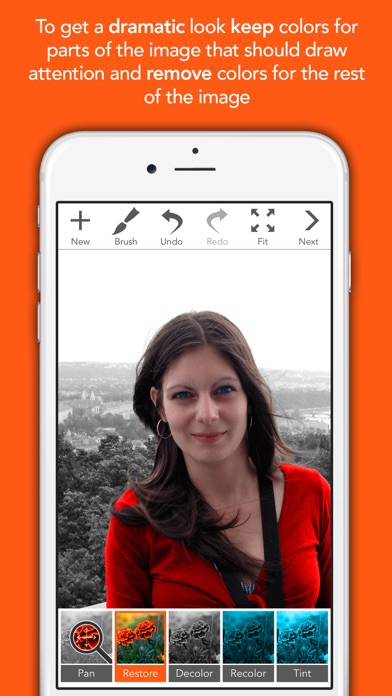
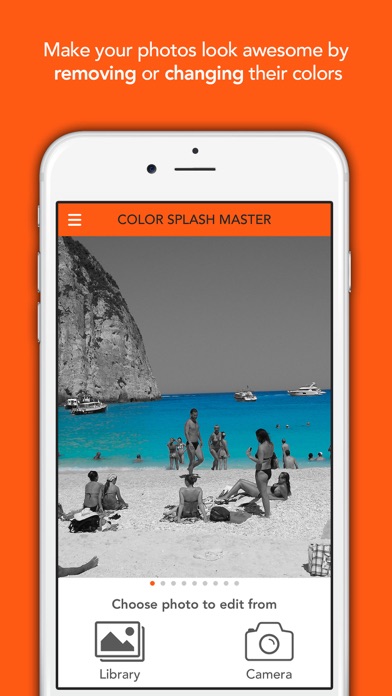
Color Splash Master is a simple photography editor that allows you to create outstanding photos using selective colorization effects. You can remove, restore original or entirely change colors on parts of the image. Using our app you can enhance your photos to draw viewers attention to specific areas of the image by keeping their colors and removing colors from the rest of the image.


HOW IT WORKS
After you choose an image from the library or take a new one using the camera, the image will be converted to a grayscale image. You can restore or entirely change colors on desired parts of the image by stroking with your finger over them. There are four tools that you can use: Restore, Decolor, Recolor and Tint. Restore tool restores original image colors. Decolor tool removes colors from the image by converting them to grayscale. Recolor and Tint tools change image colors. The main difference between them is that the Tint tool preserves image luminance. Tint tool is good to change colors of darker parts of the image. Recolor tool is good to change colors of lighter parts of the image. After you are satisfied with your changes, you can save the image or share it.


FEATURES
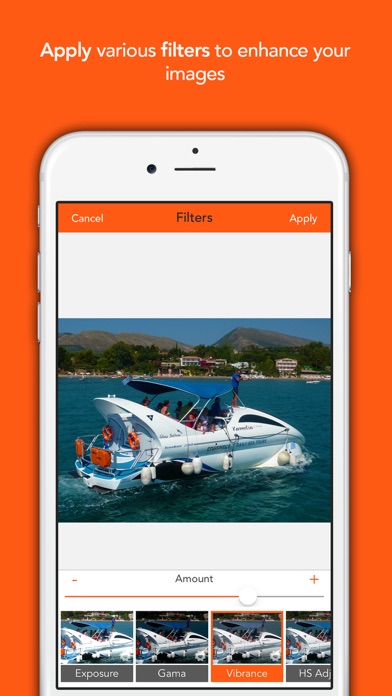
- various image filters
- zoom & pan
- undo & redo
- iPhone & iPad
- configurable brush size, opacity and softness
- mini preview for displaying part of the image covered by your finger during drawing
- optional hiding of toolbars with a single tap gesture to utilize whole screen
- sharing to Facebook, Instagram, Twitter, Flickr and sending via mail and message
- decolor tool for removing colors
- restore tool to restore native image colors
- recolor tool to change image colors
- tint tool to change image colors while preserving luminance
- simple tutorials explaining main features


CONTROLING GESTURES
zooming in/out- pinch gesture
filling image on screen - double tap gesture
hiding toolbars - single tap gesture
panning - if Pan tool is selected swipe one finger otherwise swipe two fingers
drawing with tool - swipe one finger


CUSTOMER SUPPORT
Happy customers are our highest priority. If there are any problems with our app, please contact us at csm@dencisoft.com. Although we read all App Store reviews, we cannot respond to them, nor identify the user who wrote them.

En voir plus...

Quoi de neuf dans la dernière version ?

bug fixes
  • Screenshot #1 pour Color Splash Master Pro
  • Screenshot #2 pour Color Splash Master Pro
  • Screenshot #3 pour Color Splash Master Pro
  • Screenshot #4 pour Color Splash Master Pro
  • Screenshot #5 pour Color Splash Master Pro
  • Screenshot #6 pour Color Splash Master Pro

D'autres applications du développeur

Super Stopwatch PROSuper Stopwatch PROiOS UniverselHIIT & Tabata Timer LiteHIIT & Tabata Timer LiteiOS UniverselCircuit Training Timer LiteCircuit Training Timer LiteiOS UniverselWorkout Interval Timer LiteWorkout Interval Timer LiteiOS UniverselColor Splash Master LiteColor Splash Master LiteiOS UniverselSuper Stopwatch LiteSuper Stopwatch LiteiOS UniverselVoir toutes les apps

Note

(0 note)

Détails sur l'application

Version
1.4
Taille
294.4 Mo
Version minimum d'iOS
11.0
Dernière mise à jour
03/04/2020
Publié par
DenciSoft s.r.o.

Newsletter App Store

Recevez chaque jour les meilleures promos

Actualité Apple

Image iPhone 18e : les 9 Go de RAM se confirment un peu plus
iPhone 18e : les 9 Go de RAM se confirment un peu plus
Image Apple met à jour Shazam avec des autocollants iMessage pour l’album petal d’Ariana Grande
Apple met à jour Shazam avec des autocollants iMessage pour l’album petal d’Ariana Grande
Image AAPL : l’action d’Apple chute de 10 % après les résultats financiers
AAPL : l’action d’Apple chute de 10 % après les résultats financiers
Image Apple bat un record de dépenses en R&D avec 10,2 milliards d’euros dépensés au T3 2026
Apple bat un record de dépenses en R&D avec 10,2 milliards d’euros dépensés au T3 2026
iPhoneAddict Apps

Le catalogue iPhoneAddict pour suivre les nouveautés, mises à jour et baisses de prix de l’App Store.

Apps

Toutes les apps iOS iPhone iPad Universelles Mac Apple TV

iPhoneAddict

Actualité Apple Archives keynotes Contact À propos KultureGeek

Suivez-nous

©2009-2026 i2CMedia. Tous droits réservés.