• KultureGeek
  • Comparateur de prix
       
iPhoneAddict
 iAddictv5Notre Application iPhone/iPad
  • Accueil Apps
  • Actualité Apple
  • Keynote Apple
  • Firmwares & iTunes
  • Contactez-nous
Accueil » Liste des Apps » Apps iPhone » Photo et vidéo » Cut Me In Picture
1.8 iOS €Gratuit Mobisoft Labs 0 0 Remove unwanted part of your photos by cutting it in any shape and paste it to beautiful background images. Create stunning photo edits in just a few taps. Cut Me In Picture lets you cut yourself or any subject from a photo and place it into...
Cut Me In Picture

Cut Me In Picture

iPhone / Photo et vidéo

Gratuit
Obtenir sur l'App Store

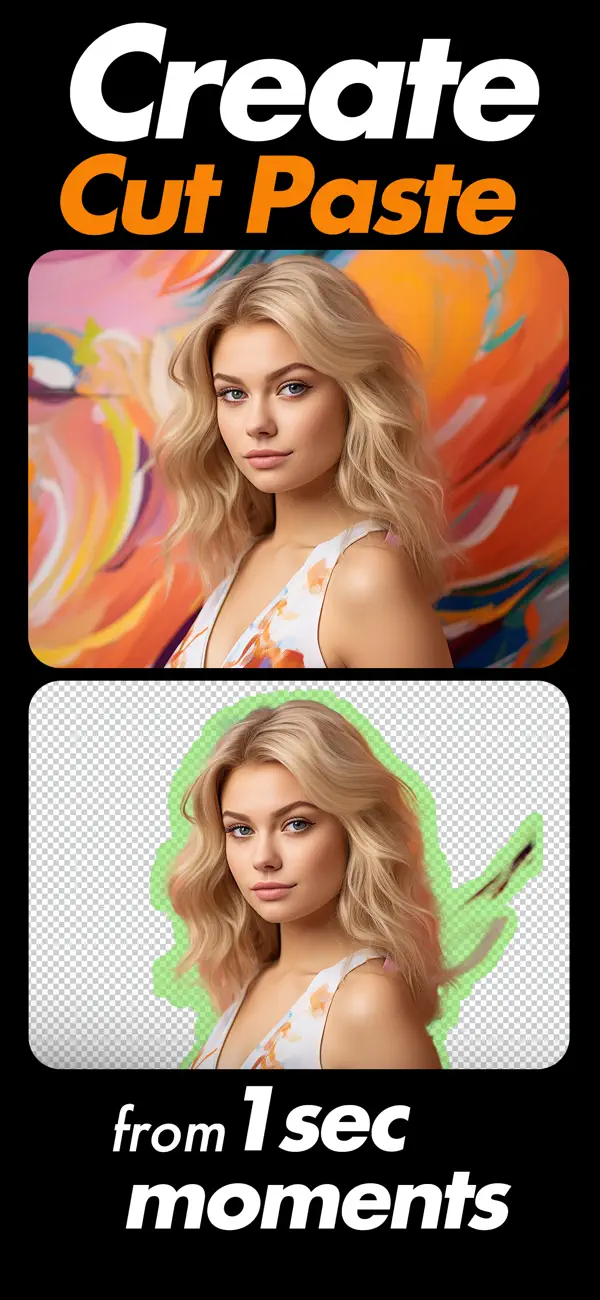
Remove unwanted part of your photos by cutting it in any shape and paste it to beautiful background images.
Create stunning photo edits in just a few taps. Cut Me In Picture lets you cut yourself or any subject from a photo and place it into beautiful new backgrounds with smooth, natural results. Whether you are creating fun edits, social media posts, or creative designs, the tools are simple and powerful.

Now with AI Powered Editing

The latest update introduces intelligent AI features that automatically detect and remove backgrounds with greater accuracy. Get cleaner cutouts, sharper edges, and faster results without complicated steps.

Key Features

• AI Auto Background Removal
• Manual cut and erase tools for detailed editing
• Cut photos in any shape and place them into new backgrounds
• Advanced zoom for precise editing
• Crop tool with multiple aspect ratios
• Add custom background images
• Apply effects and stylish themes
• Adjust brightness, contrast, saturation, exposure, shadow, temperature and more
• Smooth and refine edges for natural blending
• Add stickers and text to personalize your photos
• Save high quality images to your gallery
• Share directly to your favorite platforms
Designed with an updated, clean interface for a smoother editing experience.

En voir plus...

Quoi de neuf dans la dernière version ?

• Added AI background removal for quick and accurate cutouts
• Improved subject detection for cleaner edge results
• New brush offset control for more precise editing
• Updated Home screen with a refreshed layout
• Added additional editing controls for better flexibility
• Enhanced performance and faster processing speed
• Improved image export quality when saving
• Refined interface for smoother navigation
• General improvements and stability fixes

D'autres applications du développeur

PIP Camera -Spiral Photo Maker
/ iPhone
Blender Camera: Photo Collage
/ iPhone
Color Effects Maker - Change image colors by just touch gestures!
/ iPhone
Slideshow Video Maker Songs
/ iPhone
Passport ID Photo Maker Studio
/ iOS Universel
Hair Color & Eye Color Changer
/ iPhone
Voir toutes les apps

Note

(0 note)

Détails sur l'application

Version
1.8
Taille
62.3 Mo
Version minimum d'iOS
15.6
Dernière mise à jour
14/03/2026
Publié par
Mobisoft Labs

Newsletter App Store

Recevez chaque jour les meilleures promos

Actualité Apple

Image Apple annonce AirPods Max 2, son nouveau casque avec plusieurs nouveautés
Apple annonce AirPods Max 2, son nouveau casque avec plusieurs nouveautés
Image Twisted Yoga : la docu-série sur les dérives sectaires d’une école de Yoga est disponible sur Apple TV
Twisted Yoga : la docu-série sur les dérives sectaires d’une école de Yoga est disponible sur Apple TV
Image iPad : un prix de vente moyen en hausse… qui compense le ralentissement du marché
iPad : un prix de vente moyen en hausse… qui compense le ralentissement du marché
Image MacBook Neo : passer à 1 To de stockage, c’est possible… mais pas facile
MacBook Neo : passer à 1 To de stockage, c’est possible… mais pas facile
Partenaires : Actualité iPhone - Culture Geek
©2009-2026 i2CMedia | A propos |