• KultureGeek
  • Comparateur de prix
       
iPhoneAddict
 iAddictv5Notre Application iPhone/iPad
  • Accueil Apps
  • Actualité Apple
  • Keynote Apple
  • Firmwares & iTunes
  • Contactez-nous
Accueil » Liste des Apps » Apps Universelles » Photo et vidéo » CutOut Superimpose Lasso
1.3 iOS €Gratuit 松滔 袁 1 1 Brushes are used to quickly complete the normal quality mask, magnetic lasso for accurate rendering high-quality mask, the two can be used simultaneously, and in the end you can right edge feathering. Cut out the Object and then make...
CutOut Superimpose Lasso

CutOut Superimpose Lasso

iOS Universel / Photo et vidéo

Gratuit
Obtenir sur l'App Store

Brushes are used to quickly complete the normal quality mask, magnetic lasso for accurate rendering high-quality mask, the two can be used simultaneously, and in the end you can right edge feathering.


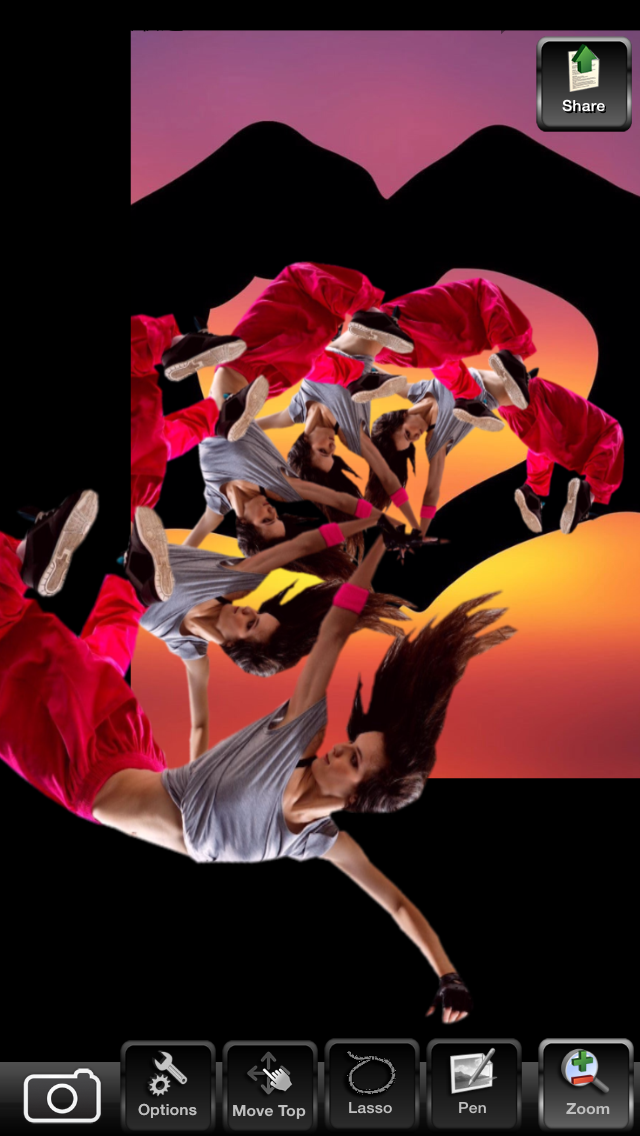
Cut out the Object and then make superimpose/juxtapose image fast, it is so easy.

To make a superimpose/juxtaposed image, you need two images to start your composition. The foreground image will be able to cutout/mask, re-size, move and rotate to blend it with the background image. The background image will be “Canvas” onto which you can then draw the top image.

The important step is going to be to isolate the foreground from the background, so that we can redraw the foreground only. The Cutting Out Lasso App provide two kinds of Cutout tools, one is the Magnetic Lasso, the other one is the Brush Pen, they all support the use of two fingers to zoom and move the canvas. Recommended zoom in to the maximum size of the canvas when adding anchor points or painting mask, then you can use two fingers to move the canvas.

Brush Pen are used to quickly complete the normal quality mask, magnetic lasso for accurate rendering high-quality mask, the two can be used simultaneously, and in the end you can right edge feathering.

Features:
Magnetic Lasso: The magnetic lasso tool detects and snaps to the edge of an object as you to trace along its outline, it tries to figure out where the edges of an object are by looking for differences in color and brightness values between the object you're trying to select and its background. As you drag along the edge of an object, the tool drops fastening points to anchor the selection. Magnetic Lasso is composed by a numerous anchor points closed curve, one finger tap the screen to add a new anchor points, one finger swipe the screen can precisely move the anchor point.
Pen: You can paint directly on the canvas mask, brush size adjustment based on scaling the canvas.

En voir plus...

Quoi de neuf dans la dernière version ?

This update from Apple will improve the functionality of this app. No new features are included.

faster

  • Screenshot #1 pour CutOut Superimpose Lasso
  • Screenshot #2 pour CutOut Superimpose Lasso
  • Screenshot #3 pour CutOut Superimpose Lasso
  • Screenshot #4 pour CutOut Superimpose Lasso
  • Screenshot #5 pour CutOut Superimpose Lasso
  • Screenshot #6 pour CutOut Superimpose Lasso

D'autres applications du développeur

Panorama 360 Camera
Panorama 360 Camera
/ iOS Universel
AI Twins Camera
AI Twins Camera
/ iOS Universel
Auto Stitch Pic-Merge Panorama
/ iOS Universel
Liquify Filter
Liquify Filter
/ iOS Universel
Skin Makeup
Skin Makeup
/ iOS Universel
Portrait Retouching-Face Beauty and Skin Whitening
/ macOS
Voir toutes les apps

Note

(1 notes)

Détails sur l'application

Version
1.3
Taille
50.2 Mo
Version minimum d'iOS
8.0
Dernière mise à jour
06/04/2015
Publié par
松滔 袁

Newsletter App Store

Recevez chaque jour les meilleures promos

Actualité Apple

Image AirTag et harcèlement : Apple est visé par plus de 30 poursuites
AirTag et harcèlement : Apple est visé par plus de 30 poursuites
Image Apple retire le Mac mini M4 avec 256 Go de stockage : le modèle de base devient plus cher
Apple retire le Mac mini M4 avec 256 Go de stockage : le modèle de base devient plus cher
Image Apple explique pourquoi les iPhone 17 ont un taux de satisfaction de 99 %
Apple explique pourquoi les iPhone 17 ont un taux de satisfaction de 99 %
Image Apple miserait sur un prix agressif pour les iPhone 18 Pro
Apple miserait sur un prix agressif pour les iPhone 18 Pro
Partenaires : Actualité iPhone - Culture Geek
©2009-2026 i2CMedia | A propos |