iPhoneAddict Apps
  • Actualités
  • Accueil Apps
  • iPhone
  • iPad
  • Universelles
  • Mac
  • Apple TV
KG KultureGeek
App
iPhone / iPad Télécharger iAddict v5 Mac Télécharger iAddict Mac
  • Actualités
  • Accueil Apps
  • iPhone
  • iPad
  • Universelles
  • Mac
  • Apple TV
  • Archives keynotes
  • Firmwares & iTunes
  • Contactez-nous
  • Comparateur de prix
  • KultureGeek
Accueil » Liste des Apps » Apps Universelles » Photo et vidéo » Frame Collage
3.1 iOS €Gratuit 志明 丁 3.7 3 With Frame Collage, you will enjoy collaging with various photo frames.Make terrific photo collages with it to amuse your family and friends, memorize some time and share around the world! Features: -Both Landscape and portrait orientation...
Frame Collage

Frame Collage

iOS Universel / Photo et vidéo

Gratuit au lieu de 0,99€
Obtenir sur l'App Store
Facebook X E-mail

With Frame Collage, you will enjoy collaging with various photo frames.Make terrific photo collages with it to amuse your family and friends, memorize some time and share around the world!


Features:

-Both Landscape and portrait orientation support.
-Add photos from the photo library or camera.
-Multiple adding:add multiple photos at a time.
-Multiple backgrounds or you can select a photo as background.
-Moving,pinching and rotating.
-Multiple photo frames: heart,round,star,cloud,etc. and frame a photo whenever you like.
-Add no frame:do not frame the photos to make a common collage.
-Multiple frame colors available.
-Auto-frame:automatically frame the newly-added photo as the last framed photo.
-Collage with photo effects: blackwhite,comic,cyanotype,sepia,softlight,oldstyle,exposure,vibrance,vignette and more are coming.
-Add shadow to photos.
-Apply to all:apply a frame,a frame color,a photo effect or shadow to all photos by a double-tap.
-High photo quality to save, mail or share on Facebook or Twitter.


Tips:

-Tap the background to add photos.
-Tap a photo to bring it to the front or long-press to move back.
-Double-tap the background or a photo to edit it.
-Double-tap the frame,the frame color,the effect or the shadow buttons to apply it to all photos.
-On iPhone/iPod touch,shake to show the options.


See the tutorial video: http://www.youtube.com/watch?v=nlz2baKC0uk

En voir plus...

Quoi de neuf dans la dernière version ?

Some optimizations
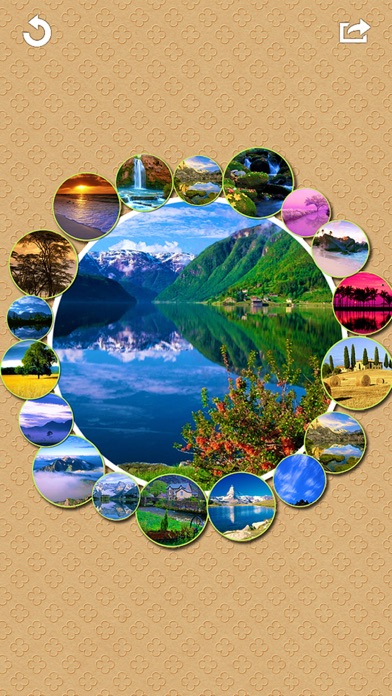
  • Screenshot #1 pour Frame Collage
  • Screenshot #2 pour Frame Collage
  • Screenshot #3 pour Frame Collage
  • Screenshot #4 pour Frame Collage
  • Screenshot #5 pour Frame Collage
  • Screenshot #6 pour Frame Collage

D'autres applications du développeur

Snowing PicSnowing PiciOS UniverseliMovingPuzzleiMovingPuzzleiOS UniverselXerXeriOS UniverselDaily Clock: Ringtone RecorderDaily Clock: Ringtone RecorderiOS UniverselUsage LogUsage LogiPhoneLoc CamLoc CamiPhone

Note

(3 notes)

Détails sur l'application

Version
3.1
Taille
36.9 Mo
Version minimum d'iOS
9.0
Dernière mise à jour
17/11/2022
Publié par
志明 丁

Newsletter App Store

Recevez chaque jour les meilleures promos

Actualité Apple

Image Apple met à jour le firmware de son adaptateur multiport AV numérique USB‑C
Apple met à jour le firmware de son adaptateur multiport AV numérique USB‑C
Image Une pub d’Apple avec un enfant et un iPhone crée une polémique en Italie
Une pub d’Apple avec un enfant et un iPhone crée une polémique en Italie
Image Apple prépare un système de reprise pour 90 jours avec l’app Cartes
Apple prépare un système de reprise pour 90 jours avec l’app Cartes
Image Apple recrute son nouveau responsable des affaires gouvernementales
Apple recrute son nouveau responsable des affaires gouvernementales
iPhoneAddict Apps

Le catalogue iPhoneAddict pour suivre les nouveautés, mises à jour et baisses de prix de l’App Store.

Apps

Toutes les apps iOS iPhone iPad Universelles Mac Apple TV

iPhoneAddict

Actualité Apple Archives keynotes Contact À propos KultureGeek

Suivez-nous

©2009-2026 i2CMedia. Tous droits réservés.