• KultureGeek
  • Comparateur de prix
       
iPhoneAddict
 iAddictv5Notre Application iPhone/iPad
  • Accueil Apps
  • Actualité Apple
  • Keynote Apple
  • Firmwares & iTunes
  • Contactez-nous
Accueil » Liste des Apps » Apps Universelles » Photo et vidéo » Kodak Instant Printer
L'application n'est plus disponible sur l'App Store français
8.73 iOS €Gratuit Prinics Co., Ltd. 2.7 7 Thank you for purchasing KODAK Instant Printer. Supported Models : Kodak 2 inch Printer (P120) Kodak 2 in 1, 2 inch Camera (C210) Kodak 3 inch Square Printer (P300) Kodak 3 inch Square 2 in 1 Camera ( C300) Kodak 4 inch Dock Printer (PD460) Easily...
Kodak Instant Printer

Kodak Instant Printer

iOS Universel / Photo et vidéo

Gratuit
Obtenir sur l'App Store

Thank you for purchasing KODAK Instant Printer.

Supported Models :
Kodak 2 inch Printer (P120)
Kodak 2 in 1, 2 inch Camera (C210)
Kodak 3 inch Square Printer (P300)
Kodak 3 inch Square 2 in 1 Camera ( C300)
Kodak 4 inch Dock Printer (PD460)

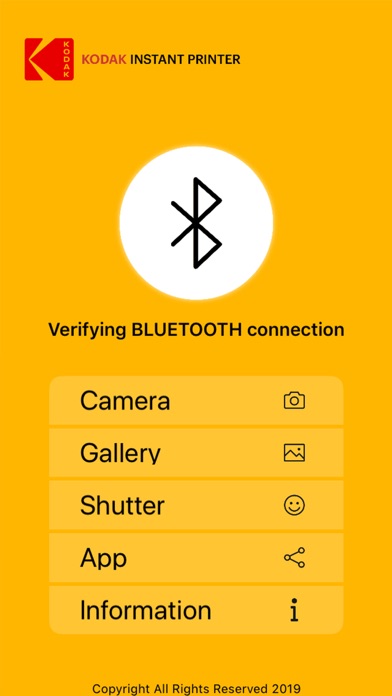
Easily print amazing photos with KODAK Instant Camera and Printer.
The "KODAK" Instant photo printer and camera can be used to print images from smartphones by connecting Bluetooth to the device.
You can take and edit pictures on smartphones or tablets. It will instantly print your precious moments!
[How to Use]
1. Make sure you recharge the printer before you use it.
2. Make sure the Adapter is connected properly.
3. Turn on the printer
4. Go to Bluetooth setting and find the printer’s MAC address.
The MAC address is placed inside the printer’s door
If you purchased Dock Printer, dock your smartphone at the pin on top the of the printer or find the MAC address on the downside of the printer to connect the device to the Bluetooth.
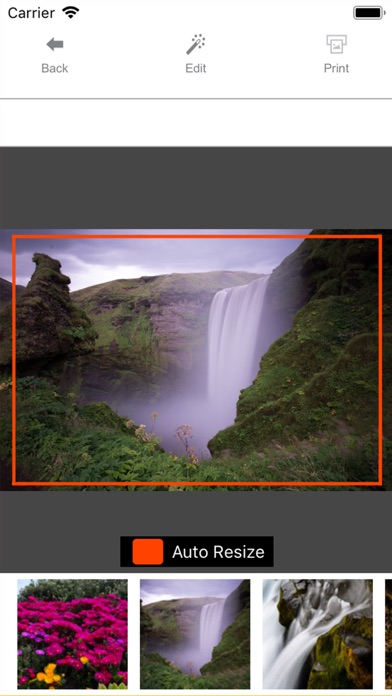
5. Select an image from the Gallery or take a photo with your smartphone.
6. Once image has been selected, edit the image with your personal preference.
7. Now press print button located on top of the printer when editing is completed.
8. When you print for the first time, it may need to update the firmware. Please follow the instruction shown on the screen of your smartphone.
9. It will take about a minute to fully print. Please do not pull the photo until it is completely printed.

En voir plus...

Quoi de neuf dans la dernière version ?

- Bug fixes

  • Screenshot #1 pour Kodak Instant Printer
  • Screenshot #2 pour Kodak Instant Printer
  • Screenshot #3 pour Kodak Instant Printer
  • Screenshot #4 pour Kodak Instant Printer
  • Screenshot #5 pour Kodak Instant Printer
  • Screenshot #6 pour Kodak Instant Printer

D'autres applications du développeur

Bolle Photo Advance
Bolle Photo Advance
/ iOS Universel
PicKit Printer
PicKit Printer
/ iOS Universel
MiniPrint
MiniPrint
/ iOS Universel
Kodak Printer Dock
Kodak Printer Dock
/ iOS Universel
Kodak Printer Mini
Kodak Printer Mini
/ iOS Universel
SI Portable Printer
SI Portable Printer
/ iOS Universel
Voir toutes les apps

Note

(7 notes)

Détails sur l'application

Version
8.73
Taille
68.3 Mo
Version minimum d'iOS
9.0
Dernière mise à jour
27/04/2022
Publié par
Prinics Co., Ltd.

Newsletter App Store

Recevez chaque jour les meilleures promos

Actualité Apple

Image Final Cut Pro en achat unique vs abonnement Creator Studio : Apple entretient le flou sur la parité des fonctions
Final Cut Pro en achat unique vs abonnement Creator Studio : Apple entretient le flou sur la parité des fonctions
Image L’iPhone pliable utiliserait du métal liquide et du titane amélioré
L’iPhone pliable utiliserait du métal liquide et du titane amélioré
Image L’Apple Card pèse déjà sur les résultats de JPMorgan Chase
L’Apple Card pèse déjà sur les résultats de JPMorgan Chase
Image Setapp Mobile, l’alternative à l’App Store pour les apps iPhone, va fermer ses portes
Setapp Mobile, l’alternative à l’App Store pour les apps iPhone, va fermer ses portes
Partenaires : Actualité iPhone - Culture Geek
©2009-2026 i2CMedia | A propos |