Multi Timer Shooting Camera
iOS Universel / Photo et vidéo
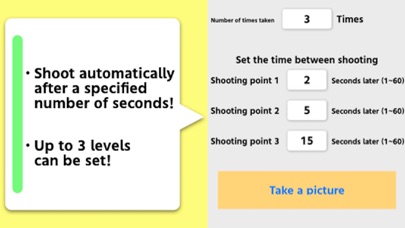
Set “Number of times taken” and each “Shooting Point”.
When “Number of times taken” is set to 3, “Shooting Point 1” is set to 5 seconds, “Shooting Point 2” is set to 3 seconds, and “Shooting Point 3” is set to 10 seconds, when the shutter button is pressed on the shooting screen, 5 seconds later Take the first shot, take the second shot 3 seconds later, and take the third shot 10 seconds later. Everything is done automatically from when the shutter button is pressed until all shots are completed.
Please contact the review section or DM here.
https://twitter.com/corasck
En voir plus...
Quoi de neuf dans la dernière version ?
Bug fixes and performance improvements.

![Electronic seal[PRO]](https://is1-ssl.mzstatic.com/image/thumb/Purple114/v4/60/df/b9/60dfb988-0c61-2247-77f4-24856bb7a3db/AppIcon-0-0-1x_U007emarketing-0-0-0-7-0-0-P3-0-0-0-GLES2_U002c0-512MB-85-220-0-0.png/256x256bb.jpg)