iPhoneAddict Apps
  • Actualités
  • Accueil Apps
  • iPhone
  • iPad
  • Universelles
  • Mac
  • Apple TV
KG KultureGeek
App
iPhone / iPad Télécharger iAddict v5 Mac Télécharger iAddict Mac
  • Actualités
  • Accueil Apps
  • iPhone
  • iPad
  • Universelles
  • Mac
  • Apple TV
  • Archives keynotes
  • Firmwares & iTunes
  • Contactez-nous
  • Comparateur de prix
  • KultureGeek
Accueil » Liste des Apps » Apps iPhone » Photo et vidéo » Background Eraser - Photo Cut
L'application n'est plus disponible sur l'App Store français
2.0 iOS €Gratuit vijay kachhadiya 3.2 6 Photo editing is an art. The people love to edit their photos, be uploading the pic on the social networking website, making it their profile pic or sharing it with their friends. It has become too common to cut the background of the captured photo...
Background Eraser - Photo Cut

Background Eraser - Photo Cut

iPhone / Photo et vidéo

Gratuit
Obtenir sur l'App Store
Facebook X E-mail

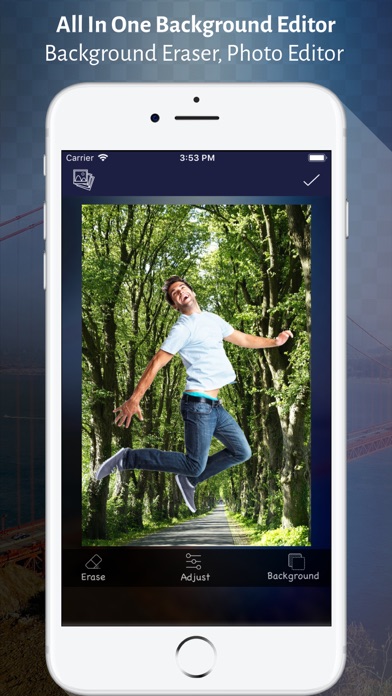
Photo editing is an art. The people love to edit their photos, be uploading the pic on the social networking website, making it their profile pic or sharing it with their friends. It has become too common to cut the background of the captured photo and replace it with a new one.

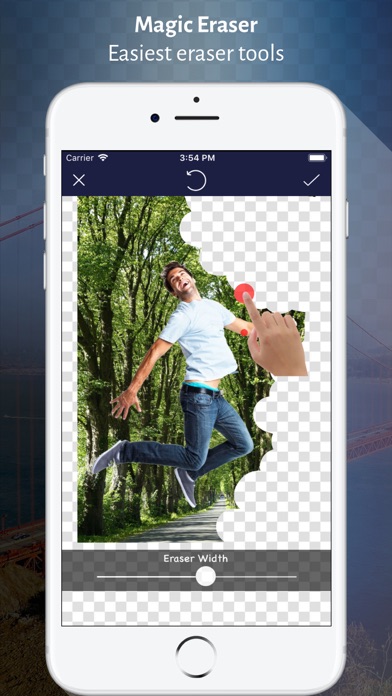
Background Eraser Editor App right on the mobile phone also lets you change the image background like a magic stick. In a few taps, the background of any picture can be easily removed and changed.

See how?

Click the photo from your mobile camera or simply add a picture from the album whose background you want to change. Either remove the background or select the background you want to keep. Preview the picture with a modified background and then save the beautiful image in png or jpg format.

Take a glance at what you can do with your photo:

- Lets you do photo editing on free
- Replace the picture's background with a new one
- Make the background white, transparent or other
- Add the text, stickers or emojis
- The filters to change the looks of the picture
- Advance selection to apply the changes to the limited portion of the background
- Undo or redo the changes made
- A reverse tool to restore the original background
- Enable resizing the output image

Erasing Photo Background is truly amazing and Great fun to create a new album where your best images can be kept.

En voir plus...

Quoi de neuf dans la dernière version ?

Bug fixes and performance enhancements might sound boring, but they make photos with Background Eraser even better. There’s nothing boring about that, right?
  • Screenshot #1 pour Background Eraser - Photo Cut
  • Screenshot #2 pour Background Eraser - Photo Cut
  • Screenshot #3 pour Background Eraser - Photo Cut

D'autres applications du développeur

Scanner App - Scan PDF DocScanner App - Scan PDF DociOS UniverselVideo Collage - Music & GifVideo Collage - Music & GifiPhoneSelfie Cam - Beauty CameraSelfie Cam - Beauty CameraiOS UniverselSquareFit No Crop Editor AppSquareFit No Crop Editor AppiPhoneSticker Maker : Meme, EmojiSticker Maker : Meme, EmojiiOS Universel

Note

(6 notes)

Détails sur l'application

Version
2.0
Taille
76.5 Mo
Version minimum d'iOS
9.0
Dernière mise à jour
11/08/2021
Publié par
vijay kachhadiya

Newsletter App Store

Recevez chaque jour les meilleures promos

Actualité Apple

Image iPhone Ultra pliable : les deux coloris se dévoilent en images
iPhone Ultra pliable : les deux coloris se dévoilent en images
Image Apple ajoute 43 appareils auditifs compatibles Made for iPhone (MFi)
Apple ajoute 43 appareils auditifs compatibles Made for iPhone (MFi)
Image Le prix de l’iPhone 17 augmenterait dans quelques jours
Le prix de l’iPhone 17 augmenterait dans quelques jours
Image Dopamine 3, le jailbreak pour iOS 26 sur iPhone, est disponible
Dopamine 3, le jailbreak pour iOS 26 sur iPhone, est disponible
iPhoneAddict Apps

Le catalogue iPhoneAddict pour suivre les nouveautés, mises à jour et baisses de prix de l’App Store.

Apps

Toutes les apps iOS iPhone iPad Universelles Mac Apple TV

iPhoneAddict

Actualité Apple Archives keynotes Contact À propos KultureGeek

Suivez-nous

©2009-2026 i2CMedia. Tous droits réservés.