Quick Shot Camera
iPhone / Photo et vidéo
QuickShotCamera enables you to capture a photo as quickly as possible, without the risk of delay from fumbling for the shutter button or restoring the correct settings. QuickShotCamera will take two Live Photos with the back camera in quick succession as soon as it is launched or returned to active status. This gives you just enough time to point your iPhone in the direction of your subject and capture the image you see before it is gone forever.
The concept for Quick Shot Camera comes from experience. How often have you tried to quickly capture a photo of a scene that is about to go away--only to find you have opened the system camera app, reached for the shutter button, and instead of the photo you want, you have started to capture a video--or set the camera to Panorama, or portrait mode, or another setting which you can't recover from until the scene is gone. This will never happen with Quick Shot Camera--every time it becomes active, it will take the photo you want!
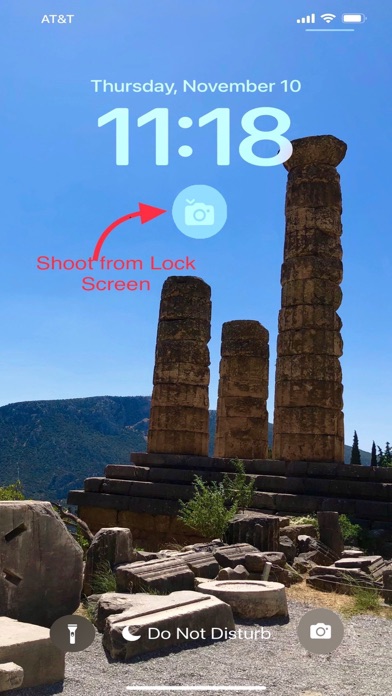
With the included Lock Screen Widget, (iOS 16 only) a photo can be captured with a single touch on the Lock Screen. From the Lock Screen, a single tap will launch the app and snap your photo. Once you've installed the widget, just tap it at any time--hold your phone up and capture your photo! Just click, point, and two Live Photos will be captured with no further steps required. (Please note that the lock screen widget is available only with iOS 16.0 or higher. Please be aware that the widget is available for installation only after the app has been launched at least once after installation or update. For instructions on how to customize your lock screen and install the lock screen widget, see https://support.apple.com/en-gb/guide/iphone/iph4d0e6c351/ios )
For most effective use, keep the icon for QuickShotCamera in the dock or on the first page of your home screen. With a little practice, you will be able to capture photos entirely with one hand. (If you prefer the initial shots to be regular still photos rather than Live Photos, you can change the default setting for Live Photo Mode in the Settings App at Settings—>Quick Shot Camera—>Live Photo Mode.)
Once the initial shots have been captured, you can take more shots with the shutter button. You can pinch in and out for zoom effects, or use the ultra-wide and telephoto buttons. You can use flash if desired. You can switch to the front camera, or switch from Live Photos to ordinary stills using the clearly marked and well-spaced controls. The settings you change will only be effective while the app remains active--when you re-launch or re-open the app, it will always immediately take two Live Photos with the back camera. You will never have to scramble to change back from videos or panoramas or take the chance of missing the shutter button on the first try.
The first several uses will be free. If you like it, an in-app purchase will allow permanent use of the shoot-on-launch feature.
Quoi de neuf dans la dernière version ?
Faster response, settings for live/still photos, single or double shot.