• KultureGeek
  • Comparateur de prix
       
iPhoneAddict
 iAddictv5Notre Application iPhone/iPad
  • Accueil Apps
  • Actualité Apple
  • Keynote Apple
  • Firmwares & iTunes
  • Contactez-nous
Accueil » Liste des Apps » Apps Universelles » Photo et vidéo » Video Timer Counter
L'application n'est plus disponible sur l'App Store français
1.0 iOS €9,99€ Ruizheng Liu 1 1 Introduction ========= Video Timer & Counter let you create transparent(clear) video with timer(up or down) and counter(up or down). You can overlay (picture on picture) the generated video to your normal video as timer or counter. For timer, you...
Video Timer Counter

Video Timer Counter

iOS Universel / Photo et vidéo

9,99€ au lieu de 11,99€
Acheter sur l'App Store

Introduction
=========
Video Timer & Counter let you create transparent(clear) video with timer(up or down) and counter(up or down). You can overlay (picture on picture) the generated video to your normal video as timer or counter.

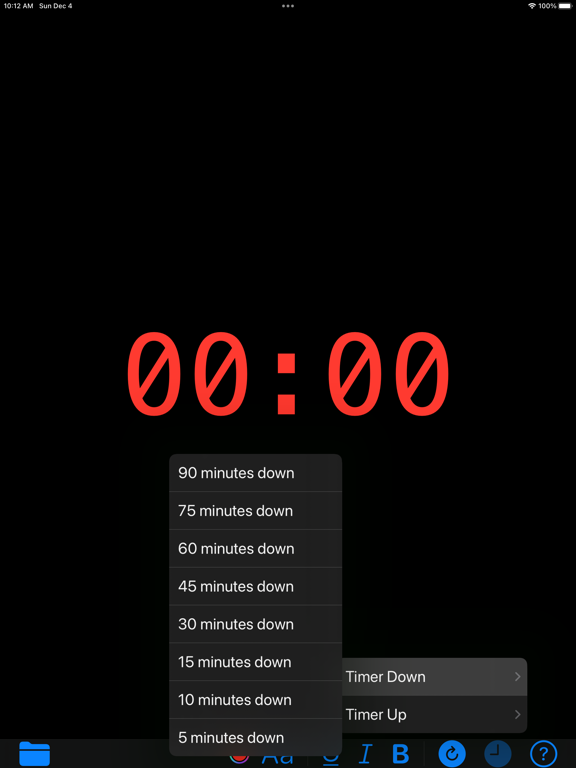
For timer, you can create time up or down in 5, 10, 15, 30, 45, 60, 75, 90 minutes period.

For counter, you can create count up or down in 5, 10, 15, 45, 60, 75, 90 seconds period.

There are two steps to create the video: the first step is to generate a series of images; the second step is to generate the video using the images.

Step 1: Generate Images
==================
Use toolbar buttons to generate Timer or Counter images. You can customize the font with the toolbar buttons:
- Choose font color
- Choose font family
- Underline font
- Italic font
- Bold font

Step2: Generate Video
=================
After the first step finished, click the Folder toolbar button to generate Timer or Counter video file. This step may take a couple of minutes depends on the period of the Timer. The video file will be saved to your Photo Library.

Settings
=======
Using the Settings window, you can choose the background color (default is transparent (clear) of the video to one of White, Black, Gray, Blue.

Notes
=====
For transparent videos generated, all the frames will be overlay together if you play them directly in Photo Library. It will be play correctly if you copy them to, for example, File folder.

En voir plus...

  • Screenshot #1 pour Video Timer Counter
  • Screenshot #2 pour Video Timer Counter
  • Screenshot #3 pour Video Timer Counter
  • Screenshot #4 pour Video Timer Counter
  • Screenshot #5 pour Video Timer Counter
  • Screenshot #6 pour Video Timer Counter

D'autres applications du développeur

Screenshot One
Screenshot One
/ macOS
PDF±
PDF±
/ macOS
QR®
QR®
/ iOS Universel
Count®
Count®
/ iPhone
Round Corner
Round Corner
/ iOS Universel
Music Sheet®
Music Sheet®
/ iPad

Note

(1 notes)

Détails sur l'application

Version
1.0
Taille
0.6 Mo
Version minimum d'iOS
16.0
Dernière mise à jour
05/12/2022
Publié par
Ruizheng Liu

Newsletter App Store

Recevez chaque jour les meilleures promos

Actualité Apple

Image L’iPhone 18 ne supportera pas des fonctions d’Apple Intelligence avec ses 9 Go de RAM
L’iPhone 18 ne supportera pas des fonctions d’Apple Intelligence avec ses 9 Go de RAM
Image L’Inde enquête après le piratage des données d’Apple et de l’iPhone 18 Pro chez Tata
L’Inde enquête après le piratage des données d’Apple et de l’iPhone 18 Pro chez Tata
Image Apple teste déjà iOS 27.4 pour iPhone
Apple teste déjà iOS 27.4 pour iPhone
Image iFixit dévoile comment une batterie d’iPhone est assemblée
iFixit dévoile comment une batterie d’iPhone est assemblée
Partenaires : Actualité iPhone - Culture Geek
©2009-2026 i2CMedia | A propos |