Check Later
iOS Universel / Productivité
A lightweight inbox for links you don’t want to lose.
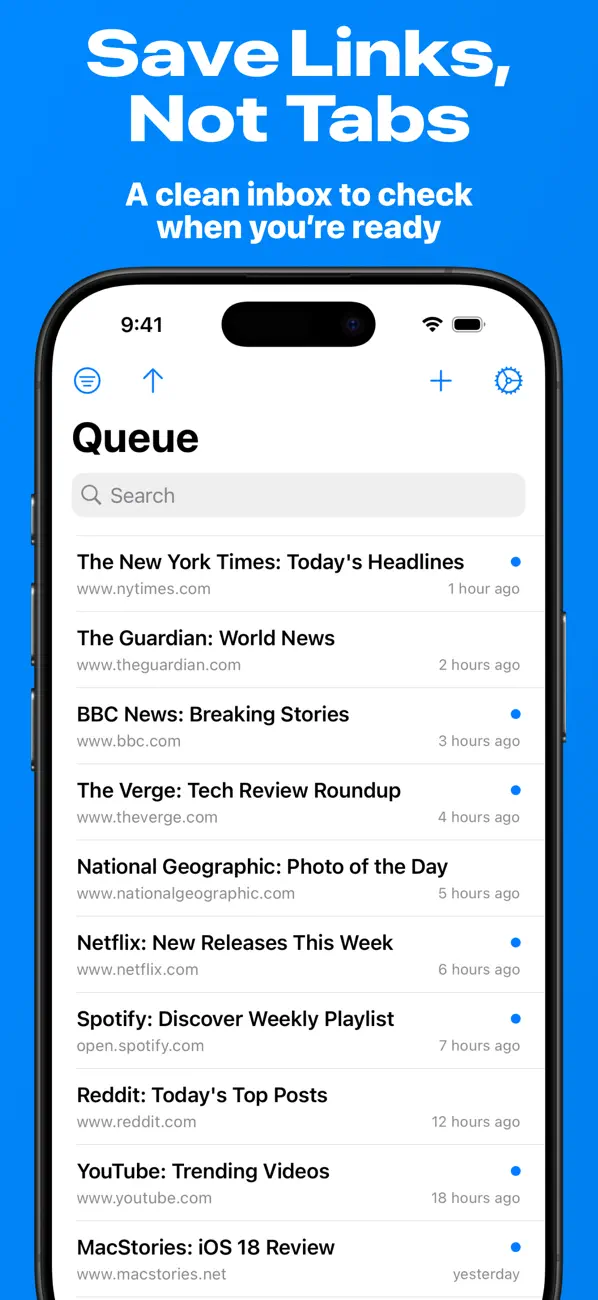
Tabs pile up, bookmarks get buried and that article is still unread.
Check Later gives you a temporary place to park any link—so your browser and read‑later service stay tidy.
Why you’ll love it
• One‑tap capture – Use the Share Sheet in any app or drop a URL on iPad.
• Widgets everywhere – Add, view or clear items right from your Home Screen or StandBy.
• Instant iCloud sync – Your queue stays identical on iPhone, iPad, Mac and Apple Vision devices—with no accounts to create.
• Smart save – Titles, favicons and timestamps fill in automatically.
• Filter, sort & search fast – Find that recipe, podcast or tech article in seconds.
• Private by design – Data lives in your iCloud; no ads, no tracking.
Stop hoarding tabs
Close the browser, clear the clutter and keep moving—then open Check Later when you’re ready to dive in.
Download free today and give your brain (and your browser) some breathing room.
Quoi de neuf dans la dernière version ?
This update makes it easier than ever to save links from Safari.
Import Safari Tabs: Copy your open tabs from Safari and paste them directly, or import from a text file. Found in Settings → Import & Export.
To copy tabs from Safari, tap and hold on a Tab Group in Safari, then select "Copy Links".
Great for clearing tab clutter while keeping everything saved for later.