Escape - Mind Map & Outline
iOS Universel / Productivité
Escape is your place to jot down notes & ideas, connect and develop them, and get things done.
WHAT'S YOUR NEXT IDEA?
• Jot down & Collect
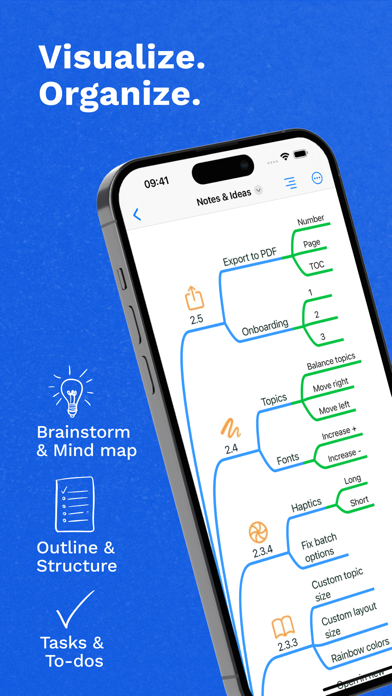
Notes, images, links or tasks, drop them all in a mind map. Start an outline for an organized, structured view, and switch to mind map to visually rearrange ideas or add new ones.
• Plan & Organize
Information is ever changing and your app should help you stay on top of things. Rearrange, edit, merge or highlight with intuitive gestures. Instantly switch between outline and mind map. Focus on details by unfolding branches.
• Get Things Done
Turn ideas into tasks and projects. Prioritize, sort, group and add task completion percentage.
• Style Your Mind Map
Create expressive maps with beautiful automatic layout, intuitive markers, Apple Pencil sketches and various text styles. Your mind map looks perfect out-of-the-box.
• Share and Collaborate
Easily share your maps with others as image, text, MD, OPML, PDF or MMAP. Collaborate on tasks with non-mind mapping users, by exporting the map as PDF with clickable checkboxes.
ESCAPE
The app comes out of the box with a full set of mind mapping features, completely free.
• Create and edit topics
• Fold and reorganize
• Add images and markers
• Add links and supplementary topic notes
• Add tasks and set completion percentage and priority
• Import MD, OPML, MMAP, text
• Export outline text, MMAP
• Widgets
• Dark Mode
ESCAPE PRO
PRO add-on is available as in-app subscription. It gives access to all the advanced features like Outlining and Batch Actions.
It is available as monthly and yearly subscription. Try all the features with a free 30-day trial.
• Outlining: create your document using a hierarchical, organized approach
• Batch Actions: work faster by sorting and styling topics in batches
• Text Styles: highlight meaning with various text styles
• Draw: sketch and annotate using Apple Pencil or your finger
• Tasks: roll-ups, automatically sort and cross off tasks
• Map structures: Mind Map, Org Chart
• Export: MD, OPML, PDF, PNG image
• Share Tasks: export PDF with checkboxes
• Deep Black Theme: custom dark theme to protect your eyes during late-night sessions
• Siri Shortcuts and App Actions
* Escape for macOS requires a separate subscription.
QUESTIONS?
Reach out with questions any time at support@escapeapp.cloud, on Reddit (r/EscapeApp), Bluesky (@escapeapp.cloud), or on X (@EscapeMindMap).
Terms of Use: https://escapeapp.cloud/terms.html
Quoi de neuf dans la dernière version ?
• Fonts: Customize mind map fonts.
• Rich Text: Import and export RTF files.
• Multi-Select: Edit or move multiple topics at once.
• Web Links: Auto-populate link info when pasting or dropping links.