HandyFlowy
iOS Universel / Productivité
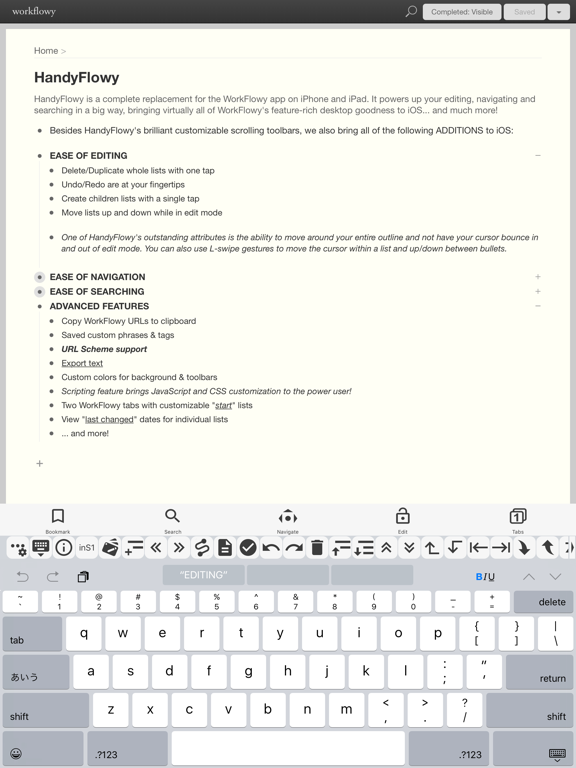
HandyFlowy is a complete replacement for the WorkFlowy app on iPhone and iPad. It powers up your editing, navigating and searching in a big way, bringing virtually all of WorkFlowy's feature-rich desktop goodness to iOS... and much more!
HandyFlowy features a quick-access, horizontal scrolling toolbar and all of the following ADDITIONS to iOS:
EASE OF EDITING
• Delete whole lists with one tap
• Duplicate lists [Pro]
• Undo is at your fingertips
• Redo [Pro]
• Create children lists with a single tap [Pro]
• Move lists up while in edit mode
• Move lists down [Pro]
• Customize Editing Toolbar [Pro]
One of HandyFlowy's outstanding attributes is the ability to move around your entire outline and not have your cursor bounce in and out of edit mode. You can also use L-swipe gestures to move the cursor within a list and and up/down between bullets.
EASE OF NAVIGATION
• The quick-access navigation panel brings:
• Navigate history Back/Forward
• Zoom out
• Jump to Previous/Next zoomed list
• Go to your custom "start" list
• Quick access to your favorites with the Bookmarks feature
• Expand/Collapse entire outlines fully or incrementally
• View Mode eliminates unwanted keyboard popups while scrolling
If you use View Mode, you will be free from a fear of an unexpected asynchronous of your already obtained outline.
EASE OF SEARCHING
• Quick-access buttons to use WorkFlowy's search operators:
• is:complete
• is:shared
• is:embedded
• Last-Changed:
• NOT (-) [Pro]
• OR [Pro]
• Completed: [Pro]
• Search History
• Saved Search list [Pro]
• Customize Search Toolbar [Pro]
ADVANCED FEATURES
• Copy WorkFlowy URLs to clipboard
• Saved custom phrases & tags [Pro]
• URL Scheme support [Pro]
• Export text
• Custom colors for background & toolbars
• Scripting feature brings JavaScript and CSS customization to the power user! [Pro]
• Two WorkFlowy tabs with customizable "start" lists
• View "last changed" and "completed" dates for individual lists [Pro]
• Sync User Settings to iCloud [Pro]
• ... and more!
[Pro] features require in-app purchase, which also removes ads.
Quoi de neuf dans la dernière version ?
Fixed bugs