iPhoneAddict Apps
  • Actualités
  • Accueil Apps
  • iPhone
  • iPad
  • Universelles
  • Mac
  • Apple TV
KG KultureGeek
App
iPhone / iPad Télécharger iAddict v5 Mac Télécharger iAddict Mac
  • Actualités
  • Accueil Apps
  • iPhone
  • iPad
  • Universelles
  • Mac
  • Apple TV
  • Archives keynotes
  • Firmwares & iTunes
  • Contactez-nous
  • Comparateur de prix
  • KultureGeek
Accueil » Liste des Apps » Apps iPhone » Productivité » Intervallical
1.01 iOS €Gratuit Janusz Polowczyk 0 0 Intervallical is a simple to use countdown timer with three distinct modes of operation: Simultaneous, Consecutive, and Intervallic. Simultaneous mode starts the two user-defined timers at the same moment, and then notifies the user when each of the...
Intervallical

Intervallical

iPhone / Productivité

Gratuit
Obtenir sur l'App Store
Facebook X E-mail

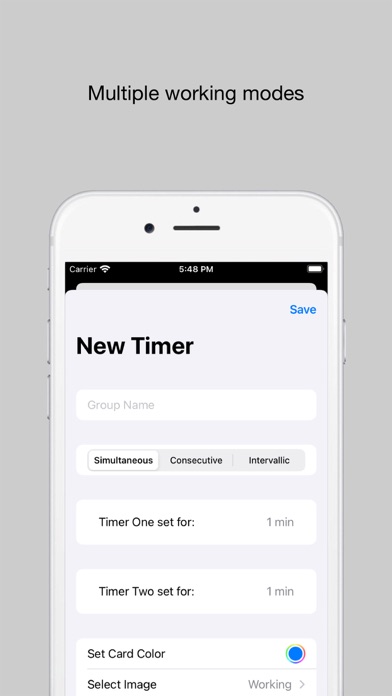
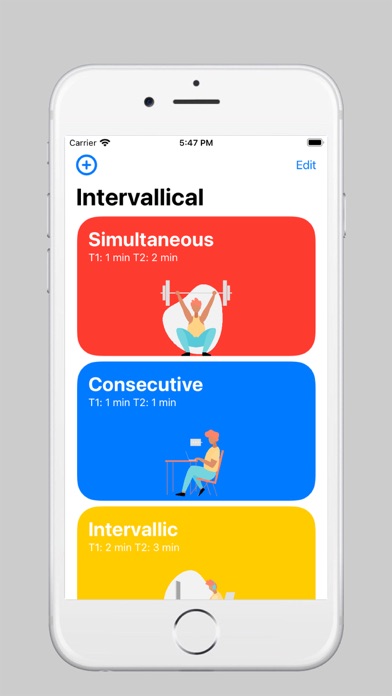
Intervallical is a simple to use countdown timer with three distinct modes of operation: Simultaneous, Consecutive, and Intervallic. Simultaneous mode starts the two user-defined timers at the same moment, and then notifies the user when each of the two reached zero. Consecutive mode works similarly to the Simultaneous mode, but the difference is that the second timer fires off after the first one hits zero. This is a take on the classic „Pomodoro” timer, in which a 25-minute study session is followed by a 15-minute break to „recharge the batteries” before another 25-minute session takes place. The third, and the last mode of operation, is the Intervallic mode, which may seem a little peculiar, but adds a different flavour into the mix. The way it works is that the user defines a specific time interval for the second timer to start. Say that the user set the first timer for 4 minutes and the second for 6 minutes, with the interval in-between being set for 1 minute. The second timer, which was initially set for 6 minutes, will fire only when the first timer will reach 3 minutes. That way the countdown for the second timer can be „delayed” by the user-specified interval.


The app was built so that it is easy to use, with controls (and UI) that are familiar to iOS users. Simply add a new card, which contains your predefined timers, and you are ready to go. Start the countdown by tapping the middle of the circle, tap once again to pause, and tap twice to reset the timers. That’s all there is to it.

En voir plus...

Quoi de neuf dans la dernière version ?

- Bug fixes
- New logo
  • Screenshot #1 pour Intervallical
  • Screenshot #2 pour Intervallical
  • Screenshot #3 pour Intervallical

Note

(0 note)

Détails sur l'application

Version
1.01
Taille
8.5 Mo
Version minimum d'iOS
14.0
Dernière mise à jour
23/06/2023
Publié par
Janusz Polowczyk

Newsletter App Store

Recevez chaque jour les meilleures promos

Actualité Apple

Image Apple limite les signalements de failles face au déluge de l’IA
Apple limite les signalements de failles face au déluge de l’IA
Image iPad Air 2027 : écran OLED, puce M5 et possible nouveau design
iPad Air 2027 : écran OLED, puce M5 et possible nouveau design
Image iPhone : Apple a capté 49 % des revenus de smartphones au 2e trimestre, un record
iPhone : Apple a capté 49 % des revenus de smartphones au 2e trimestre, un record
Image L’iPhone Air 2 aurait une Dynamic Island plus petite et d’autres nouveautés
L’iPhone Air 2 aurait une Dynamic Island plus petite et d’autres nouveautés
iPhoneAddict Apps

Le catalogue iPhoneAddict pour suivre les nouveautés, mises à jour et baisses de prix de l’App Store.

Apps

Toutes les apps iOS iPhone iPad Universelles Mac Apple TV

iPhoneAddict

Actualité Apple Archives keynotes Contact À propos KultureGeek

Suivez-nous

©2009-2026 i2CMedia. Tous droits réservés.