Jin Mobile
iPhone / Productivité
Talk, and Jin writes.
Jin turns your voice into clean text on your iPhone, in any of 100+ languages. A voice keyboard, a voice library, and now a live translator, all in one app.
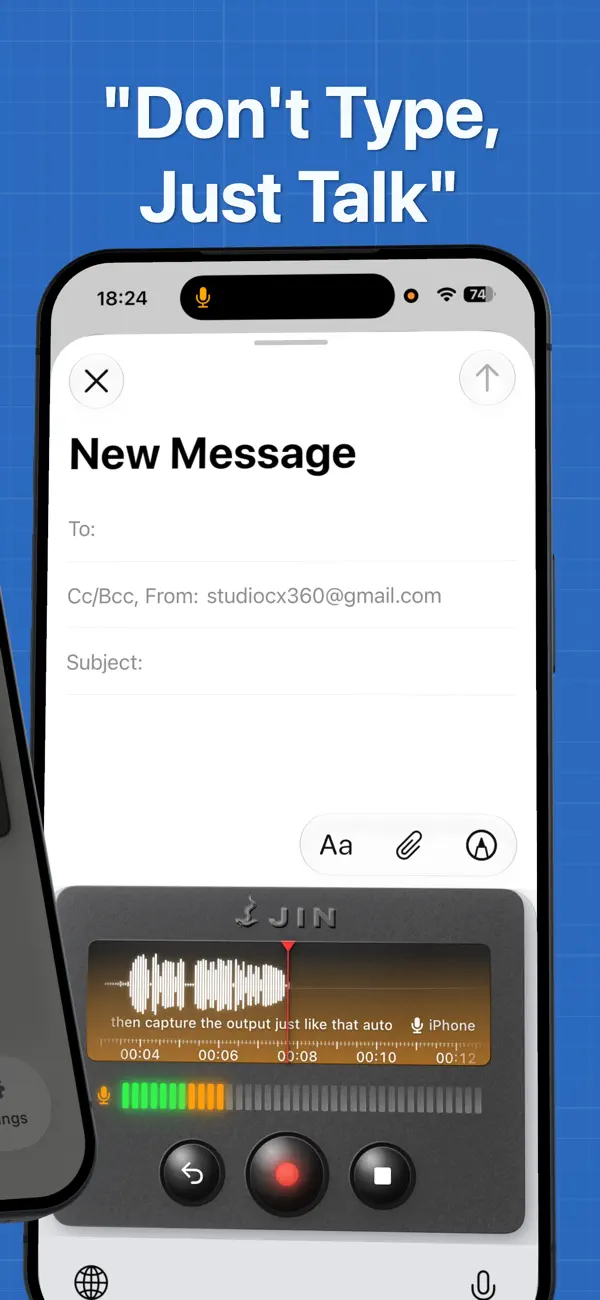
A voice KEYBOARD that types into any other app on your phone. Mail, Messages, Slack, Notes, Safari, anywhere with a text field.
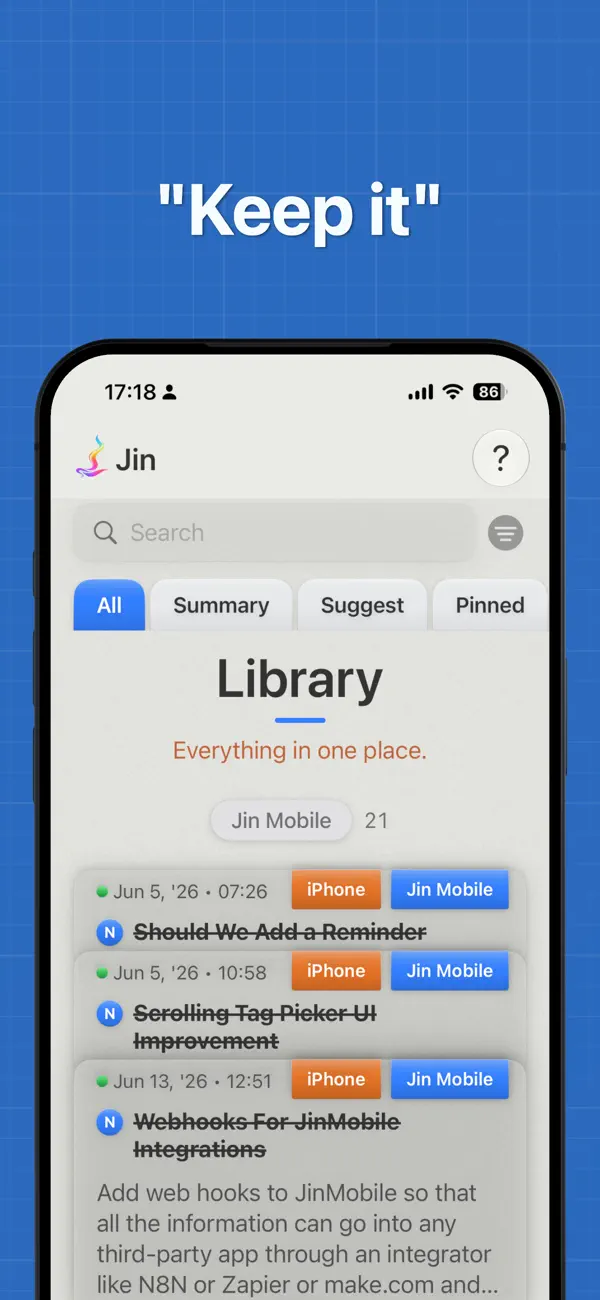
A voice LIBRARY that catches your thinking and keeps it safe with photos, places, due dates, and links to your other thoughts.
And TALK, your live translator. Two people, each speaking their own language, on one phone.
On iPhone, now on Apple Watch too, and on iPad with the iPhone app.
THE KEYBOARD
• Tap the rainbow mic and speak. Jin types your words into the app you're already in.
• 4x faster than typing.
• 100+ languages. Jin picks the best speech model for each one, all running on your iPhone.
• Magic Formatting writes times, dates, money, units, phone numbers, and math the right way.
• Pick a tone before you speak: Verbatim, Formal, Casual, Texting, or Excited. One tap to switch.
• Lasso any text in any app and translate it inline.
• Filler Words: Jin trims the ums and uhs for you. Add your own in any language.
• Vocabulary, Snippets, Replacements, and Dictation Shortcuts teach Jin your names, brands, and habits.
• Say "Hey Jin" to start recording when your hands are full.
• Hinglish, Tanglish, Banglish, and Singlish: speak the mixed way you talk, and Jin writes it in English letters, keeping words like lah and shiok.
THE LIBRARY
• Tap the big rainbow button on the Home tab and speak. Jin saves your thought and titles it for you.
• Capture from your wrist. Tap the Jin complication on your Apple Watch, speak, and it lands on your iPhone.
• Free Flow Mode for long-form thinking. Speak as long as you like, transcribed in the background, and Stop is instant.
• Smart Suggest files each thought into the folder it best fits. One tap to keep its pick, or change it.
• Karaoke playback. Every word lights up as you hear it.
• Attach photos and files to any thought. Or share a web page from Safari, Mail, or Messages straight in.
• Scan a document into a thought. Highlight, redact, or clean it up right in the app.
• Pin a place to a thought. Jin pings you when you arrive or leave.
• Set the Urgency on a thought and tag the People it is about, then filter your Library by either.
• Share a thought as a link or a file, with its audio and attachments included.
• Folders, sub-folders, tags, and pins keep your library tidy.
• Summarize a batch of thoughts by folder, tag, or date.
• Non-English thoughts get an English translation, automatic.
TALK
• Two people, two languages, one phone. Each person taps their side and speaks.
• Jin shows the translation and reads it aloud, so the conversation keeps moving.
• Apple's on-device translation handles English language pairs. Add a Google Gemini key for many more.
• Save your language pairs as presets, ready the moment you open Talk.
INTEGRATIONS
• Notion. One tap to connect, no secret tokens to paste. Your titles, transcripts, photos, files, due dates, and tags all flow to a Notion page.
• Apple Calendar. Set a due date on a thought, and Jin adds it to your calendar.
• Apple Reminders. Set a reminder on a thought, and it rings on every Apple device you own.
• Hundreds more apps through Webhooks: Make, Zapier, n8n, then Google Sheets, ClickUp, Asana, Obsidian, and the rest.
EVERYTHING ELSE
• Everything runs on your iPhone by default. Your voice stays with you.
• Optional cloud features, like advanced translation and natural voices, use your own key and only when you turn them on.
• App Lock keeps your library behind Face ID.
• Audio Retention: choose how long Jin keeps each recording, from a day to a year, or forever. The transcript always stays.
• Your library is backed up to iCloud, automatically.
• Built for iOS 27 and Apple Intelligence on a supported iPhone.
• One-time purchase. No subscription.
• No account needed.
• Works offline.
Open Jin and start talking.
Quoi de neuf dans la dernière version ?
A big update:
• Smart Suggest. Jin reads each new thought in your Inbox and files it into the folder and sub-folder it best fits. Keep its pick with a tap, or change it.
• Apple Watch. Capture a thought from your wrist, and it syncs to your iPhone.
• Free Flow Mode for long-form thinking. Speak as long as you like, transcribed in the background. Stop is instant.
• Share a thought as a link or a file. Whoever opens it gets the full thought, audio and attachments included.
• Set a reminder on any thought. It rings across every Apple device you own.
• Scan a document straight into a thought. Highlight, redact, or clean it up in the app.
• Urgency and People. Set the urgency on a thought and tag the people it is about, then filter your Library by either.
• Webhooks. Send any thought to Make, Zapier, or n8n, and on to Google Sheets, ClickUp, Asana, Obsidian, and hundreds more.
• Sub-folders inside any folder, synced to Notion. The Library groups your thoughts into tidy stacks.
• Lasso any text in any app and translate it inline.
• Summarize a batch of thoughts by folder, tag, or date.
• Audio Retention. Choose how long Jin keeps each recording, from a day to a year, or Never. The transcript always stays.
• Filler Words. Jin trims the ums and uhs. Add your own in any language.
• Live usage stats: words per minute, your average thought length, and a monthly view.
• History for Dictation, Talk, and Deleted Thoughts.
• Purge a batch of thoughts at once: pick a filter, preview, and clear them in one tap.
• A Home Screen widget that opens Jin to Thoughts, Library, Talk, or Stats.
• Built for iOS 27 and Apple Intelligence on a supported iPhone.
• UI polish and bug fixes throughout.