Mayday: The Calendar Assistant
iOS Universel / Productivité
Mayday is the next generation of scheduling software, that uses AI to personalize productivity. Combining an AI Assistant with a calendar and task manager, Mayday learns what’s important and ensures everyone spends time on what matters most.
This release currently supports Google Calendar, Google Meets, Microsoft Outlook, Microsoft Teams, and Zoom accounts. Additional integrations are coming soon.
— AI-based Scheduling —
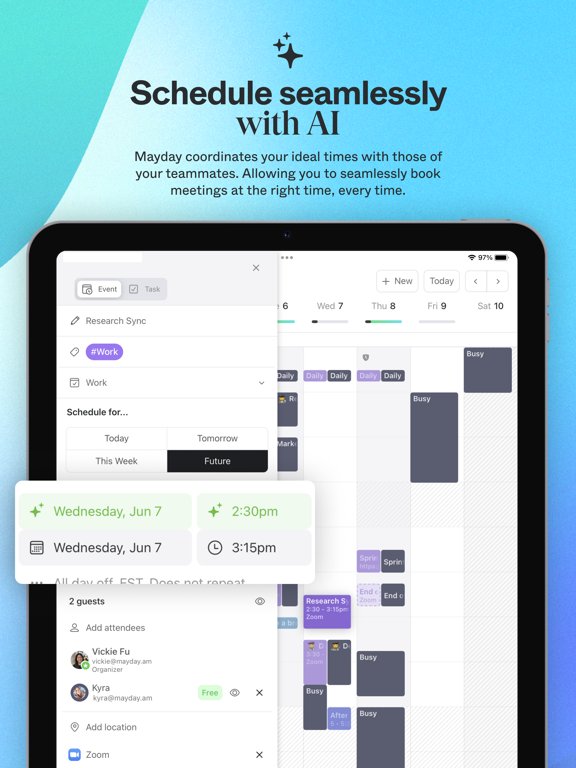
Mayday analyzes your calendar and scheduling patterns in order to determine when the ideal time for different types of events and tasks will be. Automatically find an ideal time for anything you need to schedule or re-schedule.
- AI that applies different scheduling hours for different types of events and tasks
- One-click reschedule to a new ideal time as priorities shift
- Assessment of your and your guests’ true availability based on multiple shared calendars and timezone constraints
— AI-scheduled Tasks —
Block out time for the things that you need to do with Tasks for Mayday. With flexible tasks created in Mayday, your AI assistant can reschedule your tasks as priorities evolve:
- Create tasks with unique attributes across multiple different calendars
- Auto-rescheduled tasks find new ideal times automatically as soon as conflicts with other events or tasks arise
- Incomplete tasks from the previous day will automatically reschedule to a new time if left unfinished
— One Timeline —
Mayday brings all of your calendars - work, personal, shared - into one place to create a unified timeline for you. You get a complete picture of the demands on your time and help those you work with to understand when you're available.
- Privacy-first event duplication across calendars
- Unify duplicate events in your timeline
- Mark non-critical events as "FYI" to minimize their impact on your timeline
— Scheduling Links —
With Mayday Scheduling Links, invite others to meetings based on flexible parameters that align with your priorities and let Mayday do the heavy lifting to find the best time to meet for everyone.
- Easily create custom single-use or reusable scheduling links that reflect your true availability
- Book meetings that match the structure of your ideal week, not whenever your calendar is empty
- Create event limits to ensure the same link isn’t used too often
— Smart Tag Automations —
Create automations for different types of events and tasks with Smart Tags and give your calendar more context. Use Smart Tags when creating events in order to quickly set defaults and organize common types of events.
- Create new events and tasks faster with Smart Tag based defaults that fill in your ideal parameters
- View the makeup of your week at a glance with Smart Tag colours
- Automatic event syncing rules so certain tagged events can be reflected in multiple calendars
— Protect time with Calendar Shield —
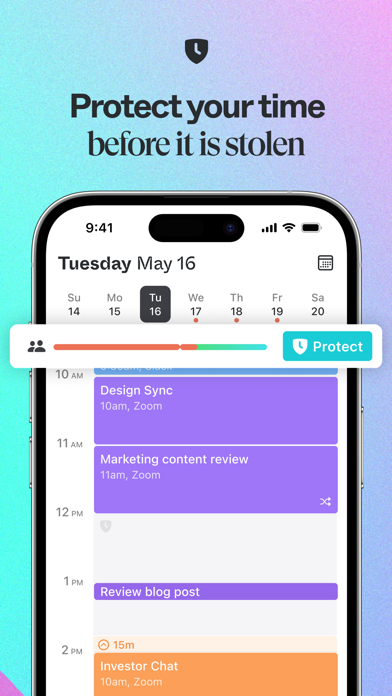
Calendar Shield ensures that you have plenty of time to do your work, during work. If a particular day starts to fill with too many meetings, Mayday automatically blocks the remaining time before you can get overloaded.
- Protect time across multiple calendars so your availability is always made clear to others
- Settings to adjust for more or less meetings depending on your role
- Customizable event descriptions
— Your Data, Your Privacy —
We’re taking privacy very seriously, and we only collect the absolute minimum data needed to provide our services to you. We firmly believe this data belongs to you, not to us. We have no intention to resell your data in any way, now or in the future. For more details, check out our Privacy Policy (https://mayday.am/privacy)
Quoi de neuf dans la dernière version ?
New features:
* Auto-scheduling toggle. Use the new auto-schedule toggle when creating an event or task to switch between AI scheduling and manual scheduling when creating new events and tasks.
General improvements:
* Restructure to event and task creation side panel. Several structural changes were made to optimize the new event and new task creation flow in the side panel. Additional changes were also made to highlighted nested settings when multiple Mayday-specific properties are applied.
* Event creation at ideal times from Month View. Updated the logic so that new events created via the Month view create at ideal times instead of as all day events.
Bug fixes:
* Deleting instances of recurring Outlook events. Fixed an issue that was preventing the ability to delete instances of recurring Outlook events.
* Auto-rescheduling flexible tasks conflicting with recurring events. Fixed an issue where flexible tasks that conflicted with recurring events were not auto-rescheduling.
* Conference links opening Apple Maps. Fixed an issue where certain custom conferencing links would open Apple Maps.
* Outlook events with URL locations. Fixed an issue where Outlook events with URLs as locations weren’t properly displaying in Mayday.
* Phone numbers as locations. Fixed an issue where phone numbers added to the location field displayed in duplicate.
* Unified events. Fixed an issue when unifying events on the timeline to ensure the editable version is always prioritized.
* Ideal time UX. Fixed an issue where ideal times weren’t highlighting in green from the time picker during event creation.
* Rescheduled event VQA. Fixed an issue where on rescheduling an event tile in the timeline it would temporarily dim.
* Integrations VQA. Fixes to ensure text copy properly truncates when viewing the add integrations page on iOS.
* Duplicate all day events. Fixed an issue where on editing an all-day event, the tile would temporarily duplicate visually.
* Saving changes to event descriptions. Fixed an issue where on editing an event for only the description, the save button wasn’t active.
* Auto-rescheduling from event details. Fixed an issue where the event details wouldn’t automatically dismiss after auto-rescheduling.