

Pocket PDF Document Scanner
iOS Universel / Productivité
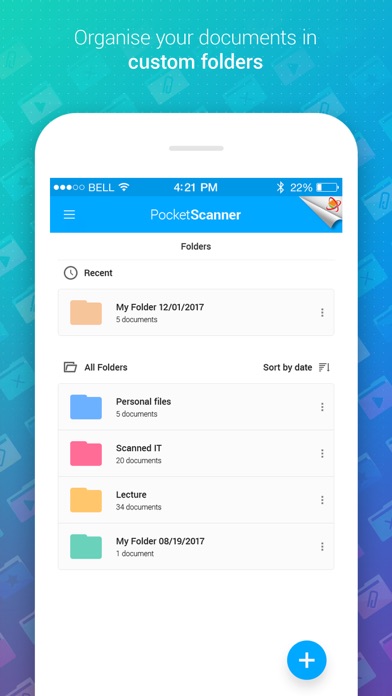
Pocket Scanner is a powerful but simple mobile phone portable document scanner app that helps you convert paper documents and files to digital format scans. This PDF Scanner app can Scan notes, documents, receipts, images and all sorts of files to digital format (PDF or JPG).
The document scanner app also has built-in OCR (Text Recognition) engine that scans and extracts text from digital documents and images. Pocket Scanner app is simple and straightforward to use. Simply point the cam scan at the file you wish to convert to JPG or PDF, and start scanning documents. The document will be scanned and saved in the format of your choice instantly. It's like having a scan bot in your pocket and the only document scanner you will ever need.
Features:
* Auto Capture - The scanner app automatically detects documents or file borders and helps you precise extract scanned documents. Use your phone camera to scan pdf docs, create pdf scans of files, receipts, notes etc.
* Editor - Once a document is scanned you can then crop it or edit it to just extract the area you desire.
* Enhance - Pocket Scanner also had advanced enhancement features that lets you enhance the captured scanned document and apply several scan filters to make it crisp and clear. Choose from one of the pre-programmed document scanning filters or use our enhancement editing tools and do it yourself.
* OCR & Text Recognition - The tiny scanners built-in OCR engine scans the document and extracts texts from images and PDF documents. Using this, you can convert images or PDF Documents from your scan into editable text.
* Scan & Share PDF Files - Pocket Scanner PDF Document Scanner app comes built with advanced capabilities that converts your scanned documents into a PDF file or PDF documents. It's a PDF Creator & a scaner in your phone.
* Backup & Store on Cloud - Pocket Scanner PDF Document Scanner app now supports Cloud Storage and Backup in Google Drive & DropBox. The document scanner app can now be used to scan and store files securely in the cloud. You can choose between DropBox or Google Drive to store your scan documents to the cloud.
Download Pocket Scanner PDF Document Scanner today, start scanning, and join hands in Saving Trees & Creating a Greener Planet.
Please take sharp images with good lightning for best results.
Subscription
- A subscription gives access to all content available in Pocket Scanner and Cloud OCR as long as it is active.
- Payment will be charged to iTunes Account at confirmation of purchase
- You can cancel online anytime – there is no cancellation fee
- You can use the subscription on any device registered with your Apple account
- Subscription automatically renews unless auto-renew is turned off at least 24-hours before the end of the current period
- Account will be charged for renewal within 24-hours prior to the end of the current period, and identify the cost of the renewal
- Subscriptions may be managed by the user and auto-renewal may be turned off by going to the user's Account Settings after purchase
- Cancellation will not go into effect until the end of the monthly billing cycle
- Payment management is done by Apple system. More information can be found here: https://support.apple.com/en-us/HT202039
Terms of Use: http://www.xlabz.com/privacy/PocketScanner-TOS.html
Terms of Use: http://www.xlabz.com/privacy/Brandee-TOS.html
Quoi de neuf dans la dernière version ?
This app has been updated by Apple to display the Apple Watch app icon.
New in v2.0
- Cloud Storage (Google Drive & Dropbox)
- Multipage Support
- Cloud OCR
- Other Enhancements & Bug Fixes




D'autres applications du développeur
 Find Near Me - Nearby & Around
 Find Near Me : Nearby & Around
 Pregnancy Tips for iPhone
 Sketch W Friends ~ Free Multiplayer Online Draw and Guess Friends & Family Word Game for iPad
 Sketch W Friends ~ Free Multiplayer Online Draw and Guess Friends & Family Word Game for iPhone
 Logo Quiz Game - Devinez LogoVoir toutes les apps