iPhoneAddict Apps
  • Actualités
  • Accueil Apps
  • iPhone
  • iPad
  • Universelles
  • Mac
  • Apple TV
KG KultureGeek
App
iPhone / iPad Télécharger iAddict v5 Mac Télécharger iAddict Mac
  • Actualités
  • Accueil Apps
  • iPhone
  • iPad
  • Universelles
  • Mac
  • Apple TV
  • Archives keynotes
  • Firmwares & iTunes
  • Contactez-nous
  • Comparateur de prix
  • KultureGeek
Accueil » Liste des Apps » Apps Universelles » Productivité » PromptBook
4.0.0 iOS €Gratuit James Appleby 0 0 PromptBook is the professional cue-marking tool built for stage managers and theatre technicians. Import your script, mark your cues, annotate with Apple Pencil, and produce a complete prompt book. MARK CUES WITH PRECISION • Drag to select text...
PromptBook

PromptBook

iOS Universel / Productivité

Gratuit au lieu de 9,99€
Obtenir sur l'App Store
Facebook X E-mail

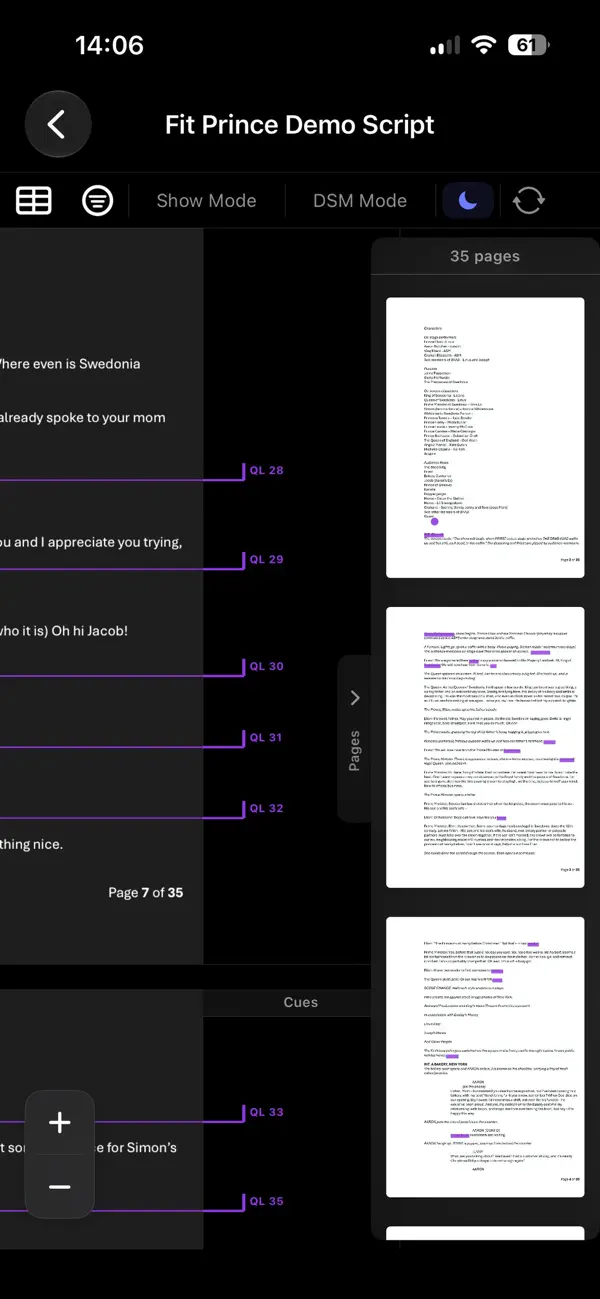
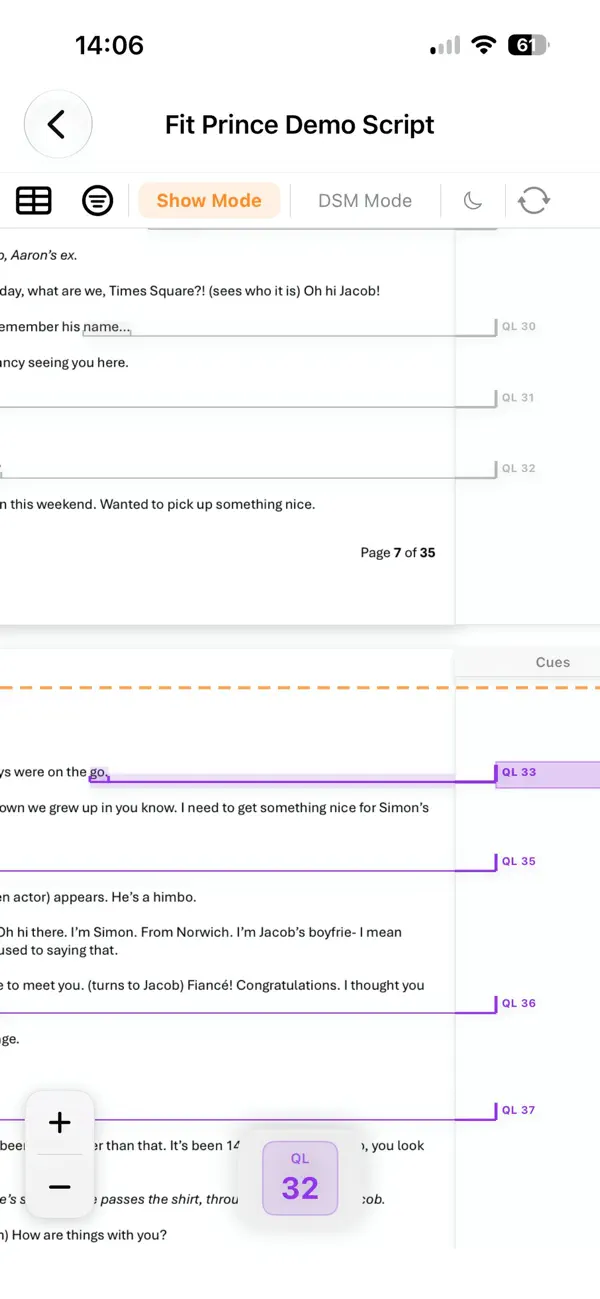
PromptBook is the professional cue-marking tool built for stage managers and theatre technicians. Import your script, mark your cues, annotate with Apple Pencil, and produce a complete prompt book.

MARK CUES WITH PRECISION
• Drag to select text and place cue marks that snap to the script baseline
• Double-tap to place point cues at exact positions
• Place multiple cues from different lists at the same moment with multi-cue mode
• Auto-generate standby cues that reference upcoming sequences (e.g. "Standby LX5-8, SFX4-9")
• Support for Scores and mixed scripts

ORGANISE YOUR SCRIPT
• Create unlimited colour-coded cue lists — LX, SFX, VFX, Fly, or any custom department
• Auto-renumber cues with configurable intervals and start points
• Click-to-renumber for precise manual sequencing
• Toggle list visibility without losing data

Collaborative editing:
* Share your script with the whole team
* Script owner can make the script read only
* Assign editors for each cue list or notes layer people can only edit what they are supposed to
* Changes sync to all participant devices in real time
* Make private notes layers
* Works offline and resyncs on connection
* When the share is stopped choose to keep a local editable copy

MAKE NOTES
• See handwritten notes made on iPad
• Create named annotation layers — Director Notes, Sound Notes, Blocking, and more
• Place floating text notes anywhere on the page

FLEXIBLE LAYOUTS
• 10 configurable page layouts: cross-page with annotation panels, on-page inline, or full-width
• Show Mode with a configurable reader line — cues above fade, upcoming cues highlight
• Light and Dark Modes

IMPORT UPDATED SCRIPTS
• Import new versions of scripts with version history and automatic cue transfer.

AUTOMATIC CUE LISTS
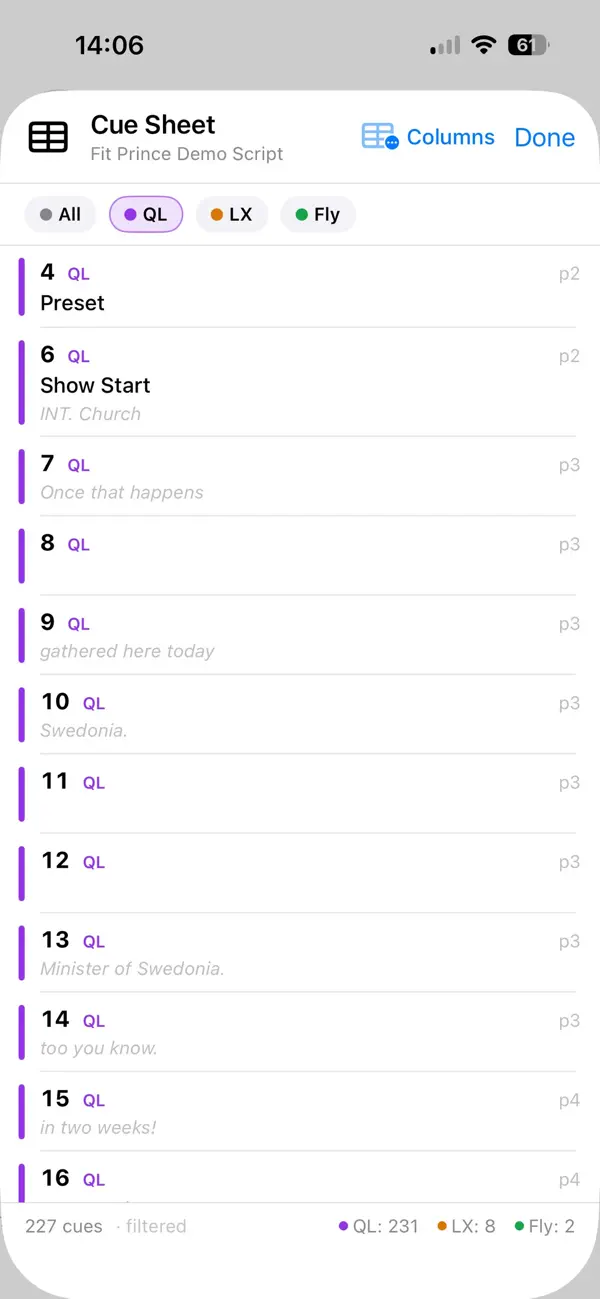
• Available in app or in various export formats based on the selected cue text.

EXPORT & SHARE
• Export your complete prompt book as PDF — binder layout or single-page inline
• Export cue sheets as PDF or ETC EOS-compatible CSV
• Choose which departments and annotation layers to include
• Import PDF or Word document scripts with automatic OCR for scanned pages

SYNC ACROSS DEVICES
• iCloud sync keeps your scripts, cues, and annotations up to date
• Annotation previews appear on Mac even without Apple Pencil
• Viewer app on iPhone

En voir plus...

Quoi de neuf dans la dernière version ?

Collaborative editing:
* Share your script with the whole team.
* Script owner can make the script read only.
* Assign editors for each cue list or notes layer people can only edit what they are supposed to.
* Changes sync to all participant devices in real time.
* Make private notes layers.
* Works offline and resyncs on connection.
* When the share is stopped choose to keep a local editable copy.


And Much Much More:
* Choose which field opens for editing on cue creation (or create without dialogue).
* Preview of cue styles.
* New cue styles.
* Added promo code input on iPad.
* Auto Discovery on all devices.
* Improved sync time between personal devices.
* Reference images for cues (including export).
* Page deletion.
* New Sharing Tab.
* Larger cue list view in app.
* New cue label style options.
* Contrast mode with visual indicators for each cue list and an alternative palette.
* Stylised file logo.
* Variable cue highlight tint.
* Page insertion/replacement.
* New help menu.
* More robust deletion mechanisms.
* Better editing within cue list.
* Multi line notes in cue list.
* Finer Zoom Increments.
* Fixed issue selecting score cues with Apple Pencil.
* Prompt to enable Apple Pencil mode for Apple Pencil users.
* Fixed issue with ff in scripts being parsed as L.
* A few pretty animations on icons.
* Re-re-repaired point cues on iPad with Apple Pencil.
* Standby cues can now be selected using Apple Pencil.
* Improved responsiveness scrolling in DSM mode.
* Smoother scrolling overall.
* Fixed scene markers clipping at the edge of the screen.

Note

(0 note)

Détails sur l'application

Version
4.0.0
Taille
12.2 Mo
Version minimum d'iOS
26.0
Dernière mise à jour
30/07/2026
Publié par
James Appleby

Newsletter App Store

Recevez chaque jour les meilleures promos

Actualité Apple

Image AAPL : l’action d’Apple chute de 10 % après les résultats financiers
AAPL : l’action d’Apple chute de 10 % après les résultats financiers
Image Apple bat un record de dépenses en R&D avec 10,2 milliards d’euros dépensés au T3 2026
Apple bat un record de dépenses en R&D avec 10,2 milliards d’euros dépensés au T3 2026
Image iPhone 18 Pro : une hausse de prix de 300 $ est évoquée
iPhone 18 Pro : une hausse de prix de 300 $ est évoquée
Image Apple Car Key bientôt compatible avec les VE Haval du constructeur chinois GWM
Apple Car Key bientôt compatible avec les VE Haval du constructeur chinois GWM
iPhoneAddict Apps

Le catalogue iPhoneAddict pour suivre les nouveautés, mises à jour et baisses de prix de l’App Store.

Apps

Toutes les apps iOS iPhone iPad Universelles Mac Apple TV

iPhoneAddict

Actualité Apple Archives keynotes Contact À propos KultureGeek

Suivez-nous

©2009-2026 i2CMedia. Tous droits réservés.