PureDocu
iOS Universel / Productivité
PureDocu — Convert. Sign. Read. Privately
Transform how you work with documents. PureDocu converts PDFs, Word files, EPUBs, and web pages into the perfect reading format — and gives you a complete PDF toolkit, entirely on your device.
Convert PDFs to EPUB for your e-reader. Turn web articles into clean Markdown. Save research papers as searchable text. Then read them right inside the app with a beautiful dark-mode reader.
What makes PureDocu different?
Every conversion happens entirely on your device. No uploads. No cloud processing. No third-party servers ever see your files. Your documents stay yours — always.
Supported formats
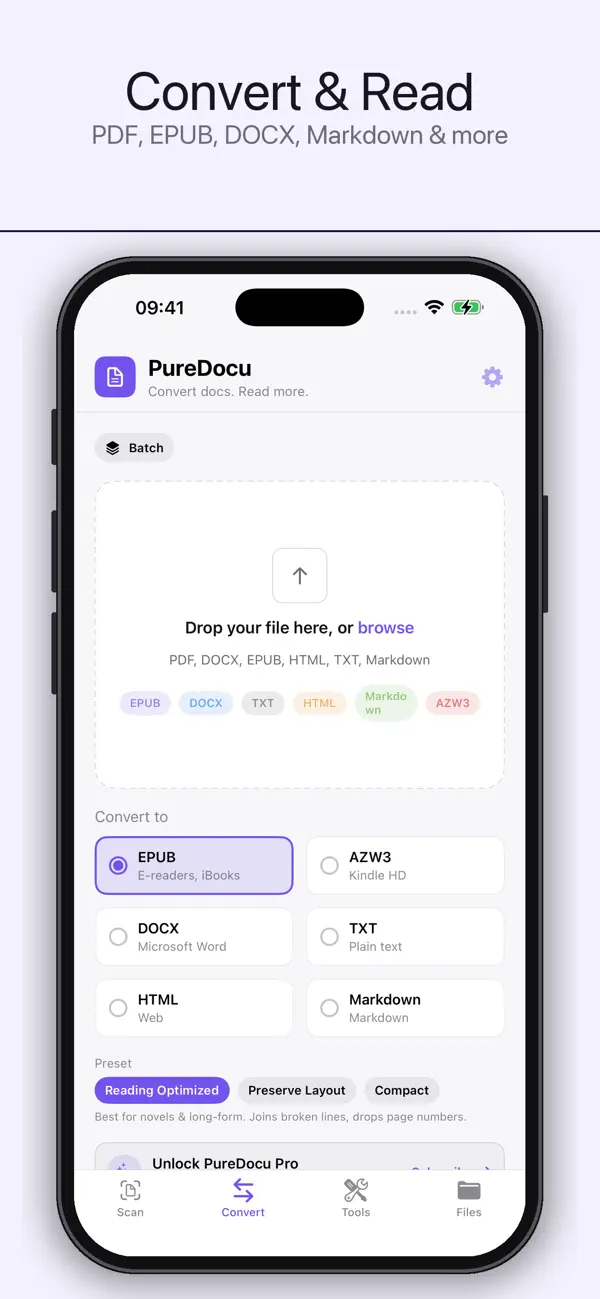
Convert between PDF, EPUB, DOCX, HTML, TXT, Markdown, and AZW3 — every format readers and writers use every day.
Smart conversions
• Automatic chapter detection from PDF outlines
• Intelligent paragraph joining (no more broken sentences)
• Repeating headers and footers stripped automatically
• Built-in OCR for scanned PDFs — no internet needed
• Bold, italic, lists, and tables preserved
• Three presets: Reading Optimized, Preserve Layout, Compact
• Password-protected PDFs supported
Complete PDF toolkit (Pro)
PureDocu is also a full PDF editor:
• Sign with your finger or Apple Pencil — place anywhere on the page
• Fill out PDF forms directly on the document
• Merge multiple PDFs into one
• Split a PDF into smaller files
• Compress to email-friendly sizes
• Lock with a password
• Add custom watermarks
• Redact sensitive information permanently
• Highlight, underline, draw, and annotate
• Make scanned PDFs searchable with on-device OCR
• Reorder, rotate, or delete pages
• Extract pages as PNG or JPG
• Scan paper documents to PDF with the camera
• Convert photos to a single PDF
Designed for iPhone and iPad
Native iPad layout with sidebar navigation, side-by-side workflows, drag-and-drop import from Files, and Apple Pencil precision for signing and annotation.
Private by design
In a world where every app wants access to your files, PureDocu takes the opposite approach. 100% on-device processing means complete privacy, no account required, and no internet connection needed.
PureDocu is available as a quarterly auto-renewable subscription for $2.99, with 2 free conversions to try first. Payment will be charged to your Apple ID at confirmation of purchase. The subscription automatically renews unless cancelled at least 24 hours before the end of the current period. You can manage or cancel your subscription in your Apple ID Account Settings at any time.
Privacy Policy: https://sites.google.com/view/puredocu
Terms of Use: https://www.apple.com/legal/internet-services/itunes/dev/stdeula/
Quoi de neuf dans la dernière version ?
PureDocu is now a complete document toolkit — convert, edit, sign, and read, all on your device.
NEW
• Full PDF toolkit — sign, fill forms, merge, split, compress, watermark, redact, and annotate
• Scan paper to PDF with your camera, or turn photos into a PDF
• Organize pages — reorder, rotate, delete, or extract as images
• Lock PDFs with a password, and make scanned PDFs searchable with OCR
• Built-in reader with dark mode and adjustable text
• Files tab to browse, rename, share, and re-open everything you've made
• Batch convert multiple files at once
• Designed for iPad — sidebar layout, drag & drop, Apple Pencil
• Light, Dark, or System appearance in Settings
• Optional iCloud sync to keep files across your devices
IMPROVED
• Smarter PDF conversion — chapter detection, two-column handling, cleaner paragraphs, and preserved formatting
• Three conversion presets: Reading Optimized, Preserve Layout, Compact
• Faster, more reliable conversions with the ability to cancel
Everything still happens 100% on your device. Your files never leave your phone.