• KultureGeek
  • Comparateur de prix
       
iPhoneAddict
 iAddictv5Notre Application iPhone/iPad
  • Accueil Apps
  • Actualité Apple
  • Keynote Apple
  • Firmwares & iTunes
  • Contactez-nous
Accueil » Liste des Apps » Apps Universelles » Productivité » RiskWatch Mobile
L'application n'est plus disponible sur l'App Store français
1.2.1 iOS €Gratuit Riskwatch International 0 0 Perform Assessments on the go with the Riskwatch App. Note: Assessments are only accessible by current RiskWatch users. (Figure 1) The ‘Login Page’ is where the user will input their username, password and domain name. The domain name is...
RiskWatch Mobile

RiskWatch Mobile

iOS Universel / Productivité

Gratuit
Obtenir sur l'App Store

Perform Assessments on the go with the Riskwatch App.

Note: Assessments are only accessible by current RiskWatch users.

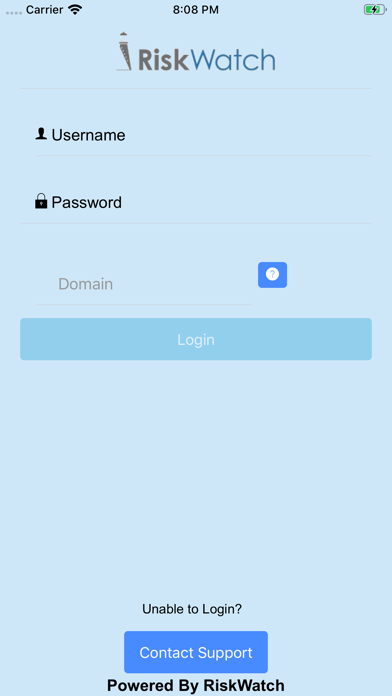
(Figure 1) The ‘Login Page’ is where the user will input their username, password and domain name. The domain name is specific to each customer. The domain name can be found by looking at the URL of your web access to our platform.

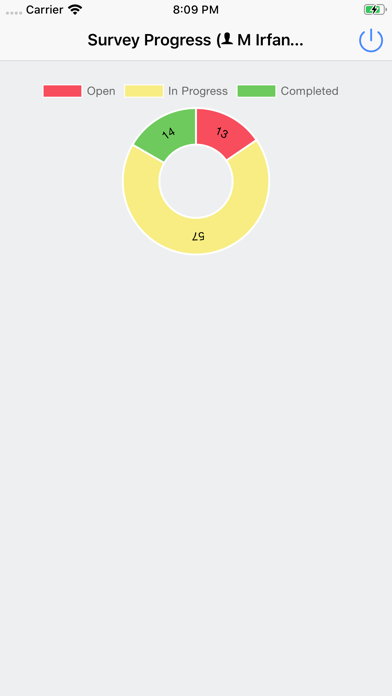
(Figure 2) The ‘Survey Progress’ page shows a pie chart with the number of assigned surveys and the progress for each (Complete, Not Complete, In Progress). The most recent survey being performed is below the chart for the user to access quickly.

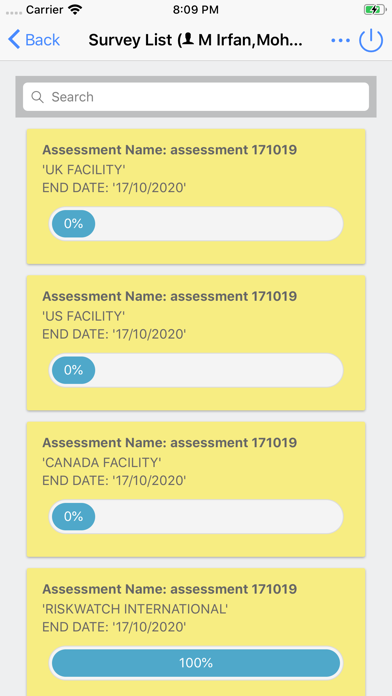
(Figure 3) After touching the pie chart, the ‘Survey List’ page appears. Each of the assigned assessments are listed. The boxes show the facility name, end date and progress for each assessment. Each can be touched to perform that survey/assessment.

(Figure 4) The ‘Take Survey’ page has a list of assigned questions that can be answered by text input, multiple choice, scales and a radio button to mark each question for review. The user can also search for questions in the search bar located at the top of the survey questions.

(Figure 5) On the ‘Take Survey’ page, when touching the upload button, a photo can be uploaded from the photo library or the device camera.

(Figure 6) On the ‘Take Survey’ page, the hamburger at the top right gives the option to choose the set of questions the user wants to answer. These are color coded, showing green for completed, yellow for in-progress and red for not started.

En voir plus...

Quoi de neuf dans la dernière version ?

Bug fix regarding domain name.
  • Screenshot #1 pour RiskWatch Mobile
  • Screenshot #2 pour RiskWatch Mobile
  • Screenshot #3 pour RiskWatch Mobile
  • Screenshot #4 pour RiskWatch Mobile
  • Screenshot #5 pour RiskWatch Mobile
  • Screenshot #6 pour RiskWatch Mobile

Note

(0 note)

Détails sur l'application

Version
1.2.1
Taille
28.4 Mo
Version minimum d'iOS
9.0
Dernière mise à jour
11/06/2020
Publié par
Riskwatch International

Newsletter App Store

Recevez chaque jour les meilleures promos

Actualité Apple

Image iOS 26.6 et macOS 26.6 : la 4e bêta publique est disponible
iOS 26.6 et macOS 26.6 : la 4e bêta publique est disponible
Image iOS 27 : Apple propose un nouveau firmware bêta pour les AirPods
iOS 27 : Apple propose un nouveau firmware bêta pour les AirPods
Image Xbox : Microsoft renforce le contrôle parental des jeux et applications sur iPhone et iPad
Xbox : Microsoft renforce le contrôle parental des jeux et applications sur iPhone et iPad
Image Apple vs Epic Games : Apple demande à la juge de faire une pause
Apple vs Epic Games : Apple demande à la juge de faire une pause
Partenaires : Actualité iPhone - Culture Geek
©2009-2026 i2CMedia | A propos |