iPhoneAddict Apps
  • Actualités
  • Accueil Apps
  • iPhone
  • iPad
  • Universelles
  • Mac
  • Apple TV
KG KultureGeek
App
iPhone / iPad Télécharger iAddict v5 Mac Télécharger iAddict Mac
  • Actualités
  • Accueil Apps
  • iPhone
  • iPad
  • Universelles
  • Mac
  • Apple TV
  • Archives keynotes
  • Firmwares & iTunes
  • Contactez-nous
  • Comparateur de prix
  • KultureGeek
Accueil » Liste des Apps » Apps iPhone » Productivité » Listino 2
L'application n'est plus disponible sur l'App Store français
1.5 iOS €Gratuit Kazumasa Kojima 0 0 Listino 2 is a simple ToDo management app. Use this app to manage your ToDos such as things to do, things to buy, things to search, and so on. Features: - Lists and Items You can add lists and items. You can check the number of items in each list...
Listino 2

Listino 2

iPhone / Productivité

Gratuit
Obtenir sur l'App Store
Facebook X E-mail

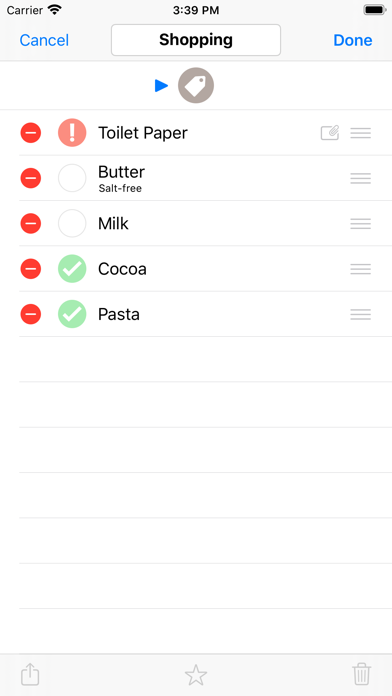
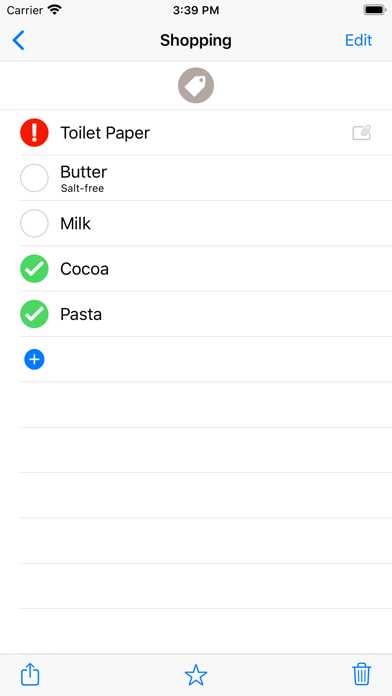
Listino 2 is a simple ToDo management app. Use this app to manage your ToDos such as things to do, things to buy, things to search, and so on.

Features:

- Lists and Items
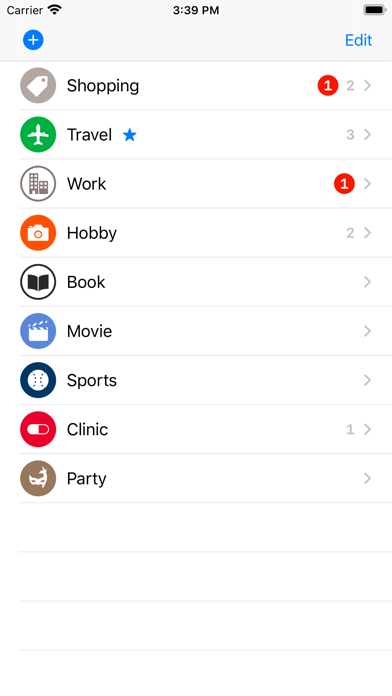
You can add lists and items. You can check the number of items in each list on the top screen (*The first screen shot is an example of the top screen).

- Check Mark
By adding check marks to items that you have finished, you can easily distinguish them from items that you have not finished yet. The number of items with a check mark in each list is excluded from the number displayed on the top screen. (You can add a check mark by touching the circle on the left side of the item.)

- Exclamation Mark
It is useful to add exclamation marks to important items. The number of items with an exclamation mark in each list is displayed in a red circle on the top screen. Moreover, they are displayed on the app icon. So, you can easily notice them. (You can add an exclamation mark by long tapping the circle on the left side of the item.)

- Sharing and Backup
You can share data for lists and items by email and AirDrop. By sending data to yourself by email or saving data to files, you can use them as backup.

- Copy / Cut / Paste
You can copy, cut, and paste a list and item. By using this functionality, you can easily duplicate a list and item, move an item from a list to another one, and so on. You can also merge two lists by cutting a list and paste it in another list.


--------------------
- Information
If you need support , please visit the support site of this app.

En voir plus...

Quoi de neuf dans la dernière version ?

This version has the following changes:
- Added compatibility with iOS 13
- Added support for dark mode
- Added new list icons
  • Screenshot #1 pour Listino 2
  • Screenshot #2 pour Listino 2
  • Screenshot #3 pour Listino 2

Note

(0 note)

Détails sur l'application

Version
1.5
Taille
3.5 Mo
Version minimum d'iOS
13.0
Dernière mise à jour
15/01/2020
Publié par
Kazumasa Kojima

Newsletter App Store

Recevez chaque jour les meilleures promos

Actualité Apple

Image iPhone 18 Pro/Ultra : les performances de la puce A20 Pro se dévoilent
iPhone 18 Pro/Ultra : les performances de la puce A20 Pro se dévoilent
Image iOS 26.6.1 bouche 29 failles de sécurité, contre 122 pour iOS 18.7.10 et 28 pour macOS 26.6.2
iOS 26.6.1 bouche 29 failles de sécurité, contre 122 pour iOS 18.7.10 et 28 pour macOS 26.6.2
Image iOS 26.6.1 est disponible, avec iOS 18.7.10, macOS 26.6.2 et visionOS 26.6.1
iOS 26.6.1 est disponible, avec iOS 18.7.10, macOS 26.6.2 et visionOS 26.6.1
Image Bêta 6 pour iOS 27, macOS 27 Golden State, watchOS 27, tvOS 27 et visionOS 27
Bêta 6 pour iOS 27, macOS 27 Golden State, watchOS 27, tvOS 27 et visionOS 27
iPhoneAddict Apps

Le catalogue iPhoneAddict pour suivre les nouveautés, mises à jour et baisses de prix de l’App Store.

Apps

Toutes les apps iOS iPhone iPad Universelles Mac Apple TV

iPhoneAddict

Actualité Apple Archives keynotes Contact À propos KultureGeek

Suivez-nous

©2009-2026 i2CMedia. Tous droits réservés.