• KultureGeek
  • Comparateur de prix
       
iPhoneAddict
 iAddictv5Notre Application iPhone/iPad
  • Accueil Apps
  • Actualité Apple
  • Keynote Apple
  • Firmwares & iTunes
  • Contactez-nous
Accueil » Liste des Apps » Apps Universelles » Productivité » SnapCalendar- with your photos
2.7 iOS €Gratuit Yuka Okada 3 1 SnapCalendar is an App that can create your original calendar photo. Set background picture and mark date, and then you can save your own pic with the calendar! [How to Make Original Calendar] Select the calendar size - Top left calendar button...
SnapCalendar- with your photos

SnapCalendar- with your photos

iOS Universel / Productivité

Gratuit
Obtenir sur l'App Store

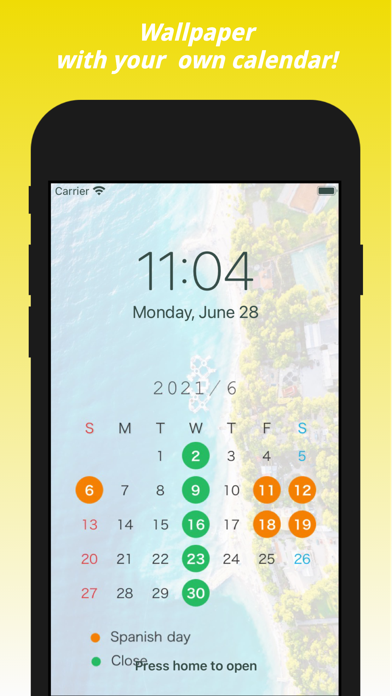
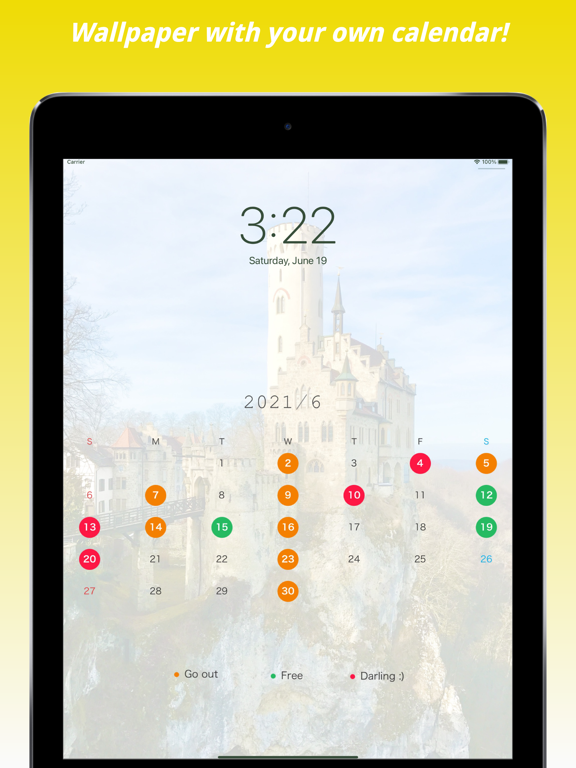
SnapCalendar is an App that can create your original calendar photo.

Set background picture and mark date, and then you can save your own pic with the calendar!


[How to Make Original Calendar]
Select the calendar size
- Top left calendar button shows the basic calendar size.
- Top left smartphone button shows the wallpaper size.

Tap the top photo button
-> you can set the background photo

Tap the top right mark [+]
-> you can adjust the position and zooming of the background image

Tap dates
-> you can mark dates with orange or green circles
For example, the closing day of your shop, memorial day, your own irregular holiday, and so on.

Long Tap dates
-> your circle mark will be outlined

Tap the yellow camera button
-> you can see the original Snap Calendar in your photo library!

Double Tap the labels
-> change explanation for marking
You can put labels anywhere
-> change colors of circles

Tap month like '2021/##'
-> you can see Sundays and Saturdays turn red and blue
If you are in Japan, national holidays are colored by red like Sunday

This application can make your original simple calendar!

Try me!

En voir plus...

Quoi de neuf dans la dernière version ?

I've added the much-requested feature to remember colored dates!
Your colored dates are automatically saved when you tap prev/next or take a snapshot.
I've also added a "Clear All" function. Long press "Clear Dates" to reset all colored dates.
I'd love to hear your feedback!

Wishing you good health as we head into 2026!

  • Screenshot #1 pour SnapCalendar- with your photos
  • Screenshot #2 pour SnapCalendar- with your photos
  • Screenshot #3 pour SnapCalendar- with your photos
  • Screenshot #4 pour SnapCalendar- with your photos
  • Screenshot #5 pour SnapCalendar- with your photos
  • Screenshot #6 pour SnapCalendar- with your photos

Note

(1 notes)

Détails sur l'application

Version
2.7
Taille
6.9 Mo
Version minimum d'iOS
16.6
Dernière mise à jour
03/11/2025
Publié par
Yuka Okada

Newsletter App Store

Recevez chaque jour les meilleures promos

Actualité Apple

Image Bêta 3 pour iOS 27, macOS 27 Golden State, watchOS 27, tvOS 27 et visionOS 27
Bêta 3 pour iOS 27, macOS 27 Golden State, watchOS 27, tvOS 27 et visionOS 27
Image Bêta 4 pour iOS 26.6, macOS 26.6, watchOS 26.6, tvOS 26.6 et visionOS 26.6
Bêta 4 pour iOS 26.6, macOS 26.6, watchOS 26.6, tvOS 26.6 et visionOS 26.6
Image Vos séries TV achetées chez Apple sont mises à niveau en 4K gratuitement
Vos séries TV achetées chez Apple sont mises à niveau en 4K gratuitement
Image Les Mac mini et Studio sont les machines de référence pour l’IA selon Apple
Les Mac mini et Studio sont les machines de référence pour l’IA selon Apple
Partenaires : Actualité iPhone - Culture Geek
©2009-2026 i2CMedia | A propos |