iNova BLE
iOS Universel / Références
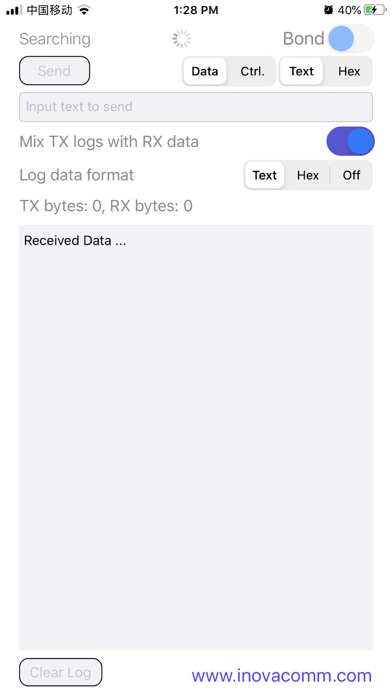
This is an app communicating with NovaComm's iNova Bluetooth low energy hardware modules. WIth the help of new Bluetooth 4.0 framework, it builds a Bluetooth SPP like link with iNova BLE module. Its feature is the following,
1. Discover iNova BLE module (even in background).
2. Automatically connect and bond with the founded BLE module.
3. Data transfer from/to the BLE module.
4. Receive data from BLE module when APP is running in the background.
The App works with Novacomm's BLE development board (DVB) as the following steps,
1. Connect the DVB with a Host MAC/PC via RS232 Serial Cable (via USB to RS232 adaptor when needed).
2. Connect the DVB with a 5V Power Supplier(PC USB Port is OK) via the Mini USB Cable
3. Use a tool such as HyperTerminal to open the COM port and use the following setting:
Baud rate: 2400bps Data bits: 8 Stop bits: 1 Parity: None Flow control: None
4. Power on the DVB (the switch shall be at the "on" position by default, so it is already power on when the MINI USB port is connected), and the following messages will be send to the the COM port,
NVC iGate\r\n
RT=01\r\n (\r\n is the new line and return characters and they are not visible)
It indicates the communication between DVB and Host is OK and the Bluetooth Low Energy Module can be connected.
5. Open the iNova BLE app and it will automatically search the DVB and connect to it. And when connect first time, pairing is needed.
6. When connected and bonded, the COM port will get the following messages,
RT=03,5cb6cc5a8711\r\n
The “5cb6cc5a8711” is the Bluetooth Address of the iOS device and may be different per device.
7. After bonded with the DVB, the "Send Data" button will be activated and the user can input some data in the text edit and touch the "Send Data" button to send them to DVB.
8. And at the DVB side, use command "BC:DT=xxx\r\n" (xxx is the data needed to be send to iOS device) to send messages to the iNova BLE App.
Quoi de neuf dans la dernière version ?
Fix a bug that the received data view is not scrolling.