Car Performance Tracker
iOS Universel / Réseaux sociaux
Car Performance Tracker – your app for driving fun, performance measurements, and a vibrant driver community.
Whether it's a winding road, a drag strip run, or a relaxed cruise with friends: start recording with just two taps – drags (0–100, 100–200, and more), routes, constant-speed runs, and miles are detected automatically. No complicated setup required.
NEW IN VERSION 2.1.0
• Route Planner: Dedicated tab with Mapbox navigation, trip preview, and free drive
• Apple CarPlay: Turn-by-turn navigation in your car, synced with your iPhone
• GPX import: Routes from the Files app – display on map or start guided navigation
• EV routing: Plan charging stops, track state of charge, view energy consumption
• Eco mode: Protects battery and device during long sessions
• 16 languages: App, route planner, and Apple Watch in more languages
PERFORMANCE & RECORDING
• Automatic drag detection (0–100, 100–150, and more) with altitude correction
• OBD data recording with comprehensive analysis
• 10 Hz GPS with external XGPS hardware for maximum precision
• Automatic Nürburgring detection (BTG)
• Route segments via pause function, resume after saving
• Offline storage and versatile export options (GPX, email, Files)
MAP & NAVIGATION
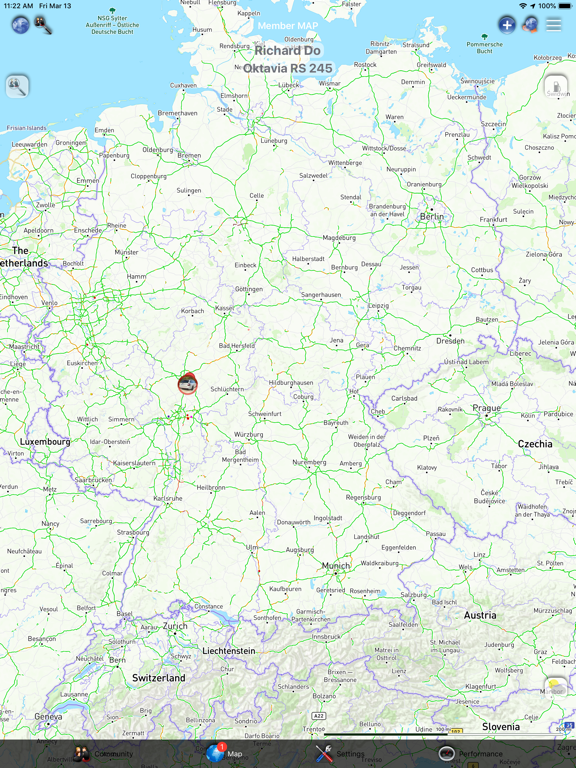
• Member Map with live view: Track friends in real time (speed, altitude)
• Fuel stations with prices and opening hours, charging station filters
• 3D map view with compass or heading-up mode
• Augmented reality map for drags and routes
• Speed camera and hazard zone warnings (with data import)
COMMUNITY
• Group and private chat
• Create, share, and notify events
• Community waypoints: See where friends are and how far from the meetup point
• Live tracking: Let others follow your drive in real time
• Top lists: VMAX, vehicles, 0–100, and more – global comparison
MORE HIGHLIGHTS
• Apple Watch support
• Weather display in map and performance view
• Customizable tab bar
• Extensive settings for your individual setup
Build your community with friends, add your cars, and hit the road. Car Performance Tracker combines measurement, navigation, and community in one app.
Have fun on the road!
Quoi de neuf dans la dernière version ?
Stability & Bug Fixes
* App icon badge resets reliably again when opening the app
* Crashes fixed when handling push notifications, racetrack lap time display, and performance tooltips
* Deep links (sportfahrer:// for tracks, drags, community) work again
* Quick Actions (long-press app icon: Performance / Chat) and Siri Shortcuts (start/stop performance) restored
* XGPS connection improved when switching between foreground and background
Performance / Live Location
* Live location upload works reliably again (Eco mode had previously blocked the timer)
* More stable timer and more robust live position uploads
* XGPS position is used for live uploads when an XGPS receiver is connected
* Race condition in ACL for LiveLocation fixed
Performance / OBD
* No more flicker in the OBD value table: Live values update without a brief gray flash.
* Glass effect on cells is configured once at load time, not on every value refresh.
* Visible table rows are updated in place instead of reloading entire rows.
Member map — camera & location follow
* New camera control architecture: Own GPS follow and live follow of another member are clearly separated and no longer conflict.
* Follow modes via button: Follow → Compass (heading) → 3D → Follow again.
* No separate “free” mode: Panning or zooming the map automatically pauses follow — the icon is grayed out while paused.
* Tap again to resume the last follow mode.
* Zoom is preserved: After pausing by panning/zooming, reactivating keeps your current zoom level (no reset to default).
* Live member location: Dedicated button icon (map_people_lens); tap to stop live follow and return to paused own-position mode.
Member map — button & icons
* Restored original arrow icons for Follow and Compass modes.
* 3D mode: Readable white “3D” label on a dark background (original asset was hard to see on the map).
* Paused follow: same icon at 45% opacity (grayed out).