• KultureGeek
  • Comparateur de prix
       
iPhoneAddict
 iAddictv5Notre Application iPhone/iPad
  • Accueil Apps
  • Actualité Apple
  • Keynote Apple
  • Firmwares & iTunes
  • Contactez-nous
Accueil » Liste des Apps » Apps Universelles » Sports » My Round Robin
6.1 iOS €Gratuit David Bigelow 0 0 My Round Robin supports up to a 28-player/team round robin pickleball match with optional scoring. The app consists of four sections, Game, Score, Players, and Teams. In Players, you can add and edit players that are permanently saved. Players...
My Round Robin

My Round Robin

iOS Universel / Sports

Gratuit au lieu de 1,99€
Obtenir sur l'App Store

My Round Robin supports up to a 28-player/team round robin pickleball match with optional scoring.

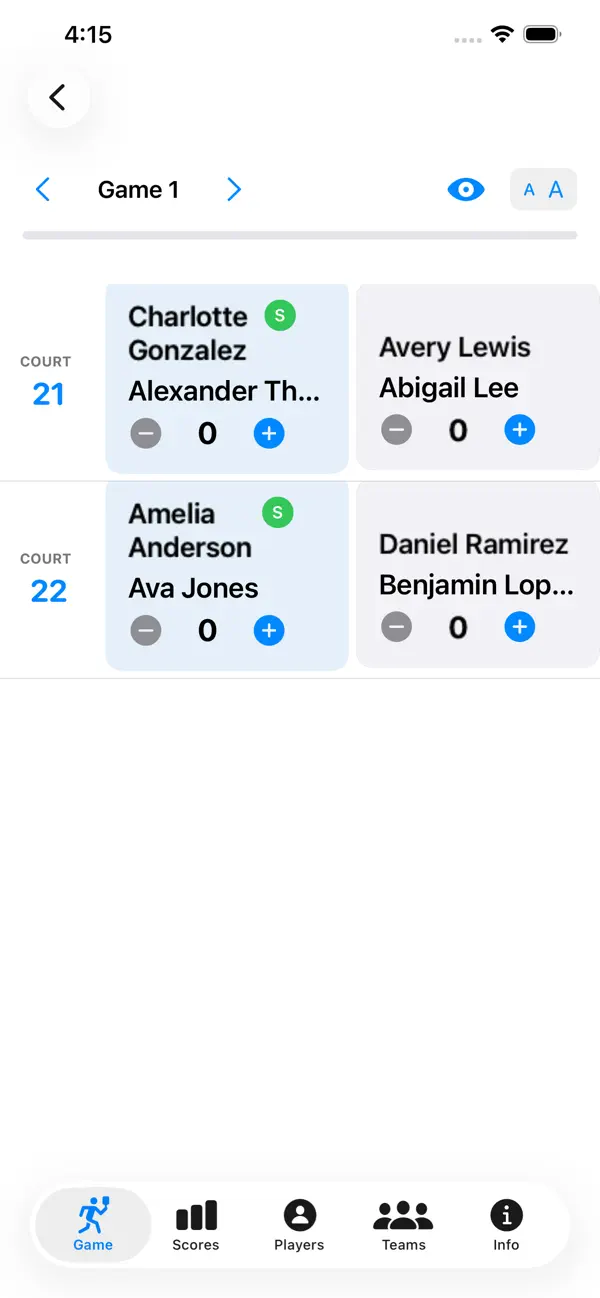
The app consists of four sections, Game, Score, Players, and Teams. In Players, you can add and edit players that are permanently saved. Players can be added with the Add Players dialog, by importing Contacts, or by importing a JSON file, a sample of which is on the support web site. Player names can be edited, and a player can be active or inactive. Only active players appear in the Active Players list in the Play Game section.

To play a game, choose either Players or Teams with the Toggle button. Depending on the screen size and orientation, you'll either see an ellipsis (...) or the How to Play and Edit buttons in the upper right corner. How to Play provides detailed instructions for how to use the app, while the Edit button allows you to either delete players or move then around by clicking and dragging on the 3 bars icon. Moving players around allows people to choose their byes. Because we sometimes have 20-25 players for a round robin, I like to preload the players. Clicking on a player's name in a particular highlights that row and adds a checkmark, so that you can keep track of who has arrived.

Click the Players List in the upper left corner, and once you have at least eight players or teams selected, an Add Courts button appears. Click the button to advance to the Courts page and select the appropriate number of courts (i.e. eight players, two courts, 20 players, 5 courts). Click the Generate Round Robin button and you get what's known as the Pickleball Sheets view, which lists the games, players, and the courts they are playing on. Note that the email notifications button is disabled if there are no players with emails. Email notifications allow you to view your court assignments, partners, and opponents in an HTML format.

Clicking on the link for each Game button allows you to see the details for a particular game and enter the scores, while clicking on the microphone icon announces the court assignments for that game, along with the serving and receiving teams.

Feel free to send me an email if you find any bugs or can think of something new to add

En voir plus...

Quoi de neuf dans la dernière version ?

Support for up to 28 players and 7 courts, along with the ability to check in a player by clicking on their name in the Games tab

Note

(0 note)

Détails sur l'application

Version
6.1
Taille
15.2 Mo
Version minimum d'iOS
17.6
Dernière mise à jour
16/02/2026
Publié par
David Bigelow

Newsletter App Store

Recevez chaque jour les meilleures promos

Actualité Apple

Image WhatsApp pour iPhone prépare la traduction automatique des discussions
WhatsApp pour iPhone prépare la traduction automatique des discussions
Image Apple met en vente les Powerbeats Pro 2 en édition spéciale Nike
Apple met en vente les Powerbeats Pro 2 en édition spéciale Nike
Image Apple s’explique pour les trois types de cœurs dans les puces M5
Apple s’explique pour les trois types de cœurs dans les puces M5
Image What Happens at Night (Apple TV)  : Martin Scorsese réunit Leonardo DiCaprio et Jennifer Lawrence pour un long-métrage
What Happens at Night (Apple TV) : Martin Scorsese réunit Leonardo DiCaprio et Jennifer Lawrence pour un long-métrage
Partenaires : Actualité iPhone - Culture Geek
©2009-2026 i2CMedia | A propos |