Video Coach
iPhone / Sports
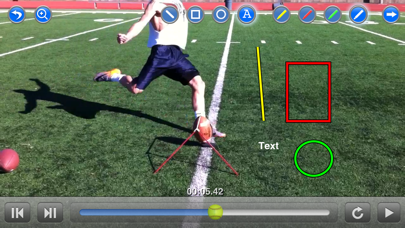
Video Coach is an all-in-one video recorder/player program that has been optimized as a training tool for real-time analysis of sports mechanics. Designed with a coach’s needs in mind, Video Coach merges HD video capture, single-frame video playback with graphic overlay, video organization, and wireless file transfer, into one, simple to use tool. Video Coach is an essential training tool for serious athletes and their coaches.
Features:
• HD or SD video recording* in both portrait and landscape orientations. Supports automatic or manual focus, white balance, exposure, and flood lighting.
• Frame-accurate video player provides single frame stepping, continuous looping, and random access for better analysis of athlete mechanics. The player automatically displays in portrait or landscape orientation based upon the video content’s native aspect ratio. Includes zooming in on a paused video frame.
• Graphic overlay allows lines, rectangles, circles and text to be drawn on top of any video during playback.
• Video slicing converts a video into a sequence of photos (up to 48 time spaced slices).
• Video organization features easy folder creation, file renaming, and file deletion. File names are automatically appended with the time and date to avoid naming conflicts.
• Videos can be copied from the device’s Photo Album or Camera Roll into the application’s video library.
• Wireless transfer allows easy video exchange between multiple devices running the application. An internet connection is not required to transfer files. A WiFi access point or router is the only external hardware requirement. File transfers can be made right at the field in just seconds… just plug in your WiFi access point and start transferring.
• Video files and photo slices can be e-mailed directly from the application.
• The Video Library is shared with your computer using iTunes, allowing content to be added, removed, or backed-up.
• The user’s manual is built into the application for quick reference.
• Includes a built-in video editor to trim unwanted footage from your videos. This is useful for content that will be e-mailed.
* HD or SD Video recording are only availble on devices that support it.
Use is subject to the Terms of the End User License Agreement.
LANGUAGE:
English
REQUIREMENTS:
Compatible with all iPhones, iPads, and most iPod Touches .
Requires iOS 5.1 or greater.
Quoi de neuf dans la dernière version ?
This update from Apple will improve the functionality of this app. No new features are included.
1) 64-bit support