HSBuddy
iOS Universel / Style de vie
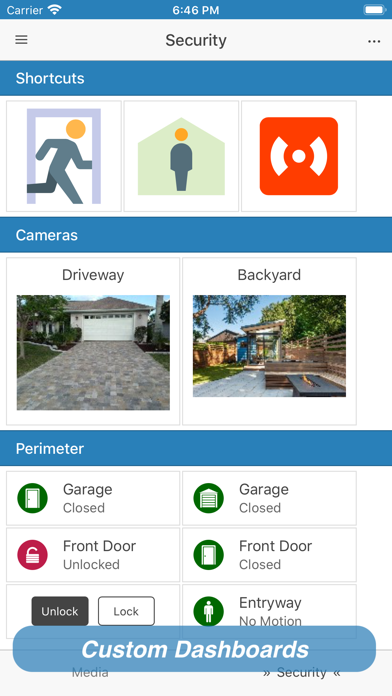
HSBuddy is a free application for iOS® that turns your mobile device into the ultimate companion for your HomeSeer® home automation system. With the included Apple Watch companion app you can take control of your home from your wrist!
Certain features require an additional HomeSeer controller plug-in which you can install from the plug-in manager in your HomeSeer configuration pages. Look for HSBuddy under the User Interfaces section.
Complement your home automation experience and use HSBuddy to:
• Control and edit devices
• Run and edit events
• View history of device state changes *
• View images from your home cameras **
• Create your own customized dashboards
• Speed up your daily automation tasks
» Create Siri shortcuts
» Place Widgets for your Home Screen
• Send push-notifications to your devices as part of your server events
• Browse your HomeSeer server logs *
• Enable geo-location on the app and location-based events *
• Automatically switch between local-WiFi and remote connectivity to your server based on your location.
• Connect to multiple HomeSeer servers and switch quickly between them
• Use Smart Tags to quickly control a device or run an event by tapping a tag with your phone
*Requires installing the free HSBuddy HomeSeer controller plug-in
**Compatible with some existing HomeSeer controller camera plug-ins
To use this app you need a running instance of HomeSeer. To find out more, visit http://www.homeseer.com
For more information and troubleshooting help, go to http://hsbuddy.avglabs.net
Quoi de neuf dans la dernière version ?
New: Widget actions now support opening an arbitrary image
Fix: Links should open using the system's browser
Fix: App crashes when asking for a PIN code