Unit price & Discount calc @
iOS Universel / Style de vie
== Features ==
* Original keys with special functions
- Unit price calculation
- Discount calculation /(percentage increase calculation)
* Larger and smaller comparison for input data
* Dual screen
* Up to 5 calculation histories
* Color Universal Design
The screen is divided into an input area, calculation area, and comparison (history) area from the bottom.
== Special Functions ==
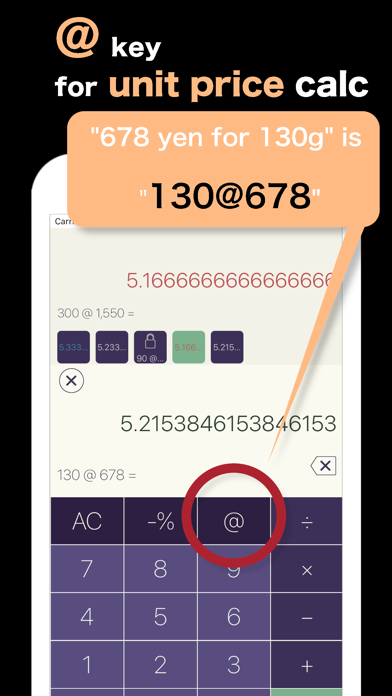
** Unit price key “@“
(key to use when the unit price calculation)
Calculates the unit price of similar products sold in different size/quantity and tell which item is less expensive.
- This APP’s discount Formula:
Unit price = (Units per item (ounce, pound, gram, kg) @ (total cost)
- more practical usage
Unit Price = (Units per item (ounce, pound, gram, kg) ×(Quantity of items purchased)@ (total cost)
** Discount calculation key “-%” (Percent Off)
This APP’s discount Formula:
Discount Price = (Original price) -% (Percent Value)
** Percentage increase calculation key “+%” (tax include)
Long tap –% key. → +% key will displayed
(Long tap again to release)
This APP’s discount Formula:
Premium Price = (Original price) +% (Percent Value)
** Comparison key ↑
(The key to use when comparing, and the next calculation.
Automatically saved in history)
When you tap the = key to complete the calculation, the ↑ key appear. (*1)
Tap again to move the current formula to the history area.
Tapping the ↑ key signals the completion of the calculation and saves the calculation to History.
From History, can either use the data as input to a new calculation or recalculation.
Note:
*1 : “↑” is not displayed during calculation.
** Left-handed (Lefty) display (Landscape Only)
When Landscape screen, a hand-shaped icon will appear on the left or right side of the upper advertisement screen.
Try tapping!
== Some hidden commands ==
* Color Change
Long tap (tap and hold) any of keys 0-9 (3 seconds)
* Numeric keys layout Change
Long tap (tap and hold) of keys . (5seconds)
(It becomes the same layout as the mobile phone / long tap again to release)
*[GT] key
Calculate the total of history (other than locked) and calculation result.
Long tap the “+” key
* [% →] key
Calculate the value before the discount and before the premium.
Long tap the “=“ key
Example: Calculation before tax included
Before tax of 500 yen, enter "500 [+%] 10 [% →]"
Caution: Can only be used for expressions that include the [-%] and [+%] keys.
== History Buttons ==
- The history is displayed in the upper left part of the screen as the form of buttons.
- Tap the history button to display the contents in the comparison area at the top of the screen.
- Up to 5 records. After the 6th case, the oldest ones will be deleted.
- Long-tap the button to lock (up to 3). Lock the history you want to keep.
- To unlock, use the long tap as well.
- The value displayed on the button is the “calculated value”. A “part of the formula” is displayed on the history button when locked.
- If press the AC key, all history except the locked history will be erased. Please be careful.
* How to use historical values in the current calculation area
To reuse the value by tapping the comparison area.
1. Tap the history button you want to use and display it in the comparison area.
2. Tap the comparison area. (You can tap the history button you want to use)
Note:
- To add history data to the current formula, after enter the arithmetical operation keys, and perform this operation.
- If you make a mistake, tap the upper area again immediately afterwards to return to the original one.
=======================
- Please help us with favorable ratings.
- If you have any suggestion for improvements, please give us some advice.
- Follow us on Instagram "icolabo" if you like.
Most importantly, share with other people you know:)
Quoi de neuf dans la dernière version ?
bug fixed