iPhoneAddict Apps
  • Actualités
  • Accueil Apps
  • iPhone
  • iPad
  • Universelles
  • Mac
  • Apple TV
KG KultureGeek
App
iPhone / iPad Télécharger iAddict v5 Mac Télécharger iAddict Mac
  • Actualités
  • Accueil Apps
  • iPhone
  • iPad
  • Universelles
  • Mac
  • Apple TV
  • Archives keynotes
  • Firmwares & iTunes
  • Contactez-nous
  • Comparateur de prix
  • KultureGeek
Accueil » Liste des Apps » Apps iPhone » Style de vie » Endless Crown
1.0 iOS €0,99€ Jenny Media LLC 0 0 Endless Crown is a watch-only haptic fidget that turns spinning the Apple Watch Digital Crown into quiet tactile feedback. Open Endless Crown, rotate the Digital Crown, and feel a crisp haptic response as you scroll through an infinite numbered...
Endless Crown

Endless Crown

iPhone / Style de vie

0,99€
Acheter sur l'App Store
Facebook X E-mail

Endless Crown is a watch-only haptic fidget that turns spinning the Apple Watch Digital Crown into quiet tactile feedback.

Open Endless Crown, rotate the Digital Crown, and feel a crisp haptic response as you scroll through an infinite numbered list. The interface stays dark and minimal, making it easy to use for a quick tactile break without pulling out your phone.

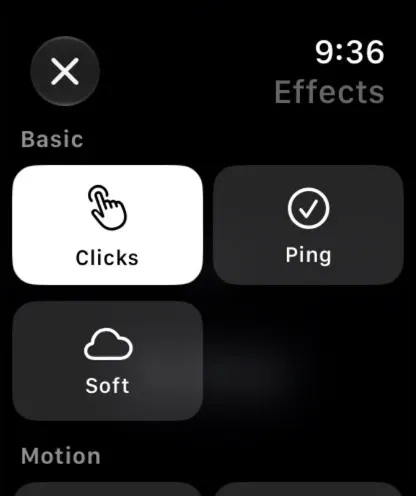
Choose from 15 haptic effects:

- Clicks
- Soft
- Heavy
- Buzz
- Ping
- Thud
- Drift
- Pulse
- Heartbeat
- Double Tap
- Gallop
- Waltz
- Staccato
- Wave
- Random

Endless Crown also includes local usage statistics, ambient mode, configurable number formats, and a WidgetKit complication that shows your current item and total haptic count.

Highlights:

- Built exclusively for Apple Watch
- Uses the Digital Crown as the main interaction
- Silent haptic feedback
- Fast effect switching
- Decimal, Roman, Binary, Hex, Octal, and Base-26 number formats
- Local-only preferences and stats
- No account, ads, analytics, or backend

How to use:

1. Open Endless Crown on Apple Watch.
2. Rotate the Digital Crown to scroll and feel haptics.
3. Tap the number line or effect chip to cycle effects.
4. Long-press the number line or effect chip to open the Effects picker.
5. Double-tap the number line or effect chip to open the menu.
6. Use the menu to change effects, number format, statistics, guide, reset, ambient mode, or menu icon visibility.

Endless Crown requires Apple Watch with watchOS 10 or later.

En voir plus...

Note

(0 note)

Détails sur l'application

Version
1.0
Taille
3.5 Mo
Version minimum d'iOS
13.0
Dernière mise à jour
20/06/2026
Publié par
Jenny Media LLC

Newsletter App Store

Recevez chaque jour les meilleures promos

Actualité Apple

Image iPad Air 2027 : écran OLED, puce M5 et possible nouveau design
iPad Air 2027 : écran OLED, puce M5 et possible nouveau design
Image iPhone : Apple a capté 49 % des revenus de smartphones au 2e trimestre, un record
iPhone : Apple a capté 49 % des revenus de smartphones au 2e trimestre, un record
Image L’iPhone Air 2 aurait une Dynamic Island plus petite et d’autres nouveautés
L’iPhone Air 2 aurait une Dynamic Island plus petite et d’autres nouveautés
Image iPhone 18e : les 9 Go de RAM se confirment un peu plus
iPhone 18e : les 9 Go de RAM se confirment un peu plus
iPhoneAddict Apps

Le catalogue iPhoneAddict pour suivre les nouveautés, mises à jour et baisses de prix de l’App Store.

Apps

Toutes les apps iOS iPhone iPad Universelles Mac Apple TV

iPhoneAddict

Actualité Apple Archives keynotes Contact À propos KultureGeek

Suivez-nous

©2009-2026 i2CMedia. Tous droits réservés.