Photo Layout Editor-Collage-A4
iOS Universel / Utilitaires
Fit more of your favorite photos onto a single sheet of A4 photo paper.
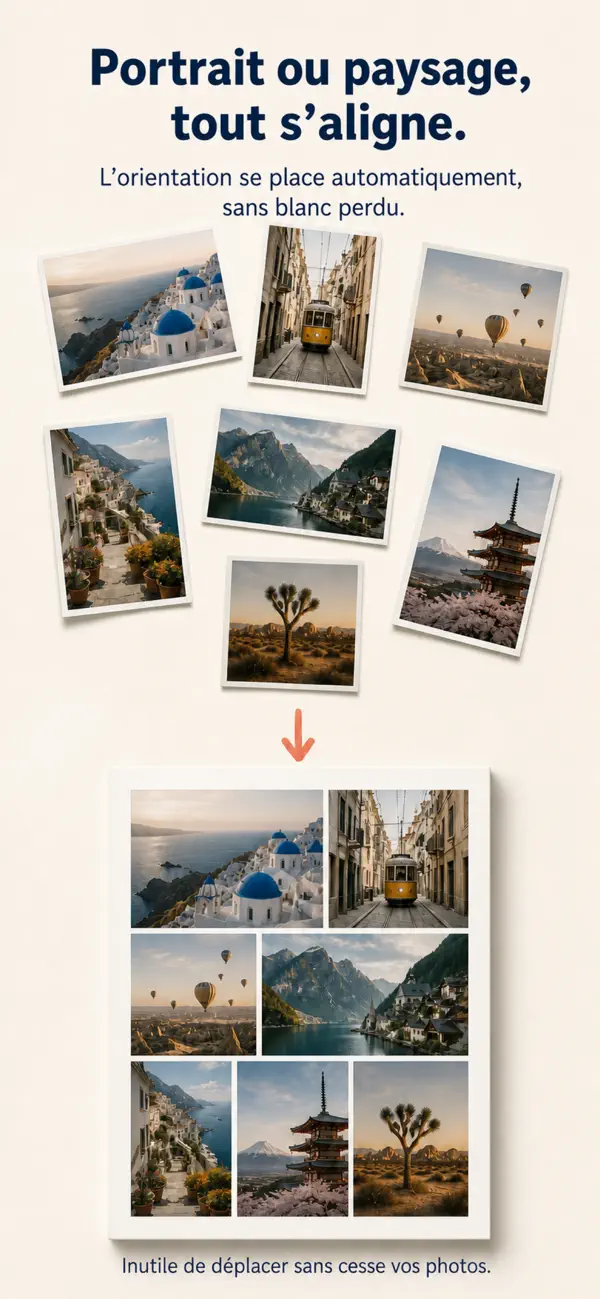
Many traditional layout tools use fixed grids, which can leave large empty areas and waste photo paper. This app is designed specifically for printing photos on A4 paper. It automatically arranges your images to make better use of the page and can add clear cutting guides for easy trimming.
Print multiple photos at once, cut them out, and enjoy a faster and more convenient printing workflow.
Key Features
• Smart A4 LayoutAutomatically arranges your photos with Fill, Fit, and Even layout modes. Switch freely between portrait and landscape pages.
• 20+ Instant Photo EffectsChoose from classic white borders, Polaroid-style frames, stamp edges, reflections, vignette glows, and more. Each photo can use its own effect.
• 8 Film-Inspired FiltersApply Hasselblad-inspired blues, vivid Leica-style colors, bright Japanese tones, retro black and white, and other looks with one tap.
• Custom Text and FontsAdd dates, locations, captions, or other text. Import your own TTF, OTF, or TTC font files.
• Multiple Photo SizesSupports standard 1–6 inch photo sizes, plus custom width and height settings for different printing needs.
• High-Resolution ExportExport a high-quality A4 image, print directly with AirPrint, or save and share the finished layout.
• Edit Photos IndividuallyAdjust cropping, effects, filters, and text separately for every photo without changing the others.
• Unlimited Pro ExportsUpgrade to Pro to remove the daily export limit.
Ideal for family albums, travel photos, journal supplies, instant-photo designs, ID-size photos, and batch printing of small pictures.
Use less empty space, save photo paper, and make photo printing easier.
Quoi de neuf dans la dernière version ?
• Improved and expanded the photo effects collection, with 36 options including instant-film looks, film frames, journal styles, light effects, grain, and creative print treatments.
• Refined color presets and categories, with 28 options for portraits, landscapes, cinematic looks, vintage film, and black-and-white photography.
• Improved per-photo editing with quicker access to duplicate, delete, text, and effect controls.
• Redesigned the export panel with high-resolution export, direct printing, purchase restoration, and feedback options.
• Redesigned the layout controls to make photo sizing, three-level balance adjustment, and cutting guides easier to use.
• Improved photo reordering and effect rendering for smoother editing of complex collages.