Shellcove · Remote Coding
iOS Universel / Utilitaires
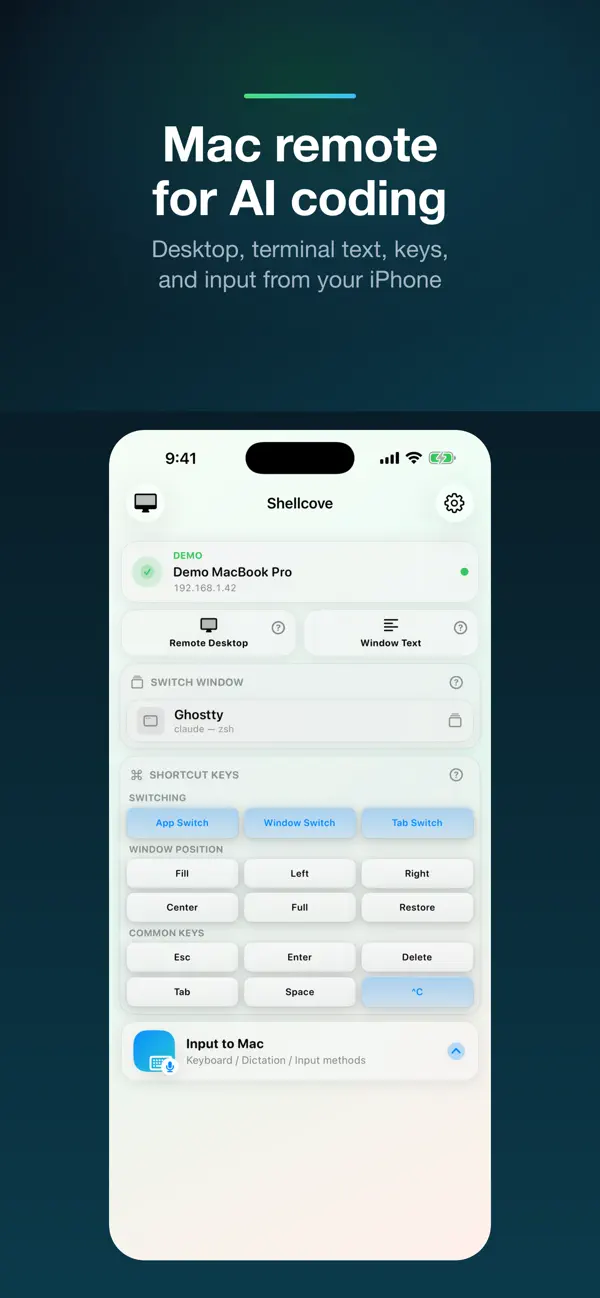
Shellcove is a local Mac remote for AI coding, terminal work, demos, and long-running tasks: Remote Desktop, live Window Text, iOS input-method text entry, keyboard, mouse, and clipboard sync over Wi-Fi, LAN, Tailscale, or VPN. No account, no cloud, no analytics.
Built for remote coding and agentic coding workflows: run AI agents, Claude Code, codex, aider, terminal sessions, and long Mac tasks, then use your iPhone or iPad to watch output, send prompts, press keys, and keep work moving from across the room.
How it works
- Open the Shellcove Mac app once. It shows a pairing QR.
- In Shellcove on your iPhone or iPad, tap "Scan QR". The two devices pin a self-signed TLS certificate over your local network — no account, no cloud.
Key features
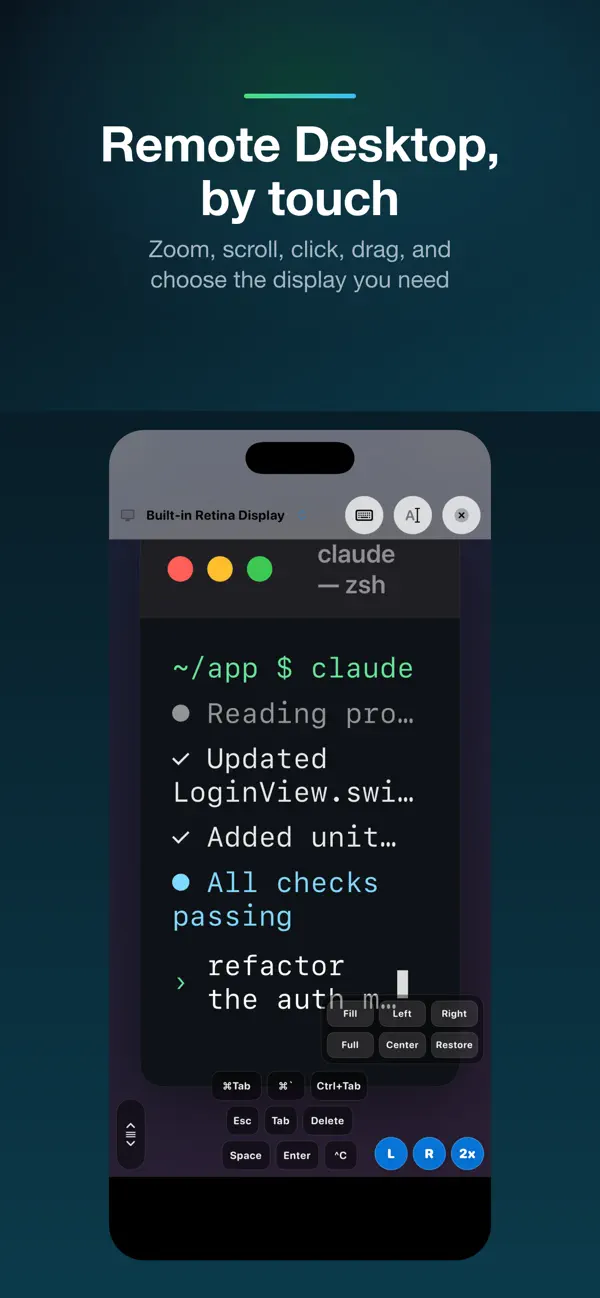
- Remote Desktop, by touch: stream the Mac desktop as video and drive it directly — tap or drag to move the cursor, pinch to zoom, two-finger scroll, long-press to drag. Use full screen, choose any display, and open Keyboard & mouse for clicks and every key.
- Text input via iOS keyboard and input methods: tap the bottom input bar, use iOS Dictation or any third-party keyboard to compose text, then send it to the focused Mac window character by character. It works in any app, including modern terminals.
- Keys: six always-visible keys (Esc, Tab, Delete, Space, Next tab ⌃Tab, Enter), plus a More Keys panel with 32 combos for editing, navigation, terminal control, and function keys.
- Clipboard sync: the Mac's clipboard mirrors to your paired devices automatically; send your device's clipboard back to the Mac with one tap.
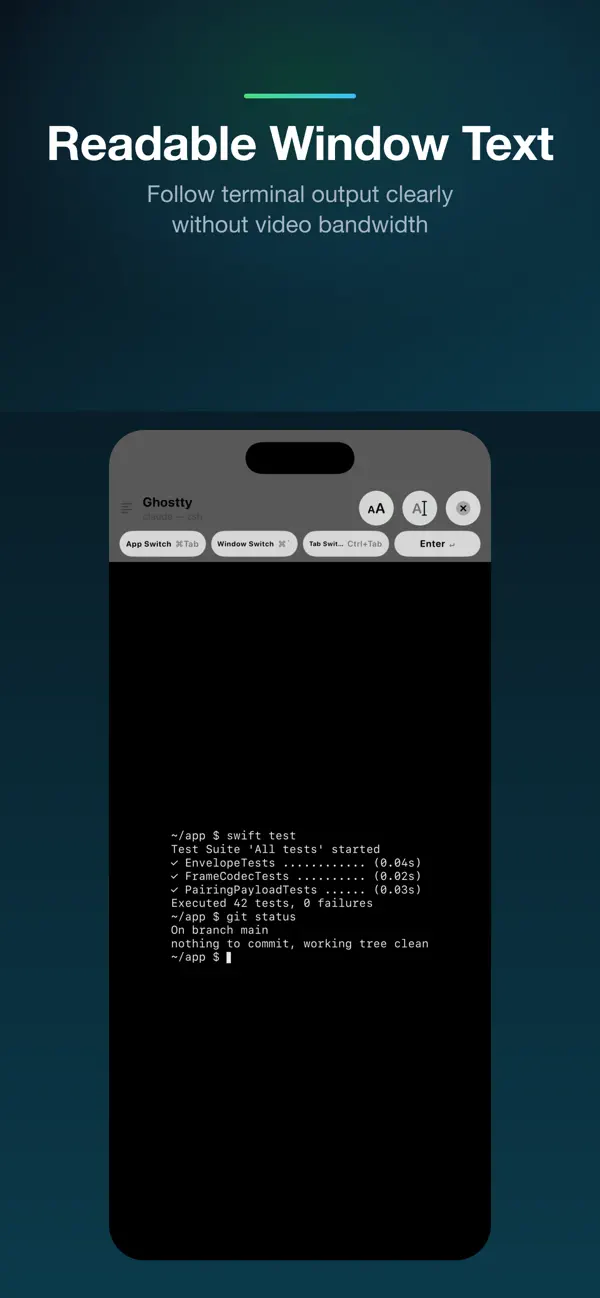
- Window Text: open a live, monospaced view of the focused Mac window's text (e.g. a terminal buffer) that refreshes as it changes. Full screen makes AI-agent output and long terminal logs easier to read; wide lines scroll, no video needed. The iOS view keeps text readable on its dark surface and stays pinned to the latest output while you type.
- Keep screen awake: optionally prevent iPhone auto-lock while Shellcove is active in the foreground, useful for long remote-control or monitoring sessions.
- iPhone + iPad, any orientation: the layout adapts to every screen — a single column on phones, a two-column "big screen + controls" layout on iPad, and a landscape mode that rearranges to fit.
- LAN + Tailscale + VPN: the Mac advertises every reachable IPv4 in the pairing QR. iOS auto-picks the fastest address and lets you switch manually when you're off the LAN.
Privacy & networking
- 100% local. Shellcove communicates only between your iPhone/iPad and Mac, over your network. Nothing leaves your devices.
- TLS with certificate pinning. The Mac generates a self-signed certificate at first launch; your device pins its fingerprint at pairing.
- No accounts, no servers, no telemetry, no third-party SDKs.
- Text is composed by the system keyboard or the input method you choose. Shellcove receives only the final text and does not request microphone or Speech Recognition permission.
Best paired with
- Remote coding with AI agents in your terminal: Remote Desktop + Window Text + text input + button remote.
- Long-running terminal commands where you keep hitting Enter / y / n.
- Demos and presentations where you want to drive the Mac from across the room.
Requirements
- A Mac running macOS 13 (Ventura) or newer with the free companion Shellcove Mac app installed (apps.zhizuzhefu.com/shellcove).
- Both devices on the same Wi-Fi network, or on any VPN where they can reach each other (Tailscale tested).
- One-time Accessibility and Screen Recording permission on the Mac so it can synthesize input and mirror the screen.
Quoi de neuf dans la dernière version ?
What's new
- Added a Keep Screen Awake setting for active remote-control sessions.
- Window Text now renders plain readable text on iOS instead of applying Mac-side colors.
- Window Text cleans terminal control characters and stays pinned to the latest output while typing.
- Remote Desktop and Window Text use a tighter full-screen layout with less top blank space.