iPhoneAddict Apps
  • Actualités
  • Accueil Apps
  • iPhone
  • iPad
  • Universelles
  • Mac
  • Apple TV
KG KultureGeek
App
iPhone / iPad Télécharger iAddict v5 Mac Télécharger iAddict Mac
  • Actualités
  • Accueil Apps
  • iPhone
  • iPad
  • Universelles
  • Mac
  • Apple TV
  • Archives keynotes
  • Firmwares & iTunes
  • Contactez-nous
  • Comparateur de prix
  • KultureGeek
Accueil » Liste des Apps » Apps Universelles » Utilitaires » AR Tape Ruler - Air Measure
L'application n'est plus disponible sur l'App Store français
1.0 iOS €Gratuit Nazia Hussain 0 0 Measure lengths and areas using only your mobile device! AR Measure is the quickest way to measure two points and area sizes. AR Ruler app uses augmented reality technology (AR) to measuring tape the real world with your smartphone’s camera....
AR Tape Ruler - Air Measure

AR Tape Ruler - Air Measure

iOS Universel / Utilitaires

Gratuit
Obtenir sur l'App Store
Facebook X E-mail

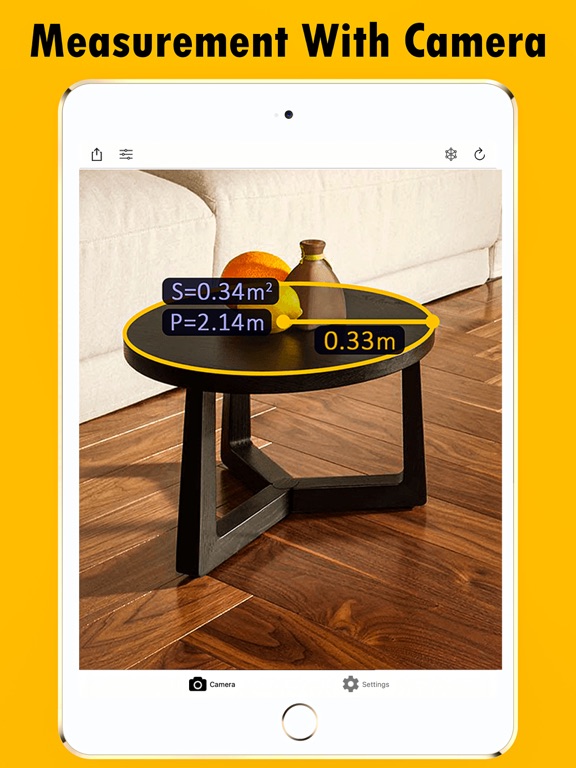
Measure lengths and areas using only your mobile device! AR Measure is the quickest way to measure two points and area sizes. AR Ruler app uses augmented reality technology (AR) to measuring tape the real world with your smartphone’s camera. Target aim on the detected plane and start to use AR tape measurement tool.

The most advanced measuring app on the planet. A tape measure quick is photo ruler in your pocket, powered by (AR) augmented reality. Move your phone around the space to find flat surfaces such as a tabletop or the floor. Point and tap to start your mesurement and adjust it accordingly. When finished, tap on measurements to get quick reference to unit conversion, copy, and delete functions.
Measurements taken with this measurement app are estimates.

Measure tape helps you with quick everyday measurements around the house or office, similar to a tape measure. With the Measure app, you can:
Measure the length and height of objects on flat surfaces, like the size of a rug, the width of a sofa, or the height of a table. Easily switch between imperial and metric units. Take a photo measure of your measurement

Draw lines and estimate their length in both horizontal and vertical dimensions. Automatically measure rectangular objects.


1) AR Rule app – allows to tape mesure linear sizes in cm, m, mm ruler, inch, feet.
2) Distance meter – allows to tape measure distance measure from device camera measurement to a fixed point on the detected 3D plane.
3) Angle – allows to tape measure corners on 3D planes.
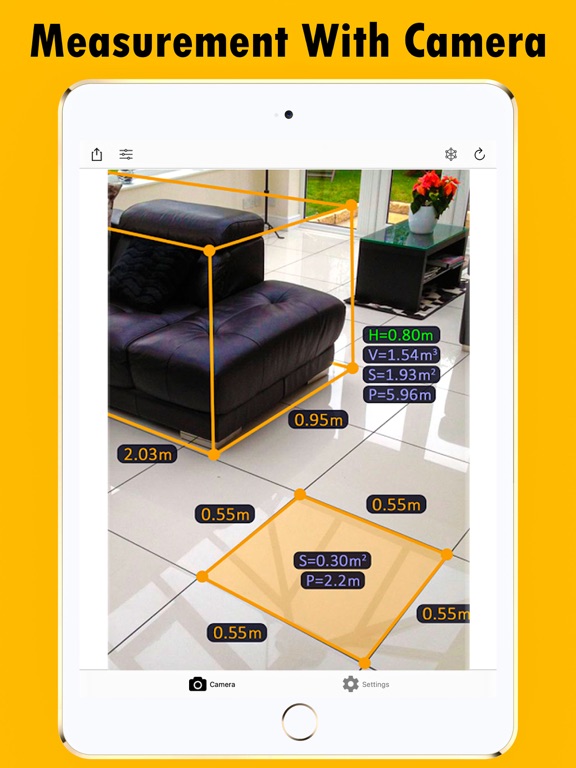
4) Area and Perimeter – allows to tape measure perimeter and area of the room.
5) Volume – allows to tape measure size of 3D objects.
6) Path – allows to calculate the length of the path.
7) Height – allows to tape measure height relative to the recognized surface.
8) On-screen Ruler app – measure small objects directly on the smartphone’s screen.
9) Share measurements with friends via Mail, Messages, and more

Augmented Reality features require ARKit with an A9 processor or later (iPhone 6S or later).
Try AR Ruler app now – we’d love to hear your feedback!

En voir plus...

  • Screenshot #1 pour AR Tape Ruler - Air Measure
  • Screenshot #2 pour AR Tape Ruler - Air Measure
  • Screenshot #3 pour AR Tape Ruler - Air Measure
  • Screenshot #4 pour AR Tape Ruler - Air Measure
  • Screenshot #5 pour AR Tape Ruler - Air Measure
  • Screenshot #6 pour AR Tape Ruler - Air Measure

Note

(0 note)

Détails sur l'application

Version
1.0
Taille
4 Mo
Version minimum d'iOS
13.0
Dernière mise à jour
18/05/2021
Publié par
Nazia Hussain

Newsletter App Store

Recevez chaque jour les meilleures promos

Actualité Apple

Image Localiser : un iPad volé a permis de retrouver un suspect après un cambriolage
Localiser : un iPad volé a permis de retrouver un suspect après un cambriolage
Image Apple Pencil : Apple imagine un contrôle par pression beaucoup plus « intelligent » pour ses futurs stylets
Apple Pencil : Apple imagine un contrôle par pression beaucoup plus « intelligent » pour ses futurs stylets
Image Le récap Apple de la semaine : iOS 27, iPhone 18, AirPods et grand ménage chez Apple
Le récap Apple de la semaine : iOS 27, iPhone 18, AirPods et grand ménage chez Apple
Image L’iMac M6 avec de nouveaux coloris arrive avant la fin de l’année
L’iMac M6 avec de nouveaux coloris arrive avant la fin de l’année
iPhoneAddict Apps

Le catalogue iPhoneAddict pour suivre les nouveautés, mises à jour et baisses de prix de l’App Store.

Apps

Toutes les apps iOS iPhone iPad Universelles Mac Apple TV

iPhoneAddict

Actualité Apple Archives keynotes Contact À propos KultureGeek

Suivez-nous

©2009-2026 i2CMedia. Tous droits réservés.