iPhoneAddict Apps
  • Actualités
  • Accueil Apps
  • iPhone
  • iPad
  • Universelles
  • Mac
  • Apple TV
KG KultureGeek
App
iPhone / iPad Télécharger iAddict v5 Mac Télécharger iAddict Mac
  • Actualités
  • Accueil Apps
  • iPhone
  • iPad
  • Universelles
  • Mac
  • Apple TV
  • Archives keynotes
  • Firmwares & iTunes
  • Contactez-nous
  • Comparateur de prix
  • KultureGeek
Accueil » Liste des Apps » Apps Universelles » Utilitaires » ARMedia SDK ToolSet
L'application n'est plus disponible sur l'App Store français
2.2 iOS €Gratuit Inglobe Technologies 0 0 The ARMedia SDK ToolSet app is a set of tools whose purpose is to help Augmented Reality developers to create and test 3D maps (targets) suitable for the ARMedia SDK and related products/plugins. By means of this app, the user (being him a developer...
ARMedia SDK ToolSet

ARMedia SDK ToolSet

iOS Universel / Utilitaires

Gratuit
Obtenir sur l'App Store
Facebook X E-mail

The ARMedia SDK ToolSet app is a set of tools whose purpose is to help Augmented Reality developers to create and test 3D maps (targets) suitable for the ARMedia SDK and related products/plugins.

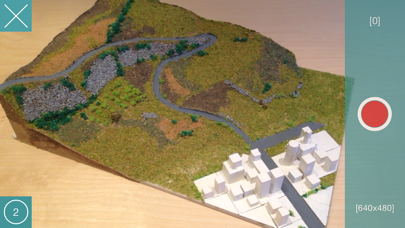
By means of this app, the user (being him a developer or not) can take photos of real objects (that will be used to create 3D map/pointcloud for tracking purposes) and also try/test 3D maps/pointclouds to evaluate tracking quality.

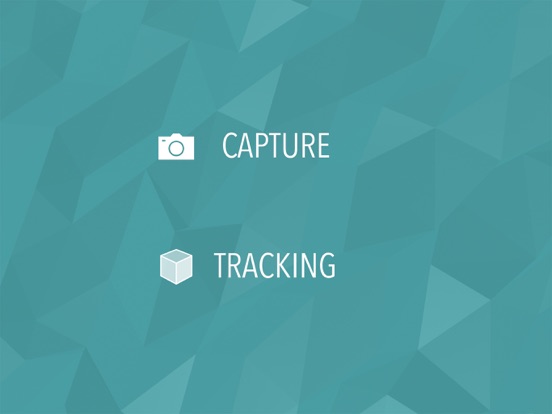
The app has two working modes: capture and tracking.

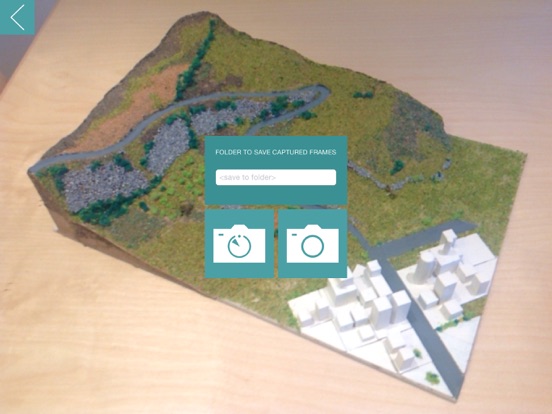
In "Capture" mode the user first of all chooses a folder to save photos in (this folder will be created in the iTunes File Sharing section related to the app) than he chooses if either shoot every single photo manually or automatically take a photo every N seconds (as set in the app's settings). Photos (frames) captured by the app are supposed to be uploaded to the ARMedia SDK developers' portal where they will be processed in order to generate a 3D map/pointcloud - the generated point cloud (and tracking configuration) must be downloaded and copied in the iTunes File Sharing section related to the app in order to be tested when the app is in "Tracking" mode).

In "Tracking" mode, the app will load any tracking configuration eventually found in the iTunes File Sharing section related to the app and will start the tracking engine. During tracking, the user's environment is searched for the real object defined by the tracking configuration and, when it is found, some visual hints appear registered in 3D on the object itself. By means of a toolbar the user can choose to display reference axes, a custom model (as specified in the app's settings) and the 3D map/pointcloud being tested. Finally, the user can tune tracking parameters by means of visual sliders and save a custom tracking configuration (stored in the same folder of the original tracking configuration files) that he can later deploy with his own app developed with the ARMedia SDK.

En voir plus...

Quoi de neuf dans la dernière version ?

- Bug fixes
- General performance improvements

  • Screenshot #1 pour ARMedia SDK ToolSet
  • Screenshot #2 pour ARMedia SDK ToolSet
  • Screenshot #3 pour ARMedia SDK ToolSet
  • Screenshot #4 pour ARMedia SDK ToolSet
  • Screenshot #5 pour ARMedia SDK ToolSet
  • Screenshot #6 pour ARMedia SDK ToolSet

Note

(0 note)

Détails sur l'application

Version
2.2
Taille
58.3 Mo
Version minimum d'iOS
11.0
Dernière mise à jour
30/11/2019
Publié par
Inglobe Technologies

Newsletter App Store

Recevez chaque jour les meilleures promos

Actualité Apple

Image Apple fait des dépôts de marques pour le jeu Sneaky Sasquatch
Apple fait des dépôts de marques pour le jeu Sneaky Sasquatch
Image macOS 27 sera préinstallé sur les nouveaux Mac mini et Mac Studio
macOS 27 sera préinstallé sur les nouveaux Mac mini et Mac Studio
Image Apple Arcade : Sneaky Sasquatch débarque dans Subway Surfers+ avec un crossover inédit
Apple Arcade : Sneaky Sasquatch débarque dans Subway Surfers+ avec un crossover inédit
Image Apple annonce un centre de formation au Vietnam
Apple annonce un centre de formation au Vietnam
iPhoneAddict Apps

Le catalogue iPhoneAddict pour suivre les nouveautés, mises à jour et baisses de prix de l’App Store.

Apps

Toutes les apps iOS iPhone iPad Universelles Mac Apple TV

iPhoneAddict

Actualité Apple Archives keynotes Contact À propos KultureGeek

Suivez-nous

©2009-2026 i2CMedia. Tous droits réservés.