iPhoneAddict Apps
  • Actualités
  • Accueil Apps
  • iPhone
  • iPad
  • Universelles
  • Mac
  • Apple TV
KG KultureGeek
App
iPhone / iPad Télécharger iAddict v5 Mac Télécharger iAddict Mac
  • Actualités
  • Accueil Apps
  • iPhone
  • iPad
  • Universelles
  • Mac
  • Apple TV
  • Archives keynotes
  • Firmwares & iTunes
  • Contactez-nous
  • Comparateur de prix
  • KultureGeek
Accueil » Liste des Apps » Apps Universelles » Utilitaires » Biocard Collector
L'application n'est plus disponible sur l'App Store français
1.0.3 iOS €Gratuit Masaaki Ichikawa 0 0 This is application to collect bio card of INGRESS. You can carry your important card with a smartphone. It automatically correct the photographed card and crop it to card size. Agent name, Faction, tag, card both sides can be registered. ...
Biocard Collector

Biocard Collector

iOS Universel / Utilitaires

Gratuit
Obtenir sur l'App Store
Facebook X E-mail

This is application to collect bio card of INGRESS.
You can carry your important card with a smartphone.
It automatically correct the photographed card and crop it to card size.
Agent name, Faction, tag, card both sides can be registered.

[Conditions]
1) If card is black, please take photo the card on a white background (paper, table, etc.).
If card is white, please take photo the card on a black background (paper, table, etc.).
2) If taking photo with a rod-shaped object such as a pencil, automatic correction may fail.

[Screen]
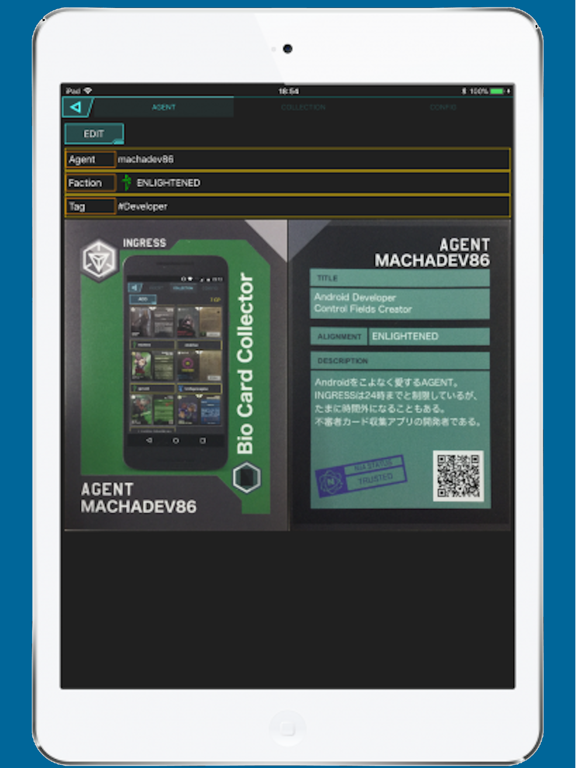
1) AGENT
Register your bio card.
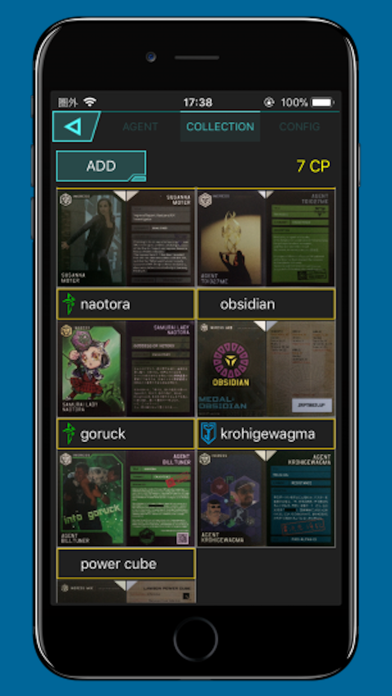
2) COLLECTION
Display registered cards as thumbnails.
Add a bio card.
3) CONFIG
Set card display settings and in-app purchase (ad delete) setting.

[Registration]
1) Select COLLECTION.
2) Press ADD button to display the card registration screen.
3) Enter the Agent name, Faction, tag (optional).
If card is white, please check mark "Detect white card".
If you select from gallery, please check mark "Select from gallery".
4) Press black card on left side of the screen to start camera.
5) Take a picture of front of card.
6) Press black card on right side of the screen to start camera.
7) Take a picture of back of card.
8) Press REGISTER button.
9) The card registration is completed and card is added to thumbnail.

[Purchase]
It will delete advertisement.
1)Please purchase with PURCHASE button at CONFIG screen.
2)Please restore with RESTORE button at CONFIG screen.

En voir plus...

Quoi de neuf dans la dernière version ?

Supported iOS 13.
Fixed CONFIG display bug.

  • Screenshot #1 pour Biocard Collector
  • Screenshot #2 pour Biocard Collector
  • Screenshot #3 pour Biocard Collector
  • Screenshot #4 pour Biocard Collector
  • Screenshot #5 pour Biocard Collector
  • Screenshot #6 pour Biocard Collector

Note

(0 note)

Détails sur l'application

Version
1.0.3
Taille
65.1 Mo
Version minimum d'iOS
9.0
Dernière mise à jour
11/08/2020
Publié par
Masaaki Ichikawa

Newsletter App Store

Recevez chaque jour les meilleures promos

Actualité Apple

Image Les États-Unis ne veulent pas qu’Apple achète de la RAM chinoise
Les États-Unis ne veulent pas qu’Apple achète de la RAM chinoise
Image Apple retire sa pub polémique avec un enfant et un iPhone en Italie
Apple retire sa pub polémique avec un enfant et un iPhone en Italie
Image L’iPhone Ultra pliable va-t-il résoudre les défauts du Galaxy Z Fold 8 ?
L’iPhone Ultra pliable va-t-il résoudre les défauts du Galaxy Z Fold 8 ?
Image Mac : des hackers exploitent la faille du partage d’écran avec un mineur de cryptomonnaie
Mac : des hackers exploitent la faille du partage d’écran avec un mineur de cryptomonnaie
iPhoneAddict Apps

Le catalogue iPhoneAddict pour suivre les nouveautés, mises à jour et baisses de prix de l’App Store.

Apps

Toutes les apps iOS iPhone iPad Universelles Mac Apple TV

iPhoneAddict

Actualité Apple Archives keynotes Contact À propos KultureGeek

Suivez-nous

©2009-2026 i2CMedia. Tous droits réservés.