iPhoneAddict Apps
  • Actualités
  • Accueil Apps
  • iPhone
  • iPad
  • Universelles
  • Mac
  • Apple TV
KG KultureGeek
App
iPhone / iPad Télécharger iAddict v5 Mac Télécharger iAddict Mac
  • Actualités
  • Accueil Apps
  • iPhone
  • iPad
  • Universelles
  • Mac
  • Apple TV
  • Archives keynotes
  • Firmwares & iTunes
  • Contactez-nous
  • Comparateur de prix
  • KultureGeek
Accueil » Liste des Apps » Apps Universelles » Utilitaires » CactusVPN - VPN & Smart DNS
L'application n'est plus disponible sur l'App Store français
3.4.2 iOS €Gratuit CactusVPN Inc. 5 2 To use the app, you need a CactusVPN account. To get an account, you can register for a 3-days free trial account on our website or to order a subscription from the app. With CactusVPN you will get: - High-Speed VPN Servers - End-to-End Encryption...
CactusVPN - VPN & Smart DNS

CactusVPN - VPN & Smart DNS

iOS Universel / Utilitaires

Gratuit
Obtenir sur l'App Store
Facebook X E-mail

To use the app, you need a CactusVPN account. To get an account, you can register for a 3-days free trial account on our website or to order a subscription from the app.

With CactusVPN you will get:

- High-Speed VPN Servers
- End-to-End Encryption
- 7 VPN Protocols
- No Logs Guaranteed
- Unlimited Bandwidth and Speed
- Unlimited Devices in the Same Time
- Shared Static IP
- 30-Days Money Back Guarantee
- Professional 24/7 Customer Support

CactusVPN iOS app allows you to:

1. Enjoy our VPN service directly from your iOS device. Simply choose the VPN server location and tap the "Connect" button. You can set the app to stop Internet traffic if VPN connection drops and reconnect automatically to VPN, to protect you from DNS leak, to sign in at app start, to connect VPN on sign in, to hide app on connect.

2. Enjoy our Smart DNS service directly from your iOS device and it’s easier than ever as you don’t need to manually connect anymore. All you have to do is run the app, sign in and enable the Smart DNS service. You can set our app to validate your IP address automatically while the app is in background and what DNS servers you want to use. You can automatically enable the Smart DNS every time you sign in to the app and you can sign in automatically at app startup.

- Hide your IP address
- Stop advertisers from tracking your digital footprints
- Stop hackers from seeing what you do on the web
- Keep your browsing habits a secret
- Secure your data on any WiFi network
- No more bandwidth throttling
- Optimize your SEO strategies

En voir plus...

Quoi de neuf dans la dernière version ?

Bug fixing: app was crashing when logging in using an account with no active subscriptions.
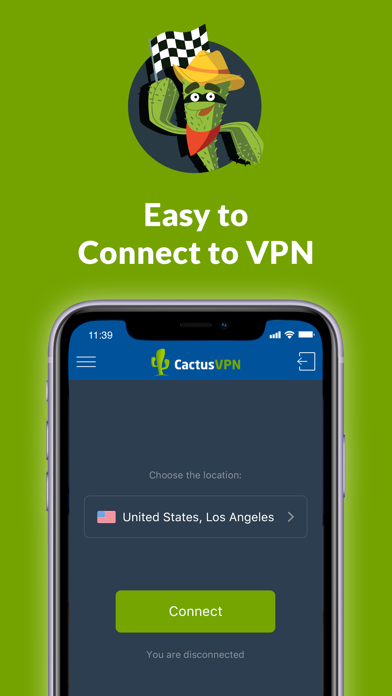
  • Screenshot #1 pour CactusVPN - VPN & Smart DNS
  • Screenshot #2 pour CactusVPN - VPN & Smart DNS
  • Screenshot #3 pour CactusVPN - VPN & Smart DNS
  • Screenshot #4 pour CactusVPN - VPN & Smart DNS
  • Screenshot #5 pour CactusVPN - VPN & Smart DNS
  • Screenshot #6 pour CactusVPN - VPN & Smart DNS

Note

(2 notes)

Détails sur l'application

Version
3.4.2
Taille
33.6 Mo
Version minimum d'iOS
12.0
Dernière mise à jour
11/03/2021
Publié par
CactusVPN Inc.

Newsletter App Store

Recevez chaque jour les meilleures promos

Actualité Apple

Image John Ternus devient officiellement CEO d’Apple et succède à Tim Cook
John Ternus devient officiellement CEO d’Apple et succède à Tim Cook
Image Starclash débarque sur Apple Vision Pro : plongez dans un film d’animation façon Pixar en vidéo immersive
Starclash débarque sur Apple Vision Pro : plongez dans un film d’animation façon Pixar en vidéo immersive
Image L’iPhone reste largement en tête aux États-Unis sur le Q2 2026, mais Samsung gagne du terrain
L’iPhone reste largement en tête aux États-Unis sur le Q2 2026, mais Samsung gagne du terrain
Image « Un désordre créé par Apple » : OpenAI rejette les accusations de vol de secrets
« Un désordre créé par Apple » : OpenAI rejette les accusations de vol de secrets
iPhoneAddict Apps

Le catalogue iPhoneAddict pour suivre les nouveautés, mises à jour et baisses de prix de l’App Store.

Apps

Toutes les apps iOS iPhone iPad Universelles Mac Apple TV

iPhoneAddict

Actualité Apple Archives keynotes Contact À propos KultureGeek

Suivez-nous

©2009-2026 i2CMedia. Tous droits réservés.