iPhoneAddict Apps
  • Actualités
  • Accueil Apps
  • iPhone
  • iPad
  • Universelles
  • Mac
  • Apple TV
KG KultureGeek
App
iPhone / iPad Télécharger iAddict v5 Mac Télécharger iAddict Mac
  • Actualités
  • Accueil Apps
  • iPhone
  • iPad
  • Universelles
  • Mac
  • Apple TV
  • Archives keynotes
  • Firmwares & iTunes
  • Contactez-nous
  • Comparateur de prix
  • KultureGeek
Accueil » Liste des Apps » Apps Universelles » Utilitaires » Create 3D Digital Designs
L'application n'est plus disponible sur l'App Store français
2.2 iOS €Gratuit Tuan Tran 0 0 Create 3D Digital Designs used to edit or view objects 3D. App compatible with models in STL, OBJ and 3DS format. You can export your work ready to print in 3D (STL format, OBJ format) or to keep working on it later (SCENE format). HOW TO USE THE...
Create 3D Digital Designs

Create 3D Digital Designs

iOS Universel / Utilitaires

Gratuit
Obtenir sur l'App Store
Facebook X E-mail

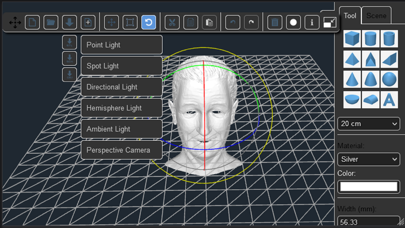
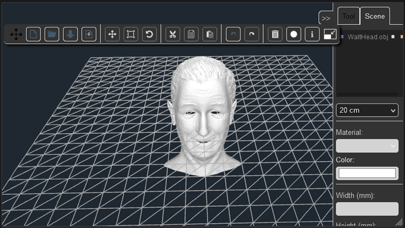
Create 3D Digital Designs used to edit or view objects 3D. App compatible with models in STL, OBJ and 3DS format. You can export your work ready to print in 3D (STL format, OBJ format) or to keep working on it later (SCENE format).

HOW TO USE THE APP:

Add geometric shapes (from the right panel) to the plataform to create your own object. Also you can import STL, OBJ and 3DS models to the plataform. Later, export the object as STL, OBJ file (for 3D printing) or as a SCENE file (to keep working on it later).

HOW TO CUT OBJECTS:

1) Add object A to the plaform.
2) Add object B to the platform.
3) Select object B.
4) Select the material 'Hollow' (from the right panel).
5) Export the work as a STL, OBJ file (the object B will erase every object, partially or entirely, that is within it's space). Depending of how complex are the objects, the device may take a few minutes to perform the task.

HOW TO FUSION OBJECTS:

1) Add object A to the plaform.
2) Add object B to the platform.
3) Select object B.
4) Select any material (except 'Hollow') from the right panel.
5) Export the work as a STL file or OBJ file.

HOW TO MOVE AROUND THE PLATFORM:

One finger to rotate, two fingers to zoom in and out and three fingers to move the camera.

En voir plus...

Quoi de neuf dans la dernière version ?

Fix keyboard
Fix rezire item
Update sdk
  • Screenshot #1 pour Create 3D Digital Designs
  • Screenshot #2 pour Create 3D Digital Designs
  • Screenshot #3 pour Create 3D Digital Designs
  • Screenshot #4 pour Create 3D Digital Designs

Note

(0 note)

Détails sur l'application

Version
2.2
Taille
187.1 Mo
Version minimum d'iOS
12.0
Dernière mise à jour
02/03/2023
Publié par
Tuan Tran

Newsletter App Store

Recevez chaque jour les meilleures promos

Actualité Apple

Image Rock Paper Pencil 4.0 imite le crayon graphite avec l’Apple Pencil
Rock Paper Pencil 4.0 imite le crayon graphite avec l’Apple Pencil
Image Volvo active l’Audio spatial de CarPlay avec Dolby Atmos sur les EX90 et ES90
Volvo active l’Audio spatial de CarPlay avec Dolby Atmos sur les EX90 et ES90
Image Safari Technology Preview 251 teste de nouvelles fonctions CSS, WebCodecs et WebRTC
Safari Technology Preview 251 teste de nouvelles fonctions CSS, WebCodecs et WebRTC
Image Mac mini M6 et M5 Pro : jusqu’à 165 Hz sur trois écrans externes
Mac mini M6 et M5 Pro : jusqu’à 165 Hz sur trois écrans externes
iPhoneAddict Apps

Le catalogue iPhoneAddict pour suivre les nouveautés, mises à jour et baisses de prix de l’App Store.

Apps

Toutes les apps iOS iPhone iPad Universelles Mac Apple TV

iPhoneAddict

Actualité Apple Archives keynotes Contact À propos KultureGeek

Suivez-nous

©2009-2026 i2CMedia. Tous droits réservés.