devCalc
iPhone / Utilitaires
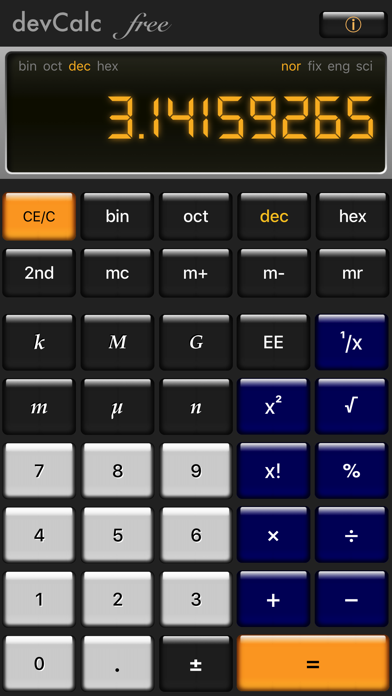
devCalc is an optimum blend of an engineering, a scientific and a programmers calculator.
Special features:
• Easy number base conversion from Binary, Octal, Decimal and Hexadecimal (bin, oct, dec, hex)
• Real Engineering mode allows you to display big and small numbers in human readable format
• Extensive functions for Scientists and Software Developers - Rotate device to landscape mode
• Swipe LCD display sideways to change color theme
devCalc is designed from top to bottom developers and engineers in mind. As a hybrid scientific and programmer calculator it gives smooth blend for IT professionals, engineers and scientists as well as university students.
Real Engineering Mode is an innovative input and display method, that makes engineers life easier by automatically scaling the number to a human readable format. This allows you to concentrate on the calculation rather than how to translate that to a calculator friendly format.
To enter a number in Real Engineering Format even in decimal mode: Just tap on the Kilo, Mega, Giga, Milli, Micro or Nano buttons. The calculator then automatically scales the calculated numbers and displays it in the way you got used to.
For example 500k * 3 automatically displayed as 1.5M. In the meanwhile devCalc Pro keeps the high precision value, therefore later on you can switch the view back to Kilo to see 1'500k, or turning the Real Engineering Mode completely off by tapping on the "k" button again to see all the decimal digits (1'500'000). Try this new and unique feature out and tell us your story how you use Real Engineering Mode.
One of the great examples is to calculate Ohm’s law in electronics: You are looking for a resistor value for 5V and 3mA, so you type: 5 / 3m and you will see 1.67k on the screen (1.67 kilo-Ohm).
Quoi de neuf dans la dernière version ?
This app has been updated by Apple to display the Apple Watch app icon.
Thank you for using devCalc!
We are providing iOS 11 support and various bug fixes and performance improvements with this release, please make sure to update it
We have unlocked all arithmetical, binary and logic functions, please enjoy :-)
We have also changed the LCD screen design for the free version to a more professional looking one, hope you like it!