E145 Virtual Panel
iOS Universel / Utilitaires
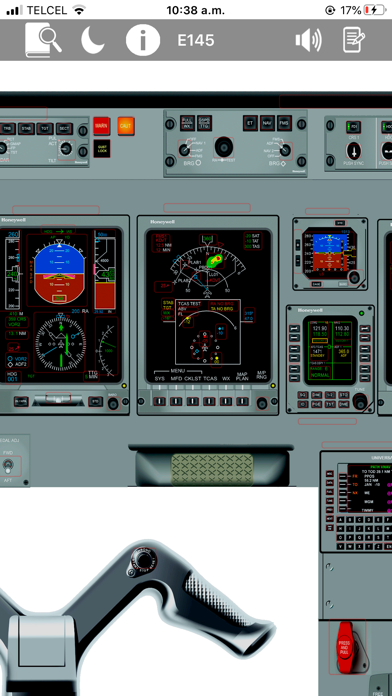
The **E145 Virtual Panel App** provides pilots with a powerful self-study tool designed to support both initial and recurrent E145 training. The app helps pilots become familiar with cockpit panel layout, button functionality, system indications, limitations, definitions, and aircraft references, reducing preparation time and improving training readiness.
**E145 Virtual Panel App includes:**
* More than **900 fully functional buttons** with explanations, images, and references
* Detailed E145 button explanations
* High-fidelity cockpit images
* Pan and zoom capabilities
* E145 limitations with fast search
* E145 definitions with fast search
* E145 EICAS messages list with fast search
* FAA abbreviations with fast search
* Jeppesen abbreviations with fast search
* Aviation glossary with fast search
* Notes feature: save your personal notes and keep them even when your device is off
* Dark mode support
**Version 3.0** now includes more than **80 interactive images** within the E145 panel, providing a more complete and visual way to study aircraft systems, indications, and cockpit functionality.
The following interactive virtual panels and system areas are included:
* Electrical Synoptic
* Hydraulic Synoptic
* ECS Synoptic
* Flight Controls Synoptic
* Fuel Synoptic
* TCAS
* EGPWS
* HSI Modes
* HSI Weather Radar Indications
* MFD Weather Radar
* Airspeed Tape Indications
* Vertical Speed Indications
* AHRS Fail Annunciations
* Aileron Schematic
* Landing Gear
* Air Conditioning
* Electronic Attitude Indicator
* Baggage Detection / Extinguishing
* Tuning Backup Control
* Digital Chronometer
* Engine Fuel Schematic
* Powerplant Schematic
* Mask Stowage Box
* Altitude Tape Indications
* ADI Indications
* Oxygen Mask Functions
* PFD Annunciations
* PFD Miscompares
* EGPWS Display on PFD
* ADI Takeoff
* TCAS Indications on PFD
* Windshear Indications on PFD
* Horizontal Profile Indications
* Full EICAS Functions
* Thrust Lever Buttons
* DVDR
* Flight Attendant Panel
**Note:** Aircraft manufacturers and operators may use slightly different cockpit configurations. The panels, buttons, and switches shown in this app represent a specific E145 configuration.
The **E145 Virtual Panel App** is designed to be a complete study companion for pilots who want to review and understand the E145 cockpit, systems, indications, limitations, and operational references in one place.
Quoi de neuf dans la dernière version ?
**What’s New in Version 3.0**
* Improved user interface for a cleaner and more intuitive study experience
* New skin color function to customize the app appearance
* Updated information according to the latest available manuals and references
* Improved app performance and smoother navigation
* Full iPad compatibility for a better training experience on larger screens
* General improvements and minor fixes to enhance stability and usability
Version 3.0 makes the E145 Virtual Panel App more complete, faster, and easier to use, giving pilots a better way to study the E145 cockpit, systems, indications, limitations, and references.