iPhoneAddict Apps
  • Actualités
  • Accueil Apps
  • iPhone
  • iPad
  • Universelles
  • Mac
  • Apple TV
KG KultureGeek
App
iPhone / iPad Télécharger iAddict v5 Mac Télécharger iAddict Mac
  • Actualités
  • Accueil Apps
  • iPhone
  • iPad
  • Universelles
  • Mac
  • Apple TV
  • Archives keynotes
  • Firmwares & iTunes
  • Contactez-nous
  • Comparateur de prix
  • KultureGeek
Accueil » Liste des Apps » Apps Universelles » Utilitaires » EyeLook IP camera JPEG viewer
L'application n'est plus disponible sur l'App Store français
1.0 iOS €Gratuit Kaloyan Beshev 0 0 EyeLook is an application, which turns your smartphone or tablet into an IP camera surveillance JPEG monitor for your home or office cameras. Now you don't have to worry about leaving your pets or child at home, you can open the EyeLook app and see...
EyeLook IP camera JPEG viewer

EyeLook IP camera JPEG viewer

iOS Universel / Utilitaires

Gratuit
Obtenir sur l'App Store
Facebook X E-mail

EyeLook is an application, which turns your smartphone or tablet into an IP camera surveillance JPEG monitor for your home or office cameras.

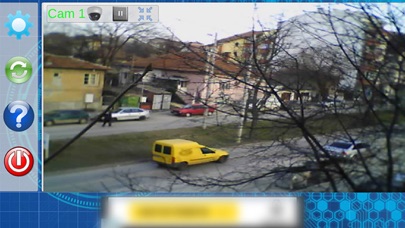
Now you don't have to worry about leaving your pets or child at home, you can open the EyeLook app and see what is happening in front of your IP camera.

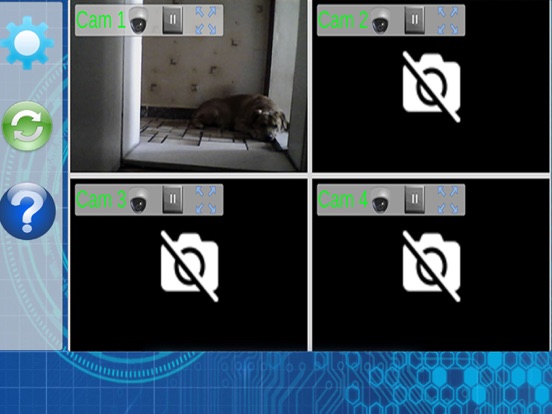
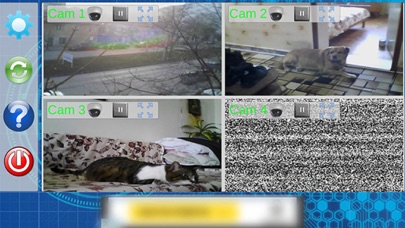
You can choose a one cam or four cameras layout, depending on your needs. Each of the 4 cameras can be expanded so that you can see it better.

Currently the app only supports JPEG source to connect to most IP cameras.

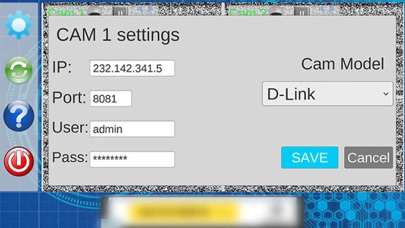
Camera settings:

IP: (your router's WAN IP address).
Port: (your camera's port number)
User: The USERNAME for your IP camera
Password: The PASSWORD for your IP camera
Cam Model: You can use one of the predefined camera makes selected or, if you select --Custom link-- a new field will appear where you have to type in only the link after your camera's IP and Port Number, for example if the link to the camera's image is http://(IP ADDRESS):(PORT NUMBER)/image.jpg, you only have to type in the "image.jpg" part, the same goes if the link to the camera's image is http://(IP ADDRESS):(PORT NUMBER)/imagep/picture.jpg, you only have to type in the "imagep/picture.jpg" part.


General Settings:

Screen stays on: The screen of the device never dims or turns off, while the app is running.
Low bandwidth mode: If you are using mobile network for your internet connection you may want to set that mode to ON. This way the video will seem to lag, but in reality it will load images after withing a specified interval of time, thus lowering your internet usage.

Camera number: If you have a single camera you might want to set this option to one, since it will show one large camera view, instead of four, which will even lower the app's processing needs, increasing your device's battery life while using the app.

Static is black color: If the static effect on the idle cameras bothers you you can set it to on, which will show only a black screen with a camera icon.

En voir plus...

Quoi de neuf dans la dernière version ?

This app has been updated by Apple to display the Apple Watch app icon.
  • Screenshot #1 pour EyeLook IP camera JPEG viewer
  • Screenshot #2 pour EyeLook IP camera JPEG viewer
  • Screenshot #3 pour EyeLook IP camera JPEG viewer
  • Screenshot #4 pour EyeLook IP camera JPEG viewer
  • Screenshot #5 pour EyeLook IP camera JPEG viewer
  • Screenshot #6 pour EyeLook IP camera JPEG viewer

Note

(0 note)

Détails sur l'application

Version
1.0
Taille
73.6 Mo
Version minimum d'iOS
7.0
Dernière mise à jour
07/03/2017
Publié par
Kaloyan Beshev

Newsletter App Store

Recevez chaque jour les meilleures promos

Actualité Apple

Image Apple dope le marché des écrans OLED : les ventes d’iPhone profitent fortement à Samsung Display
Apple dope le marché des écrans OLED : les ventes d’iPhone profitent fortement à Samsung Display
Image Apple idéalement placé sur un marché des wearables qui dépassera 1 000 milliards de dollars d’ici 2032
Apple idéalement placé sur un marché des wearables qui dépassera 1 000 milliards de dollars d’ici 2032
Image Apple Vision Pro M5 : une étude valide son utilisation pour la chirurgie de la cataracte
Apple Vision Pro M5 : une étude valide son utilisation pour la chirurgie de la cataracte
Image Apple contre OpenAI : Cupertino maintient ses accusations de vol massif de secrets commerciaux
Apple contre OpenAI : Cupertino maintient ses accusations de vol massif de secrets commerciaux
iPhoneAddict Apps

Le catalogue iPhoneAddict pour suivre les nouveautés, mises à jour et baisses de prix de l’App Store.

Apps

Toutes les apps iOS iPhone iPad Universelles Mac Apple TV

iPhoneAddict

Actualité Apple Archives keynotes Contact À propos KultureGeek

Suivez-nous

©2009-2026 i2CMedia. Tous droits réservés.